
On this page
You bought a 128 GB phone, opened Settings, and the numbers don't add up. Two things are going on: there are two definitions of "gigabyte", and the phone's own software needs room before you save a single photo.
What does 128 GB on the box actually mean?
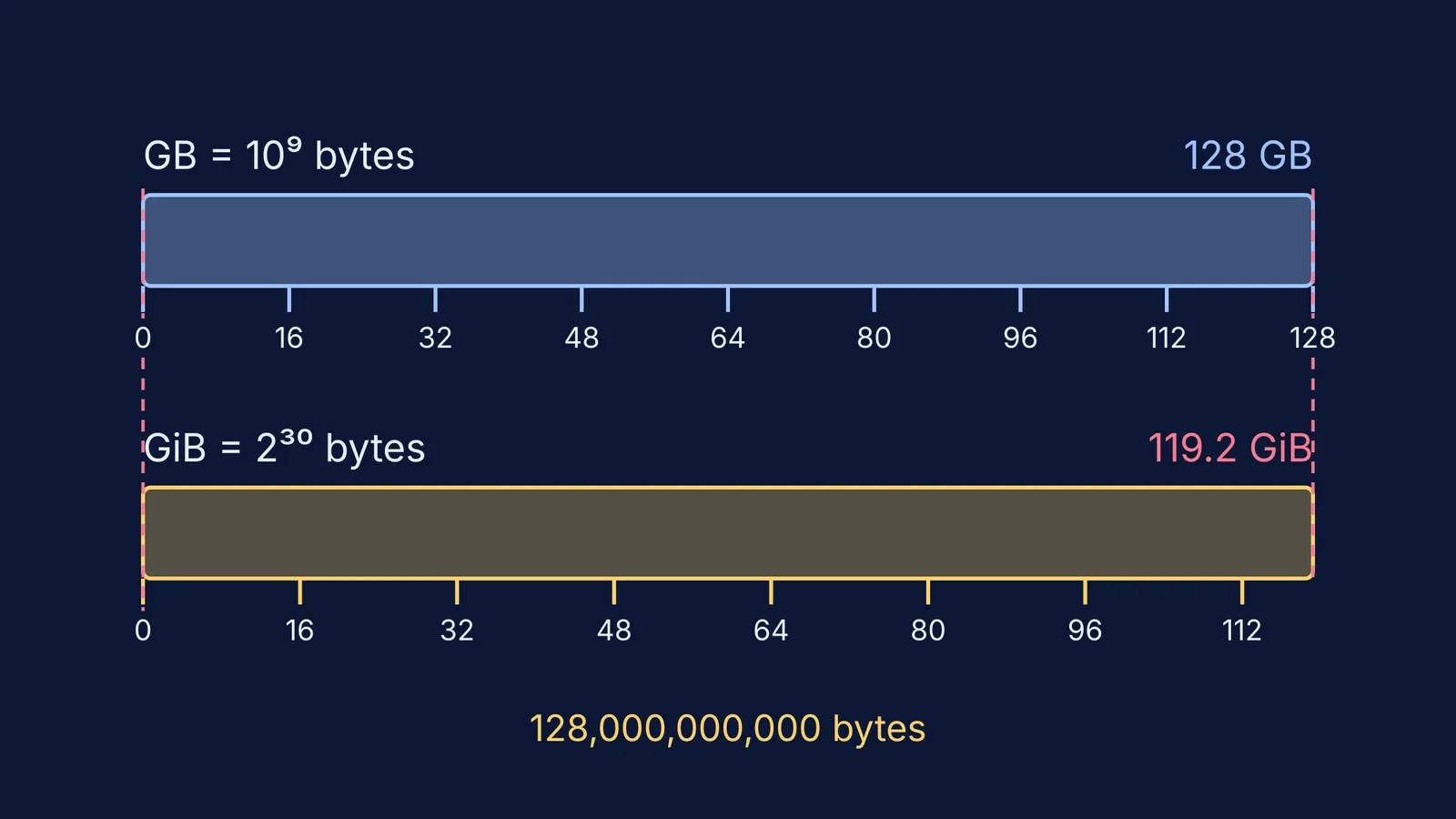
Phone and drive makers count in powers of ten. Apple states that 1 GB = 1 billion bytes, adding "actual formatted capacity less" (Apple Support). Seagate, a hard-drive maker, says all major disk drive manufacturers use decimal values when discussing storage capacity (Seagate).
So 128 GB on the box means 128 × 10⁹ = 128,000,000,000 bytes.
Why do some screens show 119 GB instead of 128?
Computers work in binary, so software long counted in powers of two. In that system 1 GB = 1,073,741,824 bytes, which is 2³⁰ (Apple Support). To stop the confusion, the IEC approved separate names for binary multiples in December 1998, such as kibi (Ki) for 2¹⁰ and gibi (Gi) for 2³⁰. NIST notes that these binary prefixes are not part of the SI, the metric system (NIST).
Here is the worked conversion. Same bytes, binary ruler:
Start with the box figure: 128,000,000,000 bytes.
Divide by 1,024: 125,000,000 KiB.
Divide by 1,024 again: 122,070.3125 MiB.
Divide by 1,024 a third time: about 119.21 GiB.
That is where "119 GB" comes from when software counts in 1,024s but still writes "GB". Seagate gives the same effect one size up: a new 1 TB drive reporting only about 931 GB (Seagate).
The gap grows with each prefix, because every step multiplies in another factor of 1,000 ÷ 1,024:
kilo: 1,000 ÷ 1,024 ≈ 0.977, so the binary figure is 2.3% smaller
mega: (1,000 ÷ 1,024)² ≈ 0.954, so 4.6% smaller
giga: (1,000 ÷ 1,024)³ ≈ 0.931, so 6.9% smaller
tera: (1,000 ÷ 1,024)⁴ ≈ 0.909, so 9.1% smaller
Does my phone count in 1,000s or 1,024s?
Newer phones mostly count the way the box does. Android's developer documentation says that as of Android O, file-size prefixes take their SI meanings, so kB = 1,000 bytes, while Android N and earlier used powers of 1,024 (Android Developers). Android O was released publicly as Android 8.0 in August 2017 (Android Developers). Apple says iOS 10 and earlier used the binary system (Apple Support).
So an old phone, or a computer program that counts in 1,024s, shows a total of about 119 GB. A current phone shows 128 GB as the total, and the shortfall is in the free space instead.
Where does the rest of the space go?
Apple says the formatting process and the operating system take up storage space (Apple Support). On an iPhone, Settings > General > iPhone Storage lists a System category, which Apple describes as space taken by the operating system that can vary based on your device and model (Apple Support). HMD, which makes Nokia phones, says some storage is taken up by the operating system and pre-installed apps (HMD Support).
Because the system's size varies, read your own figure, then subtract. The system figure below is an assumed example; swap in yours.
Total on a current phone: 128 GB.
Suppose Settings shows the system using 12 GB.
Space you can fill: 128 − 12 = 116 GB.
The same 116 GB counted in 1,024s on a laptop: 116 × 0.931 ≈ 108 GiB.
How can you use this before buying or clearing space?
Before buying, check the system figure on a phone of the same model if you can, and subtract it from the box number.
When copying files to a laptop or memory card, expect about 93% of the box figure if the software counts in 1,024s.
When storage fills up, open the storage screen in Settings and start with the largest category, often photos and videos.
Under the surface this is powers of ten against powers of two, the same index laws from school maths. Our post on laws of exponents with the same base covers them, and binary addition and conversion by hand shows why computers like numbers such as 1,024. For how the bytes are physically held, read how SSDs and hard disks store data.
If prefixes and powers still feel slippery, the Fermi Concept Library gives each concept in mathematics and computing its own lesson, and the Fermi Problem Library has worked problems with a step-by-step solver that explains the reasoning rather than printing an answer.
Next time a number on a screen looks short, ask which ruler it was measured with.