
On this page
A hard disk and an SSD both keep your files as 0s and 1s, but the physics is very different: one uses magnetism and motion, the other electric charge and no moving parts. That difference also explains why one is faster.
How does a hard disk store data?
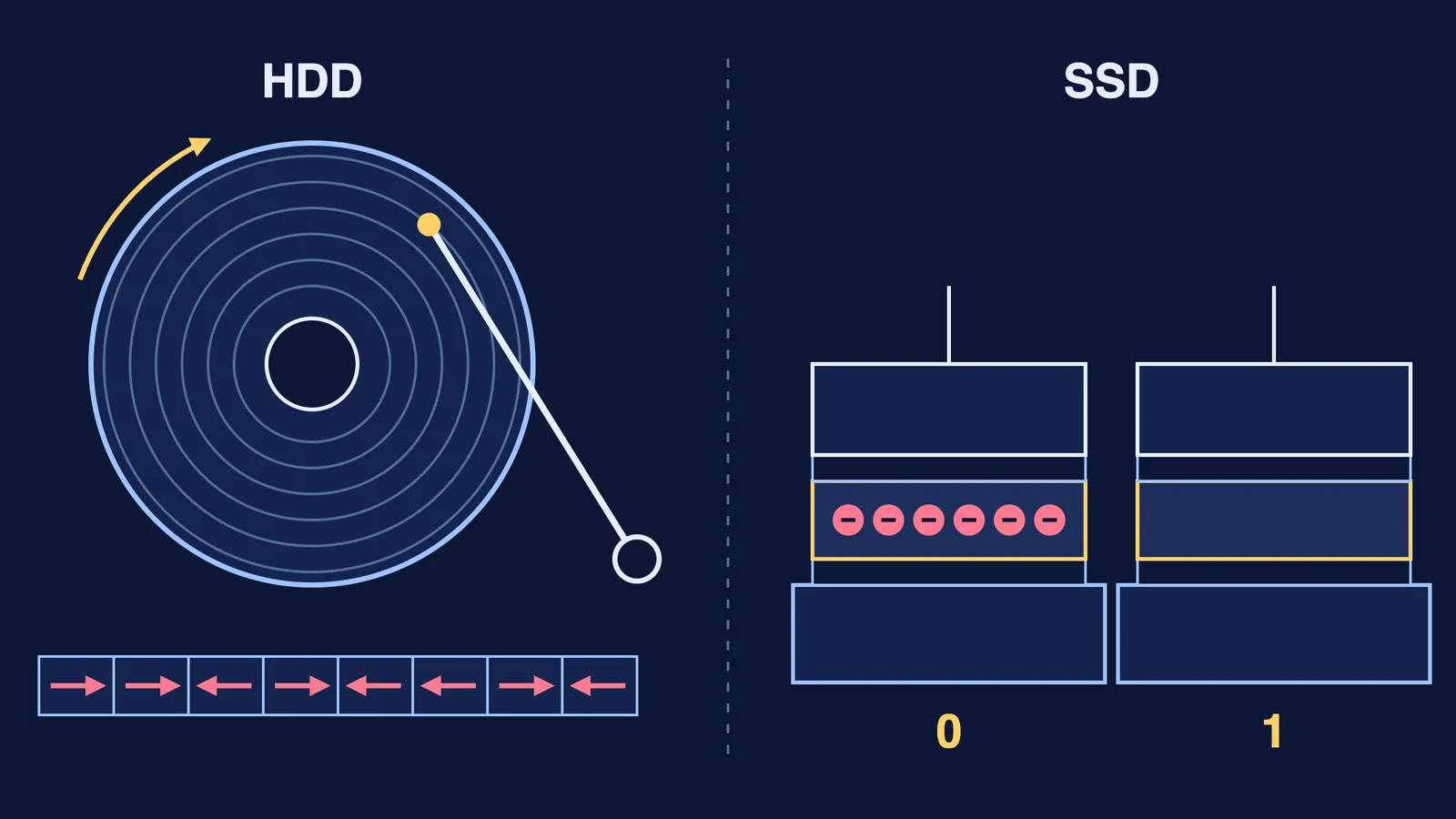
A hard disk stores information as microscopically small areas magnetised in different directions, and a read-out head scans the disk and registers the magnetic changes, according to the Nobel Prize in Physics 2007 press release. The same release explains that the prize went to Albert Fert and Peter Grünberg for Giant Magnetoresistance (GMR), which each discovered independently in 1988: very weak magnetic changes give rise to major differences in electrical resistance. The first GMR read-out head was launched in 1997, and the release notes that the smaller the magnetic areas, the more sensitive the head has to be.
IBM's history of the RAMAC describes the IBM 305 RAMAC of 1956 as the first computer to use a random-access disk drive. Its engineers coated aluminium disks with iron oxide paint, let magnetic spots on each disk stand for characters of data, and used compressed air to keep the arm hovering above the disk so it never touched the surface. The whole machine was the size of two kitchen refrigerators and held about 5 million characters.
Why does a magnetised spot stay put after the write head moves on? That is the physics of magnetic domains in ferromagnets, and of hysteresis, which describes how some materials keep their magnetisation after the field is removed. If domains are hard to picture, the Fermi Simulation Lab has interactive simulations for ideas that are easier to see than to read.
How does an SSD store data?
An SSD is built from NAND flash memory, which Kioxia says was created by Dr Fujio Masuoka, then at Toshiba, in 1987 (Kioxia, history of NAND flash).
In flash memory, data is stored by moving electrons into and out of a charge storage film enclosed in an insulator (Kioxia, what is NAND flash memory). Kioxia's page walks through three operations:
Write: a high voltage on the control gate pulls electrons from the silicon through the insulator into the film. They stay there when the power is off.
Erase: a high voltage on the silicon side pulls the electrons back out.
Read: a fixed voltage is put on the control gate. Trapped electrons raise the threshold voltage, so no current flows (Kioxia calls this "0"). An empty film lets current flow ("1").
The cell is a cousin of the field-effect transistor, an idea Julius Lilienfeld first filed a patent for in 1925.
One cell can hold more than one bit. Kioxia's page on multi-level cell technology explains that storing N bits needs 2^N distinct threshold voltage levels: 16 levels for 4 bits per cell (QLC). More bits per cell cuts the cost per amount of data, but writing and reading must be slower and the cell's lifespan is shorter.
Why is an SSD faster than a hard disk?
A hard disk has to wait for the right spot to come round under the head. You can work out that wait yourself.
Seagate's BarraCuda 3.5-inch data sheet lists models spinning at 5,400 and 7,200 revolutions per minute (RPM). Take the 7,200 RPM drive:
Revolutions per second: 7,200 ÷ 60 = 120.
Time for one turn: 1 ÷ 120 s = 8.33 ms.
On average the data is half a turn away, so the average wait is 8.33 ÷ 2 = 4.17 ms.
The 5,400 RPM drive turns 90 times a second, so one turn takes 11.1 ms and the average wait is about 5.56 ms. Then add the time for the arm to swing to the right track. On the 1956 RAMAC, the goal was to reach any track in half a second; "We achieved something like 800 milliseconds," recalled Reynold Johnson, who guided the team (IBM).
An SSD has neither delay. Reading a cell means putting a voltage on a gate and checking whether current flows. There is nothing to spin up and no arm to move.
How do you choose between an SSD and an HDD?
Use the physics to reason it out:
Speed when opening files and apps: no spinning platter and no arm favour the SSD.
Cost per byte for large archives: compare the price per terabyte on today's listings, since prices change.
Many bits per cell: QLC flash trades speed and lifespan for capacity, by Kioxia's account, so check the cell type on SSD specification sheets.
If you are revising Class 12 physics, this topic ties magnetism and semiconductor devices together. The Fermi Concept Library gives every concept in physics its own lesson, so you can fill a gap in threshold voltage or ferromagnetism as you go.