
On this page
Your 14-year-old wants to start a series their whole class is talking about. The tile says U/A 16+. Is that a firm no, a maybe, or a "watch it with me"? The answer is in the rules streaming platforms in India have to follow.
Where do these ratings come from?
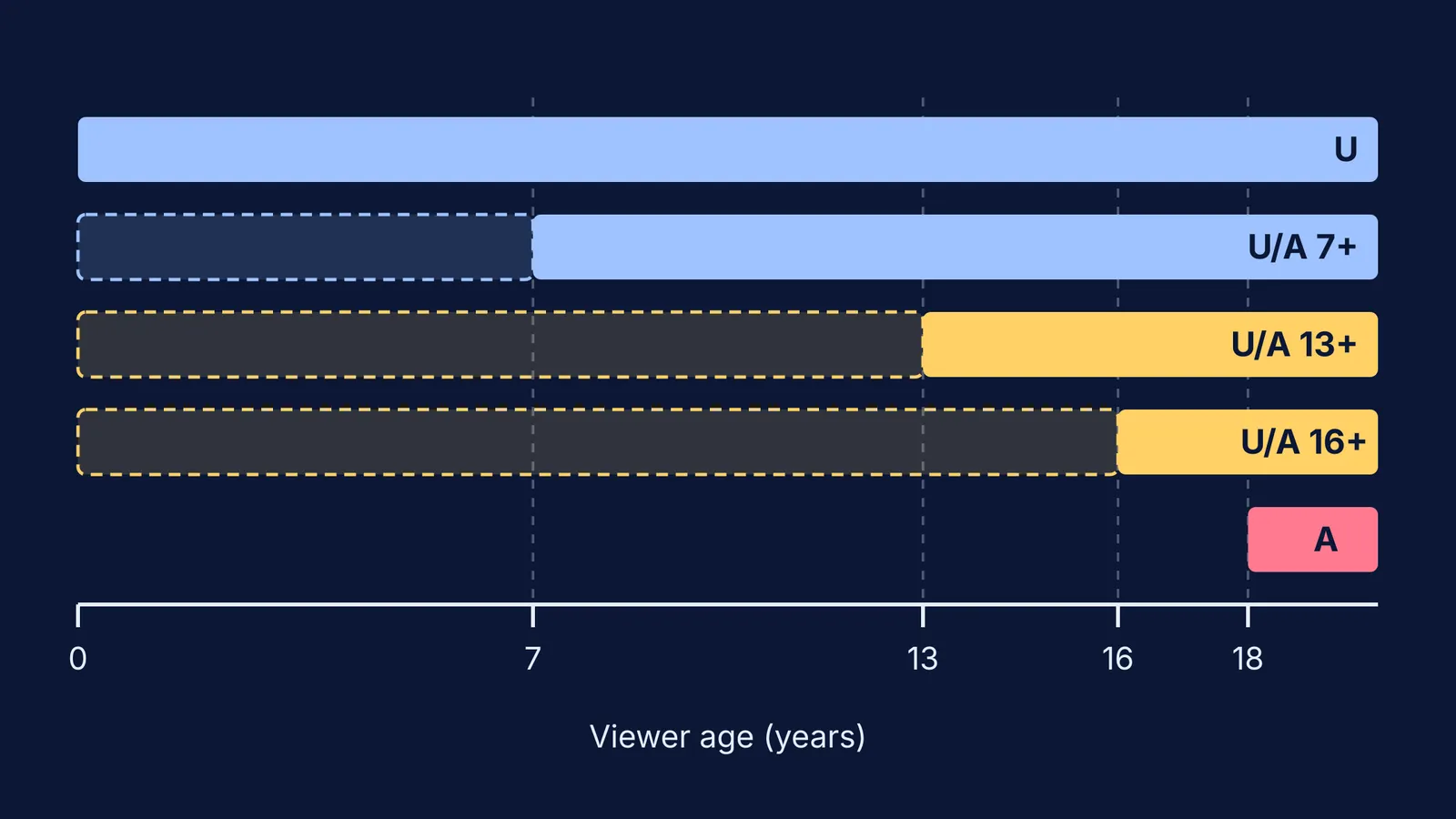
In February 2021 the government notified the Information Technology (Intermediary Guidelines and Digital Media Ethics Code) Rules, and the Press Information Bureau release of 25 February 2021 explains that streaming platforms must self-classify their content into five age-based categories: U, U/A 7+, U/A 13+, U/A 16+ and A.
"Self-classify" matters: the platform decides the rating itself, using guidelines in the Rules, so the label is its own judgement.
What do 13+ and 16+ ratings mean on shows?
The official text of the Rules on the MeitY website defines each rating in one line:
U: suitable for children as well as people of all ages.
U/A 7+: suitable for ages 7 and above; a child under 7 can watch with parental guidance.
U/A 13+: suitable for ages 13 and above; a child under 13 can watch with parental guidance.
U/A 16+: suitable for ages 16 and above; a child under 16 can watch with parental guidance.
A: restricted to adults.
So a U/A rating is not a ban for younger viewers. It is a signal that a parent should be part of the decision. Only A is meant to be kept away from children, and the same Rules define a child as anyone below 18.
What can a 16+ show contain that a 13+ show cannot?
The Rules do not give a list of allowed scenes for each level. The Schedule in the same MeitY document instead tells platforms what pushes a show to a higher rating:
Sexual content: the rating runs from U/A 16+ to A depending on whether sex is implied or shown explicitly. Nudity with a sexual context gets an A.
Copyable risky behaviour: scenes that children might imitate, including suicide and self-harm, get a higher rating.
Drugs, alcohol and smoking: shows that, as a whole, portray their misuse get a higher rating.
Songs and dances with sexual innuendo get a higher rating.
Violence and language: judged by how strong they are and their context, including that what offends varies across India's languages.
In practice, a U/A 16+ show may have implied sexual content, stronger violence or heavier themes than a 13+ show. The Rules also require a content descriptor before every programme, such as violence, language or substance use. Those few seconds on screen can tell you more than the number does.
How do you lock profiles on a shared TV?
The Rules require platforms that carry U/A 13+ or higher content to make access controls, including parental locks, available, and A-rated content needs a reliable age check. You have to switch the lock on.
Here is a setup for a shared family TV, using Netflix as the worked example; other apps have their own parental controls, with different menus.
Give each child their own profile. Netflix's guide to setting profile maturity ratings gives the steps for its phone app and web browser, and you confirm with your account password or a code.
Set each profile's rating to the child's age band: a 12-year-old at 7+, a 14-year-old at 13+. For a Kids profile, Netflix says the rating can only be edited in a web browser.
Block specific titles you have already decided against, from the same Viewing Restrictions screen.
Lock the adult profiles. Netflix's Profile Lock page explains how to set a 4-digit PIN, otherwise a child can simply tap a parent's profile on the TV.
Refresh the TV. Netflix suggests switching to another profile and back, or signing out and in, so the new settings show up.
Repeat on every app that runs on the TV, including the ones bundled with your broadband or DTH plan.
What should you say when your teen asks for a higher-rated show?
A locked profile works best with a rule your child understands. Try this:
"Your profile is set to 13+, because that is what the rating system says fits your age. For a 16+ show, ask me. We'll read the descriptor together and watch the first episode side by side. If it's mostly language, it's probably fine. If it's about self-harm or drugs, we'll talk about whether now is the right time."
This keeps the "parental guidance" part of U/A real, and teaches your teen to check ratings on their own.
If a show leaves your child upset, read our guide on what to do when your child sees a disturbing video. For late-night viewing, see how to handle a teenager binge-watching web series. For games, there is a separate guide on checking whether a game suits your child's age.
And if a sci-fi series leaves your teen curious about the science behind it, the Fermi Simulation Lab has interactive simulations for ideas that are easier to see than to read.