
On this page
Many students in India get AI homework help on a phone or laptop the whole family uses. An AI app remembers more than a browser tab does. If you stay logged in, anyone who picks up the device can scroll your chat list, see what the chatbot has saved about you, and carry on the conversation as you. Here is how to fix that in ChatGPT and Gemini.
What can a sibling see on a shared phone?
If your account is still signed in, a sibling or cousin can usually see three things:
Your chat list, with titles like "Class 11 kinematics doubt" or something more personal.
What the AI remembers about you. In ChatGPT, saved memories are details you asked it to remember, or that it saved as useful context, and they shape later answers.
Archived chats. In ChatGPT, archiving takes a chat out of the sidebar but does not delete it, and archived chats still show up in search.
How do you delete AI chat history on ChatGPT and Gemini?
In ChatGPT on the web, open the three-dot menu next to a chat in your history, choose Delete and confirm. In the mobile app, open the menu, press and hold the chat title, then tap Delete (OpenAI's help page on deleting chats). To clear everything, go to Settings, then Data controls, then Delete all chats.
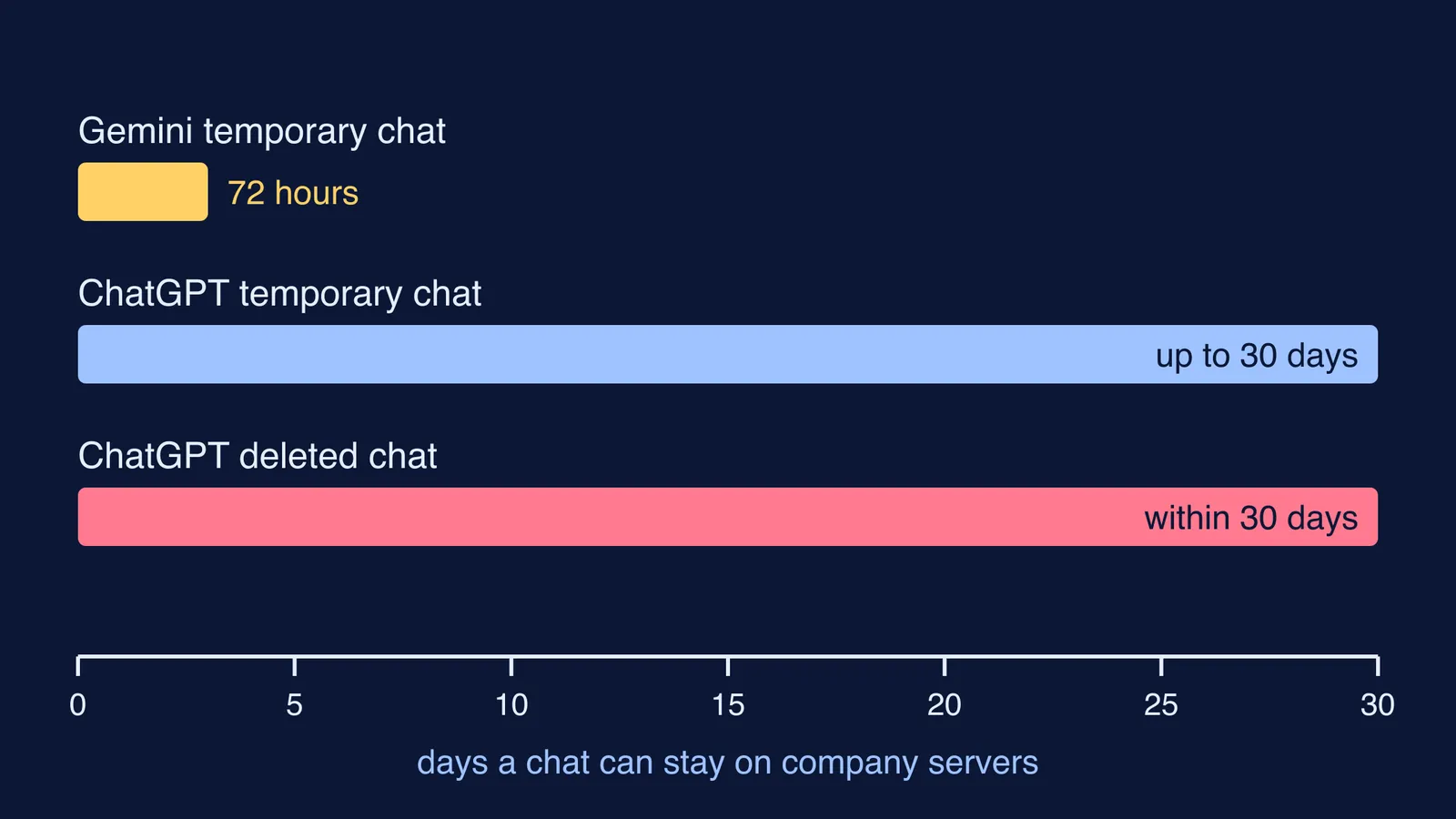
OpenAI schedules a deleted chat for permanent deletion from its systems within 30 days, unless it must keep it longer for security or legal reasons (OpenAI). A deleted chat cannot be restored, so copy any notes you need first.
In Gemini on Android, open the app, tap Menu, then your profile picture, then Gemini Apps activity. Choose what to delete, such as the last hour, the last day or all time, and tap Delete (Google Gemini Help). For users aged 18 and over, Keep Activity is on by default, and you can set auto-delete to 3, 18 or 36 months.
Even with Keep Activity off, Google says chats are saved with your account for up to 72 hours to provide the service and process feedback (Google Gemini Help).
Does deleting a chat also delete what the AI remembers?
Not always. OpenAI says that deleting the original chat does not automatically delete a separate saved memory (OpenAI Memory FAQ). To check, go to Settings, then Personalization, then Memory. You can review and remove memories there or turn Memory off. Turning Memory off does not delete your past chats, so delete those separately.
For a one-off private question, use a temporary chat. A ChatGPT temporary chat stays out of your history and does not create or update memories, though OpenAI may keep a copy for up to 30 days for safety (OpenAI). Gemini's temporary chats do not appear in your recent chats and are kept with your account for 72 hours (Gemini Apps Privacy Hub).
A temporary chat keeps things off the shared screen, not off the company's servers. If you also want to stop your chats being used to train models, see our guide on how to opt out of AI training.
The two-minute shared-device checklist
Do this every time you finish on a family phone or laptop:
Sensitive question? Start a temporary chat before you type, not after.
Delete the chats you would not want read. Do not just archive them.
Check memory (ChatGPT: Settings, Personalization, Memory) and remove anything personal.
Log out of the app before you hand the device back.
On a shared laptop, use Chrome's Guest profile. When you exit Guest mode, Chrome deletes your browsing history, cookies and site data from the computer.
Forgot to log out somewhere? In ChatGPT, open Settings, then Security, and choose Log out all. Other sessions may take up to 30 minutes to close (OpenAI).
Never save your password in the shared browser. Add two-step verification to your study accounts so a remembered password is not enough to get in.
With Fermi's AI tutor, your progress, notes and everything generated along the way stay in your library. That is useful for revision, and one more reason to log out.
How do you raise privacy with your family without a fight?
Privacy is not the same as secrecy, and parents are right to want to know how a device is used. A short, calm script helps:
Student: "I use the phone for AI study help. I log out after each session so my brother does not end up in my account. Can we agree nobody opens anyone else's apps without asking?"
Parent: "That is fair. Show me once which app you use and how you log out. If something worrying ever turns up in a chat, come to me first."
Shared a chat link with friends? That is a separate risk; here is what to check before you share an AI chat link.
If a chat ever touched on something that is troubling you, talk to a trusted adult or call Tele MANAS on 14416, the government's toll-free mental health helpline.