
On this page
Your email is the master key to your study life. School portals, exam registration sites, your notes in the cloud and the "forgot password" link of almost every app lead back to it. Whoever controls your email can reset the rest. Two-step verification stops a stolen password from being enough.
Why does a password alone get stolen?
A password usually leaks in one of three ways.
Breaches. A website you once signed up for gets hacked and its list of emails and passwords is dumped online. The breach-search service Have I Been Pwned counts billions of accounts exposed this way.
Reuse. If your quiz app and your Gmail share a password, a leak from the quiz app opens your Gmail. Google's security team reported in 2019 that most attacks on accounts it sees come from automated bots with access to passwords leaked in other sites' breaches.
Phishing. A fake login page looks like the real one, and you type your password into it yourself. Our guide on how to spot AI-written phishing emails shows why the old "look for bad grammar" test no longer works.
A unique password helps with the first two (see managing passwords for exam portals), but not once you have typed it into a fake page. The second step closes that gap.
What is two-step verification?
Two-step verification (also called 2SV, two-factor authentication or MFA) means signing in needs your password plus a second proof, usually from your phone. The US Cybersecurity and Infrastructure Security Agency defines multifactor authentication as requiring "two or more ways to verify a user's identity". Someone holding only your password gets stuck at step two.
How much does two-step verification actually help?
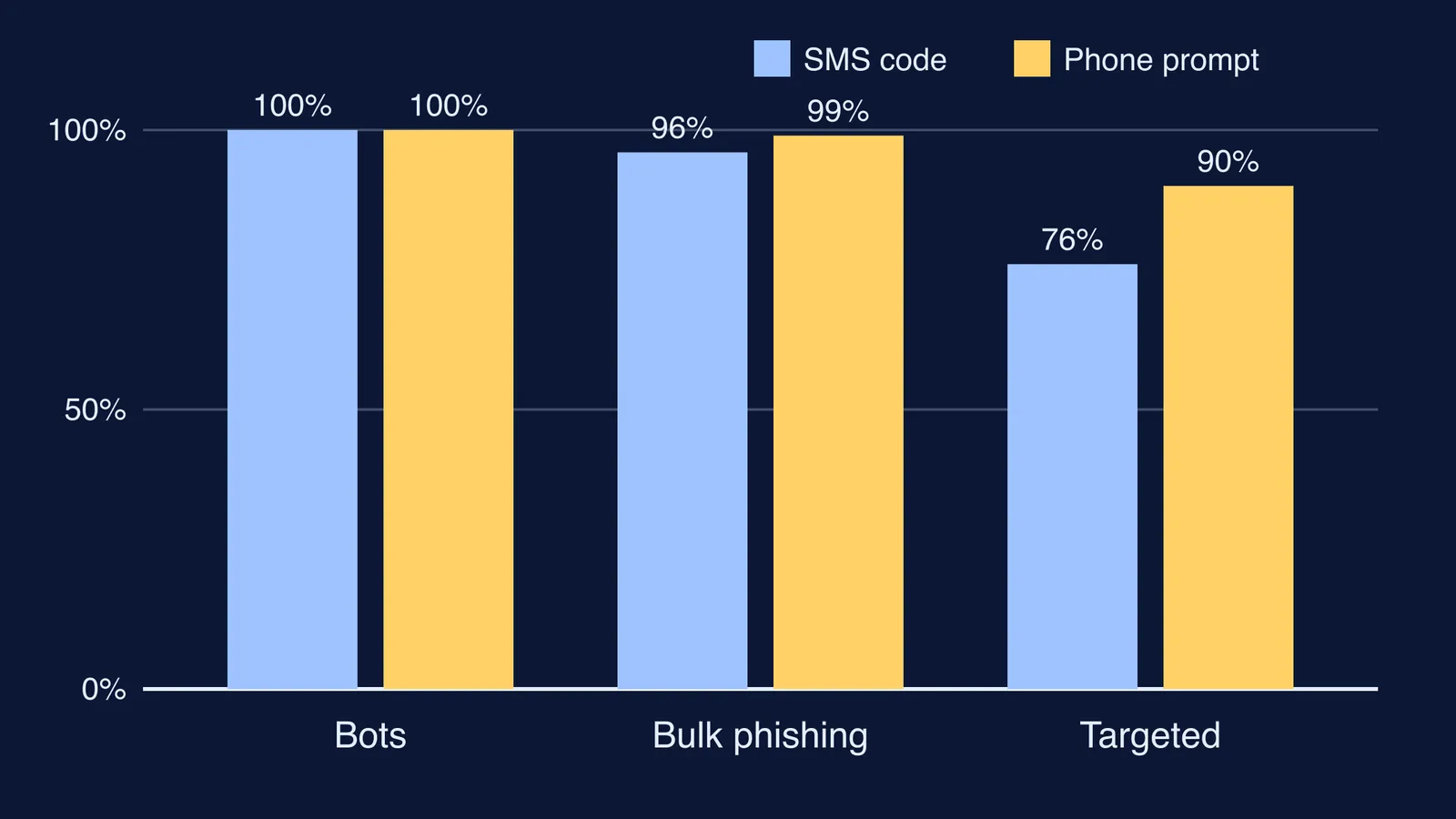
The clearest numbers come from a year-long study by Google with researchers from New York University and the University of California, San Diego, summarised on Google's security blog. It measured what happened when Google spotted a suspicious sign-in and asked for proof from the account owner's phone.
An SMS code sent to a recovery phone number helped block 100% of automated bots, 96% of bulk phishing attacks and 76% of targeted attacks.
An on-device prompt (a "Yes, it's me" tap on your phone) helped block 100% of bots, 99% of bulk phishing and 90% of targeted attacks.
A 2023 Microsoft study of business accounts on its Azure Active Directory service, posted on arXiv, found that multifactor authentication cut the risk of compromise by 99.22%, and by 98.56% for accounts whose passwords had already leaked. The authors also found authenticator apps did better than SMS.
So the method matters. CISA ranks security keys and authenticator apps as stronger, and text or email codes as the weakest option, to use only when nothing stronger is available. Still, any second step beats none.
How to turn on two-step verification: a checklist
Do email first, because it resets everything else.
Google account (Gmail, Drive, YouTube, Classroom):
Open your Google Account and go to Security & sign-in.
Under "How you sign in to Google", select Turn on 2-Step Verification and follow the steps (Google's help page).
Choose Google prompts, a passkey or Google Authenticator as your main method; keep a phone number as a fallback.
Back on the 2-Step Verification page, under Backup codes, select Continue. Google gives you a set of 10 eight-digit backup codes, and each works only once.
Microsoft account (Outlook, Office, Teams):
Go to account.microsoft.com/security and select Manage how I sign in (Microsoft's steps).
Under Additional security, find Two-step verification and select Turn on.
Generate a 25-digit recovery code, print it, and do not store it on a device you sign in with.
Every other study account: go through cloud storage, school and exam portals, social media, then payment apps. In each, look under Settings for "two-step", "2FA" or "login verification". If an app lacks it, give it a password you use nowhere else.
What if you lose your phone?
This is where backup codes earn their place. Google suggests keeping them somewhere safe, like where you keep your passport.
Print or write the codes; do not keep them only as a photo on the same phone.
Cross out each code once used.
If the codes may have been seen, make a new set. The old set stops working.
Add a second recovery option too. Microsoft recommends keeping three pieces of security info on your account, because losing them can mean a 30-day recovery wait.
Study apps now hold more of your work than they used to. Fermi's AI tutor keeps your progress, notes and everything generated in a session in your library, one more reason to protect the email you sign in with.
If someone has already got into an account, act quickly: here is how to report cybercrime in India.