On this page
When registering for entrance exams like JEE Main, NEET-UG, state counselling, or the National Scholarship Portal, you secure admit cards, exam centres, and seat allotments. Despite the stakes, 72% of Gen Z users reuse passwords across sites, though 79% acknowledge the risk, according to Bitwarden World Password Day research. In studies on password portfolios in the *ACM Transactions on Privacy and Security*, researchers Elizabeth Stobert and Robert Biddle found that users ration cognitive effort by recycling a single base password. For students, this usually means picking a name, birth year, and symbol—a pattern attackers crack within minutes.
Why is password reuse dangerous for exam portals?
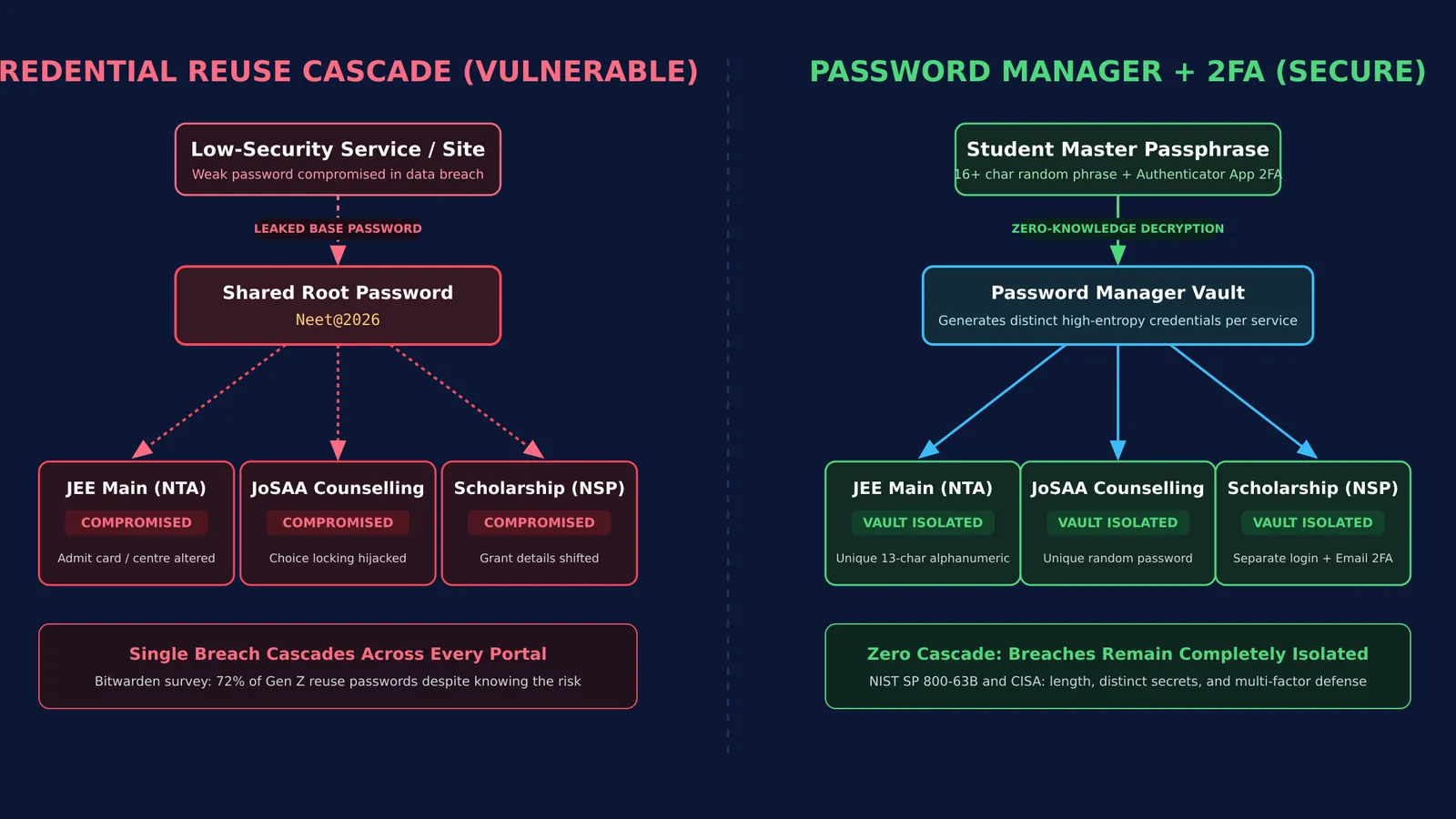
Reusing passwords exposes student accounts to credential stuffing, where automated scripts test leaked credentials from low-security sites on official portals. Research by Rick Wash and Emilee Rader in the *Journal of Cybersecurity* shows that users prioritize perceived security needs over day-to-day usability for high-stakes accounts, but arbitrary composition rules do little to improve choices. The National Testing Agency (NTA) JEE Main Information Bulletin mandates passwords between 8 and 13 characters with uppercase, lowercase, numeric, and special characters. Facing these rules, students create predictable patterns like `Neet@2026`. If one database leaks, every exam and counselling account using that root password is compromised. An intruder can alter your JoSAA choice locking or redirect financial aid, making it essential to recognize how to spot fake scholarship offers and guard your logins.
How does a password manager protect student credentials?
A password manager acts as an encrypted digital safe, storing unique credentials for every portal while requiring you to remember only one master passphrase.
According to the Cybersecurity and Infrastructure Security Agency guidelines on strong passwords, password managers eliminate reuse by creating random strings for each site. Under NIST Special Publication 800-63B from the National Institute of Standards and Technology, length protects accounts far more effectively than complex character rules. For your master password, NIST recommends a passphrase of four or five unrelated words, such as `mango-river-pencil-breeze-72`.
Zero-knowledge managers like Bitwarden or Proton Pass offer free tiers for students. When logging in to study tools like the Fermi Concept Library, which covers every concept in physics, chemistry, biology, mathematics and computing, letting a manager autofill credentials lets you focus on learning instead of password resets.
How should you set up two-factor authentication?
Multi-factor authentication (MFA) requires two pieces of evidence to verify identity. As the CISA Multi-Factor Authentication guidelines emphasize, MFA blocks most automated takeover attacks because a stolen password alone cannot gain access to the account.
Students should apply MFA across two critical layers:
Primary email account: Enable MFA using an authenticator app (such as Aegis or Google Authenticator) rather than SMS, which is vulnerable to SIM swapping.
Password manager vault: Require an authenticator code to open your vault on any new device.
While Indian portals send SMS One-Time Passwords (OTPs) to your registered phone, securing your email ensures password recovery links cannot be intercepted. For scholarship applicants, combining secure logins with fixing Aadhaar bank seeding for scholarships prevents disbursement delays.
What is the safe protocol for cyber cafes and public computers?
Many Indian students visit cyber cafes or coaching computer labs to register and download admit cards. Public computers carry severe risks from keyloggers, browser caching, and unmonitored sessions. The National Testing Agency explicitly warns candidates never to share credentials or OTPs with cafe operators.
To protect your identity on public computers, follow this four-point protocol:
Type credentials from your phone: Keep your password manager on your phone. Manually type the password from your screen; never log in to your vault or email on a public machine.
Use private browsing: Open an Incognito window so cookies, history, and form cache clear automatically upon closing.
Refuse password saving: Always select "Never" when prompted to save your password.
Log out and delete files: Click the portal's official "Log Out" button, delete downloaded admit cards from the Downloads folder, and empty the Recycle Bin.
These habits are as essential as adopting safe online payment habits for students when paying examination fees.
A student checklist for portal credentials
Just as you work through multi-step reasoning in the Fermi Problem Library—which offers worked problems with a step-by-step solver that explains the reasoning rather than printing an answer—securing your accounts requires a systematic routine. In line with CISA password guidelines, establishing a secure routine requires a few consistent steps:
Create a dedicated application email: Use a separate email strictly for exams and college admissions.
Install a trusted password manager: Set up a free manager on your phone with a 16-character master passphrase.
Generate unique passwords for each portal: Create distinct credentials matching portal rules (such as NTA's 8 to 13 character range).
Store recovery details in secure notes: Save application numbers, security answers, and official portal URLs inside your vault.
Keep an offline emergency sheet: Write your master passphrase and account recovery key on paper and store it with your certificates.