On this page
Every year, thousands of students check the National Scholarship Portal or their state portal and see "Application Approved", yet weeks pass and the funds never arrive. When a sanctioned scholarship goes missing, the issue is rarely an administrative cancellation. In almost all cases, the transaction failed because of how the student's bank account is mapped in the Aadhaar payment system.
Understanding how Direct Benefit Transfer (DBT) routes funds lets you identify the error, give your bank branch the exact instructions needed, and release your money.
Why was your scholarship approved but the money not received?
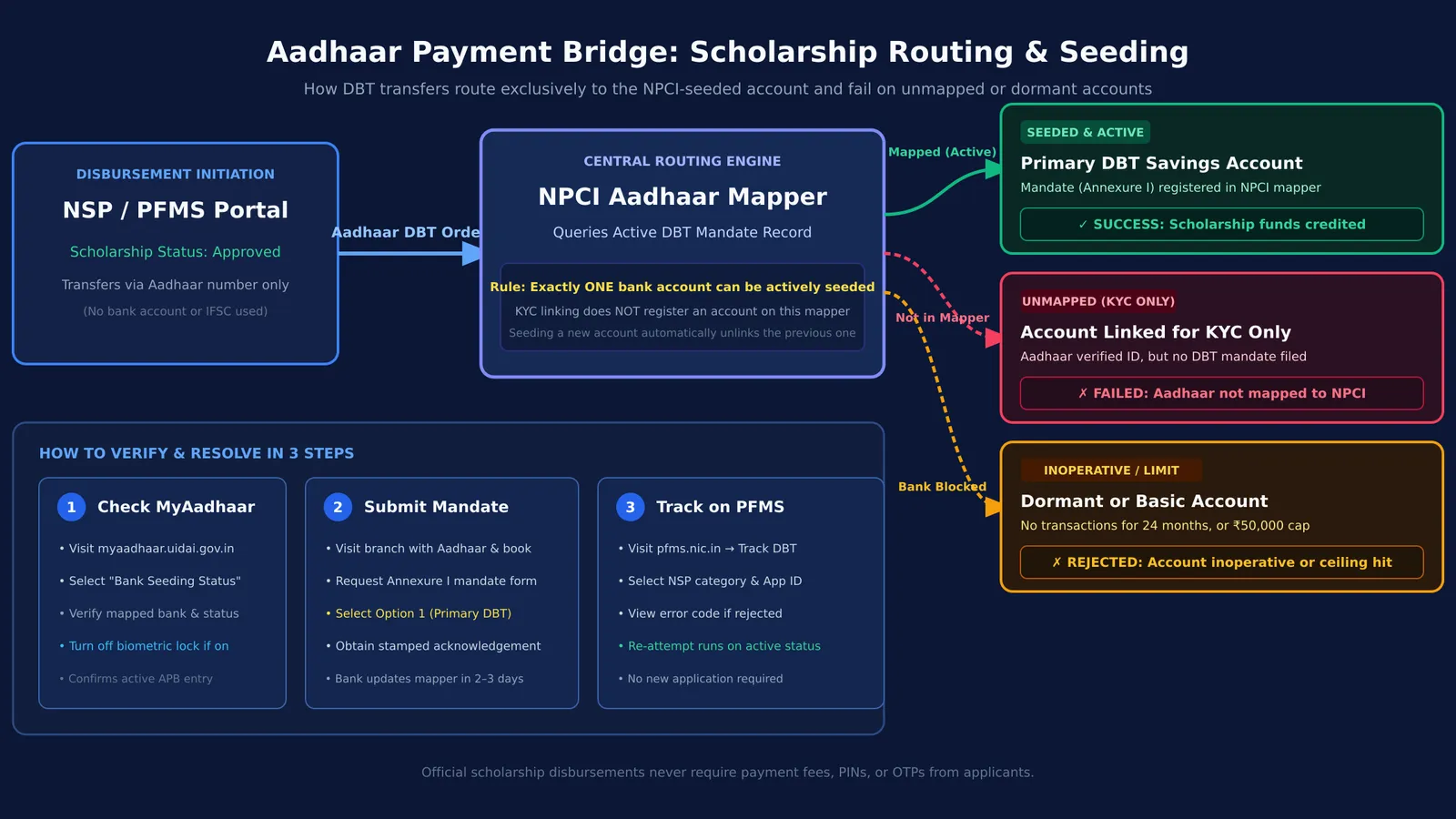
Central and state schemes disburse scholarship funds through Direct Benefit Transfer. According to the DBT Bharat Portal, the DBT framework has routed welfare benefits across hundreds of schemes, logging cumulative estimated financial gains exceeding ₹5.14 lakh crore by eliminating duplicates and paying verified beneficiaries directly. Under this model, agencies do not transfer funds using an account number and IFSC. Instead, the Public Financial Management System sends your 12-digit Aadhaar number to the National Payments Corporation of India (NPCI). NPCI checks its central Aadhaar mapper to find the single account designated for DBT.
When your scholarship fails to credit, one of four issues has usually occurred:
Your bank linked your Aadhaar for KYC, but never registered it on the central NPCI mapper for DBT.
You opened a new account during your first semester at college, but an older school-era account remains mapped in the central register.
Your account is dormant. Under Reserve Bank of India guidelines, savings accounts without customer-induced transactions for 24 months turn inoperative, rejecting incoming electronic credits.
Your account is a minor or basic savings account (such as a BSBDA-Small account) with a deposit ceiling of ₹50,000 that blocks larger transfers.
What is the difference between Aadhaar linking and Aadhaar seeding?
The difference between linking and seeding causes widespread confusion.
Aadhaar linking attaches your Aadhaar number to a bank account for Know Your Customer compliance. You can link your Aadhaar to multiple accounts across different institutions to verify your identity.
Aadhaar seeding is different. Seeding registers one specific account in the central National Payments Corporation of India (NPCI) mapper as your designated recipient for government benefits. Under NPCI rules, only one bank account can be actively seeded for DBT at any time. Seeding a new account automatically unlinks the previous one.
How do you check if your bank account is seeded for DBT?
Do not rely on verbal assurances that "Aadhaar is already linked." Verify your active DBT status yourself:
Visit the MyAadhaar Portal and log in with your Aadhaar number and OTP.
Select the "Bank Seeding Status" service to view your mapped bank and active status date.
Alternatively, check status on the National Scholarship Portal homepage under student services.
If the portal displays "No Bank Account Seeded" or lists an inaccessible old account, payments will bounce. If your biometrics are locked on the mAadhaar app, disable the biometric lock so authentication checks succeed.
How do you fix Aadhaar bank seeding at your branch or online?
If your status is inactive or unmapped, resolve it through these steps:
Digital seeding: Check your bank's mobile app or net banking under service requests for Aadhaar seeding, or use NPCI's Bharat Aadhaar Seeding Enabler (BASE) platform.
Branch visit: Visit your branch with your Aadhaar card and passbook, and request the official mandate form (Annexure I).
At the counter, use this script:
> "I need to seed my savings account in the NPCI mapper for Direct Benefit Transfer to receive my scholarship. Please update this as my primary DBT account under Option 1 of the mandate form, and provide an acknowledged copy."
According to guidelines on the National Scholarship Portal, banks typically update the NPCI mapper within two to three working days after receiving the mandate.
How do you track your scholarship payment on PFMS?
Once your seeding is active, track your disbursement on the Public Financial Management System:
Click "Track DBT Details" on the PFMS homepage.
Select scheme category "NSP".
Enter your scholarship application ID and captcha, then click "Search".
If the status shows "Rejected", PFMS displays the reason code—such as "Aadhaar not mapped to NPCI" or "Account closed or inoperative". Once your seeding shows "Active", the scholarship agency re-initiates failed payments in the next disbursement run.
While resolving paperwork, staying consistent with studies is essential whether you are applying for scholarships for science students or meeting INSPIRE-SHE guidelines. For students tackling tough assignments, the Fermi Problem Library provides worked problems with a step-by-step solver that explains the reasoning rather than printing an answer. Students can also review core topics in the Fermi Concept Library, which covers every concept in physics, chemistry, biology, mathematics and computing, keeping academic progress steady while banking records update.