On this page
If you spot a mistake in your JEE Main application after paying the fee, you cannot email NTA to fix it. The only route is a short online correction window, and you get one go at it.
How do I correct mistakes in my JEE Main form after submission?
NTA's Information Bulletin for JEE (Main) 2027 says your details are treated as final once the form is submitted, and that NTA does not modify them itself. Instead it offers a one-time correction facility. It will not act on corrections sent by post, fax, WhatsApp, email or by hand.
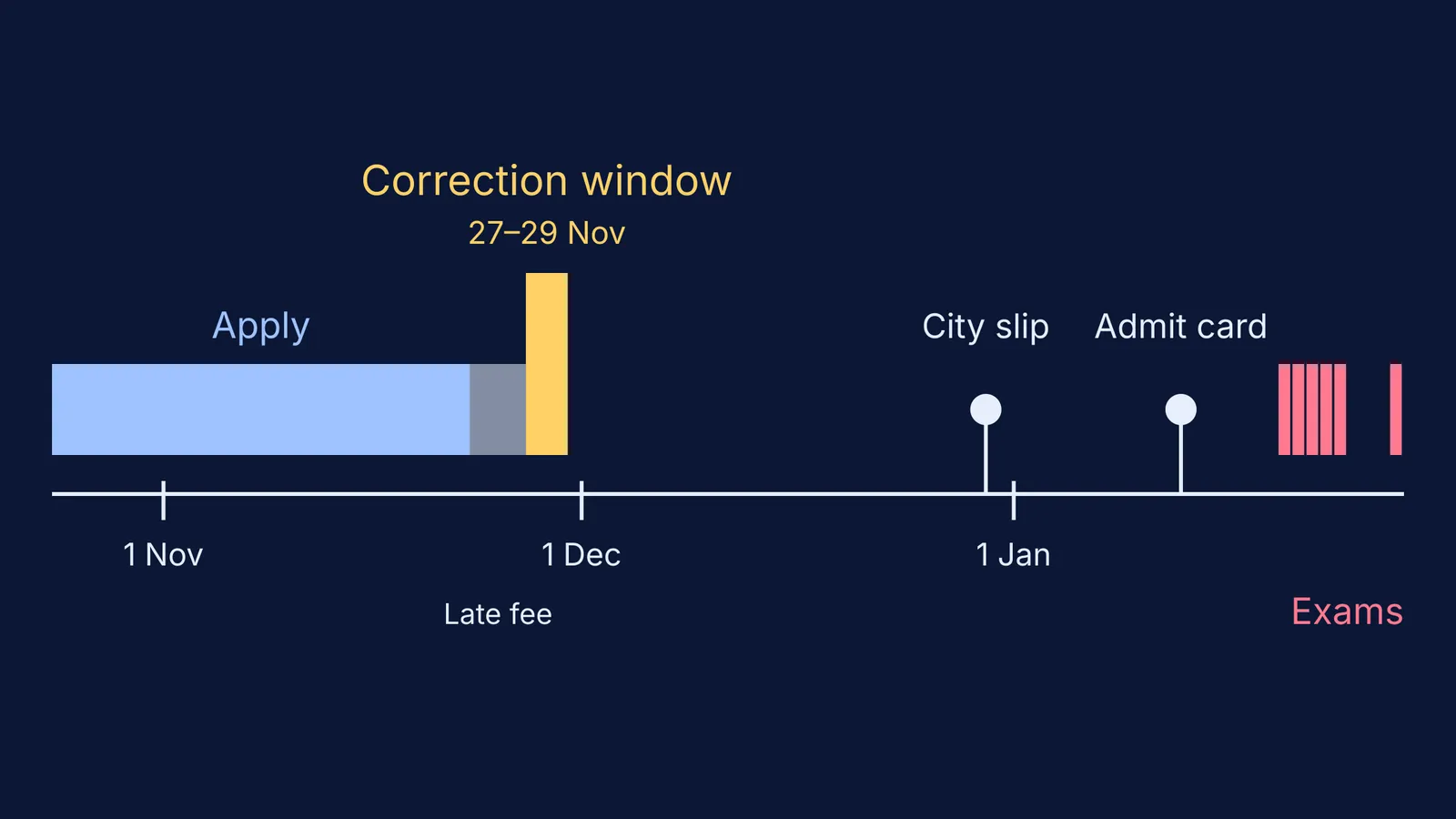
For Session 1 (January 2027), the bulletin lists the correction window as 27 to 29 November 2026, up to 11:50 pm. For Session 2 (April 2027), it is 8 to 10 February 2027, up to 11:50 pm. You log in on jeemain.nta.nic.in with your application number and password.
The list of editable fields is published when the window goes live, so read that notice before you change anything.
What can and cannot be changed in the correction window?
The clearest guide is the last window. NTA's public notice of 21 February 2026 for Session 2 of JEE (Main) 2026 set these rules for new applicants.
You could not change:
mobile number
email address
permanent and present address
emergency contact details
live or uploaded photograph
You could change only one of: your name, your father's name or your mother's name.
You could change or add all of these: Class 10 and Class 12 details, state code of eligibility, date of birth, gender, category, sub-category or PwD status (if not verified by the UDID portal), signature and paper. Exam city and medium could be changed based on your addresses, and identity details only if you registered with an ID other than Aadhaar.
Candidates who had already registered for Session 1 got a different list: paper, medium, state code of eligibility, exam cities, Class 10 and Class 12 details, gender, category and fee payment.
The same notice says that if a change raises your fee, you pay the difference, and fees are not refunded. It also says the correction is one-time: once you submit, the form is frozen.
What if the mistake is in a field you cannot edit?
Do not fill in a second form. The 2027 bulletin says more than one application from a candidate can be treated as unfair means. If you created a duplicate by accident, it asks you to contact the NTA helpline straight away to have one cancelled: 011-40759000 or 011-69227700, or jeemain@nta.ac.in.
NTA sends updates only to the mobile number and email you registered, so if they belong to a parent, make sure every message gets forwarded. If your photo or signature is the problem, see our guide to fixing an admit card photo or signature mismatch. And check any rumour about an extra window against NTA's own notices; here is how parents can handle JEE and NEET rumours on Telegram.
How to use the correction window carefully
Before the window opens, download your current confirmation page and print it.
Lay it next to your Class 10 marksheet, Class 12 details, Aadhaar and any category certificate. Tick each field that matches.
Write your changes on one sheet of paper, exactly as they should appear.
Read the live NTA notice for the fields open this time.
Log in on the first or second day, not at 11 pm on the last. Use a steady connection and have a working payment method ready.
Make only the changes on your sheet. Check the preview line by line, ideally with a parent reading aloud from the documents.
Submit, pay any extra fee, and download the new confirmation page at once.
A worked example. Say your form spells your mother's name "Sunita" but her documents say "Sunitha", and you also want a different exam city. Last time only one of the three names could be changed, so you fix your mother's name and leave the other two alone. For the city, think about travel first; our piece on taking an exam in another city helps you weigh it. Then check both changes in the preview and submit once.
Why save a copy after every change?
The bulletin tells you to download, save and print the confirmation page and to keep proof of fee payment. After a correction, your old printout is out of date. Save the new PDF with a clear name, such as JEEMain2027_S1_after_correction_28Nov.pdf, and keep one copy in your email and one on paper. If a later document shows the wrong detail, that saved copy shows what you submitted.
Once the form is settled, turn back to preparation. Fermi's AI tutor works out what you already know and builds a plan for the session, so your next study hour starts with a clear step.