
On this page
You do not need an expensive chair to study without a sore back. This guidance comes from the UK Health and Safety Executive (HSE), which sets out good posture for people who use screens at work or at home, and the American Optometric Association (AOA), which covers screen position and eye strain. Neither was written for students, but most of it works at a dining table.
How should you sit while studying to avoid back pain?
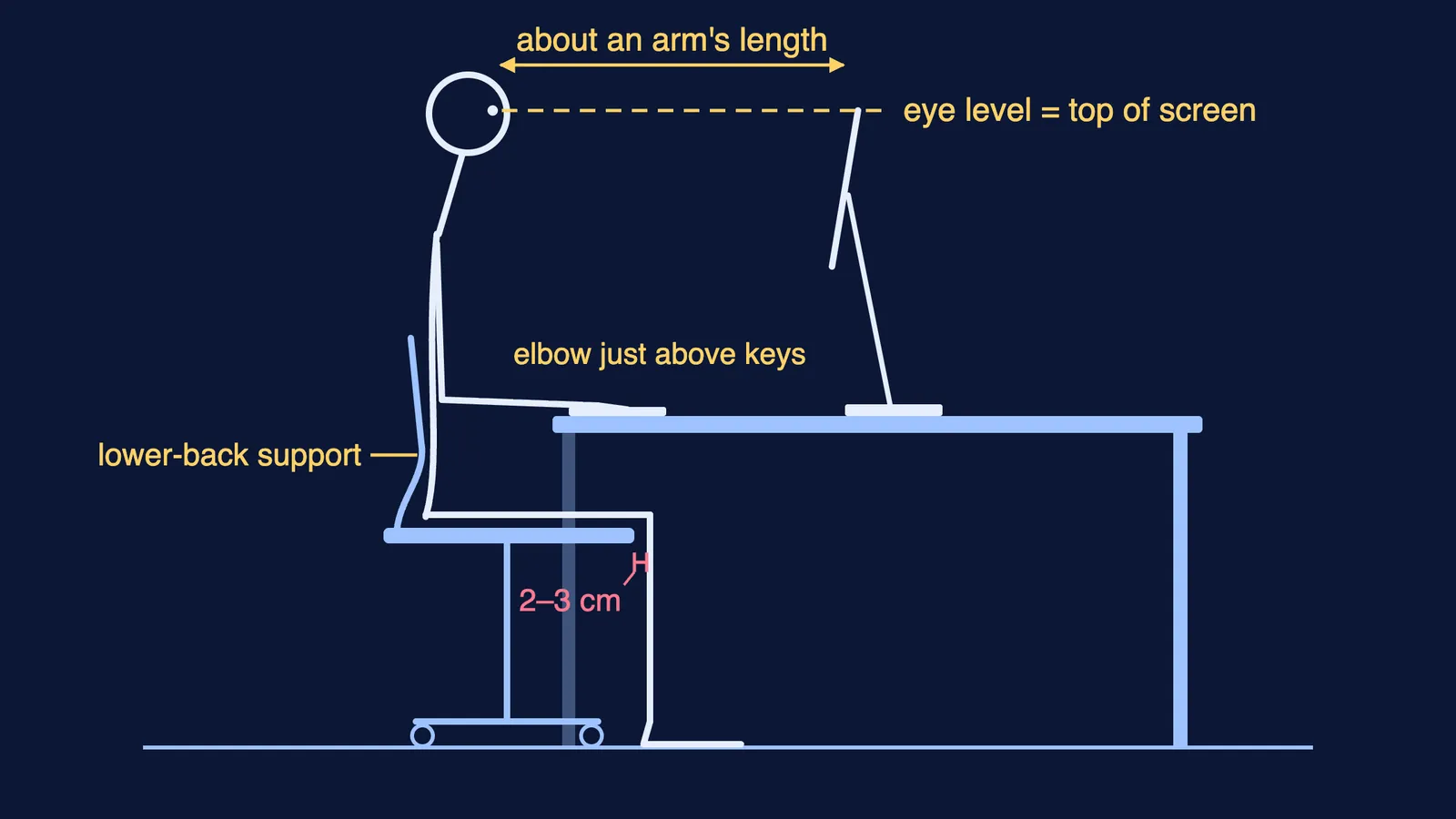
HSE's guide to good posture at a screen lists nine points. These matter most at a study desk:
The chair back supports your lower back. If it does not, add a cushion.
The seat supports the front and back of your thighs equally.
There is a gap of 2–3 cm between the front edge of the seat and the back of your knee.
Your shoulders are relaxed. If you have to shrug them to write, you are sitting too low.
Your screen and keyboard are straight in front of you, so you do not twist your back.
The last point is the easiest to break at a study desk: phone to one side, textbook on the left, notebook on the right.
How high should the desk and chair be?
There is no single right height, so HSE gives a body-based rule: your keyboard should sit just below elbow height, with your shoulders relaxed (HSE). For a notebook, let your arms hang, bend your elbows, and the desk should be level with or just below your forearms.
In many Indian homes the study desk is a dining table. The AOA notes that most people prefer a work surface about 26 inches (66 cm) high, while desks and tables are usually 29 inches (74 cm) (AOA). Tables tend to run high, so raise yourself with a firm cushion rather than hunch up to the table, as HSE also suggests.
If your child prefers the floor or wants a standing desk, our guide to floor, chair or standing desks for study compares the options.
Where should your screen and books go?
HSE says the top of the screen should be level with your eyes, about an arm's length away (HSE). The AOA puts the centre of the screen 15 to 20 degrees below eye level and 20 to 28 inches (about 50 to 70 cm) from your eyes (AOA).
For a laptop, HSE suggests a separate keyboard and mouse so the laptop can be raised on a riser.
The AOA advises placing reference material between the keyboard and the screen, or on a holder beside the screen, so your head is not constantly moving between them. A book stand beside the screen does this.
How often should you take breaks while studying?
HSE's guidance on work routine and breaks says short, frequent breaks beat longer, rarer ones: 5 to 10 minutes every hour is better than 20 minutes every 2 hours. Use a break to get up and move around, or at least stretch and change posture.
For your eyes, the AOA recommends the 20-20-20 rule: every 20 minutes, look at something 20 feet (about 6 metres) away for 20 seconds (AOA). The World Health Organization advises that all age groups should limit the amount of time spent sedentary (WHO).
A timed study block makes breaks automatic; our 25-5 Pomodoro plan shows one way. If deciding what to do in each block is the hard part, Fermi's AI tutor can work out what you already know and build a plan for the session, so each block starts with a clear task.
A worked example: a dining-table study corner
A student studies at the dining table on a plastic chair, with a laptop for recorded lectures and a printed textbook. Step by step, using the HSE posture points, HSE break advice and the AOA's 20-20-20 rule:
With elbows bent, her forearms sit below the table edge, so she shrugs to write. A firm cushion raises her to table level.
The chair back is flat, so a rolled towel goes behind her lower back.
The laptop goes on old textbooks until the top of the screen is at eye level, with a plug-in keyboard on the table.
The textbook moves from flat on her left to a stand beside the laptop.
A timer runs 50 minutes of study, then 10 minutes up and walking. Every 20 minutes she looks out of the window for 20 seconds.
When is back pain more than posture?
The NHS says back pain often improves on its own within a few weeks, though it can sometimes last longer or keep coming back. It advises seeing a doctor if the pain does not improve after a few weeks of home care, does not improve with rest or is worse at night, and getting emergency help straight away for pain, tingling, weakness or numbness in both legs. A desk setup is not a treatment: if the pain keeps returning, talk to a doctor.
To keep the desk clear enough to use, try our five-minute study desk reset plan.