
On this page
A line follower is a small robot that reads a dark line on a light floor and keeps steering itself back onto it. It is a good first build because it is a whole control loop in miniature: sense, decide, act, repeat.
What parts do you need for a line follower robot?
A controller: an Arduino Uno or Nano.
Three to five infrared (IR) reflective sensors on one strip, such as TCRT5000 modules.
A motor driver board, such as one built on the L293D chip.
Two geared DC motors with wheels (yellow BO motors work), plus a caster wheel.
A separate battery pack for the motors, a chassis and jumper wires.
A track: black electrical tape on white chart paper.
The TCRT5000 pairs an infrared emitter at 950 nm with a phototransistor, inside a package that blocks visible light (Vishay TCRT5000 datasheet). Its peak operating distance is 2.5 mm, and its output stays above 20% of that peak from 0.2 mm to 15 mm, according to the same datasheet.
The L293D is rated for up to 600 mA per channel at supply voltages from 4.5 V to 36 V, and it has built-in clamp diodes to absorb the voltage spikes motors produce (Texas Instruments L293D datasheet). Before you trust that rating, measure what your motors actually draw; our guide on using a multimeter safely as a beginner shows how.
How does a line follower sensor detect the line?
White paper reflects most of the infrared light back to the phototransistor; black tape absorbs most of it.
On a Uno, analogRead() turns a voltage between 0 and 5 V into a whole number from 0 to 1023, and one read takes about 100 microseconds (Arduino analogRead reference). Many sensor modules give a lower voltage over white and a higher one over black, but some do the opposite. Never assume: measure.
Worked example: five readings to one error number
Calibrate. Hold each sensor over white, then over black, and print the readings. Say one sensor reads 120 on white and 880 on black. Its threshold is the midpoint: (120 + 880) / 2 = 500.
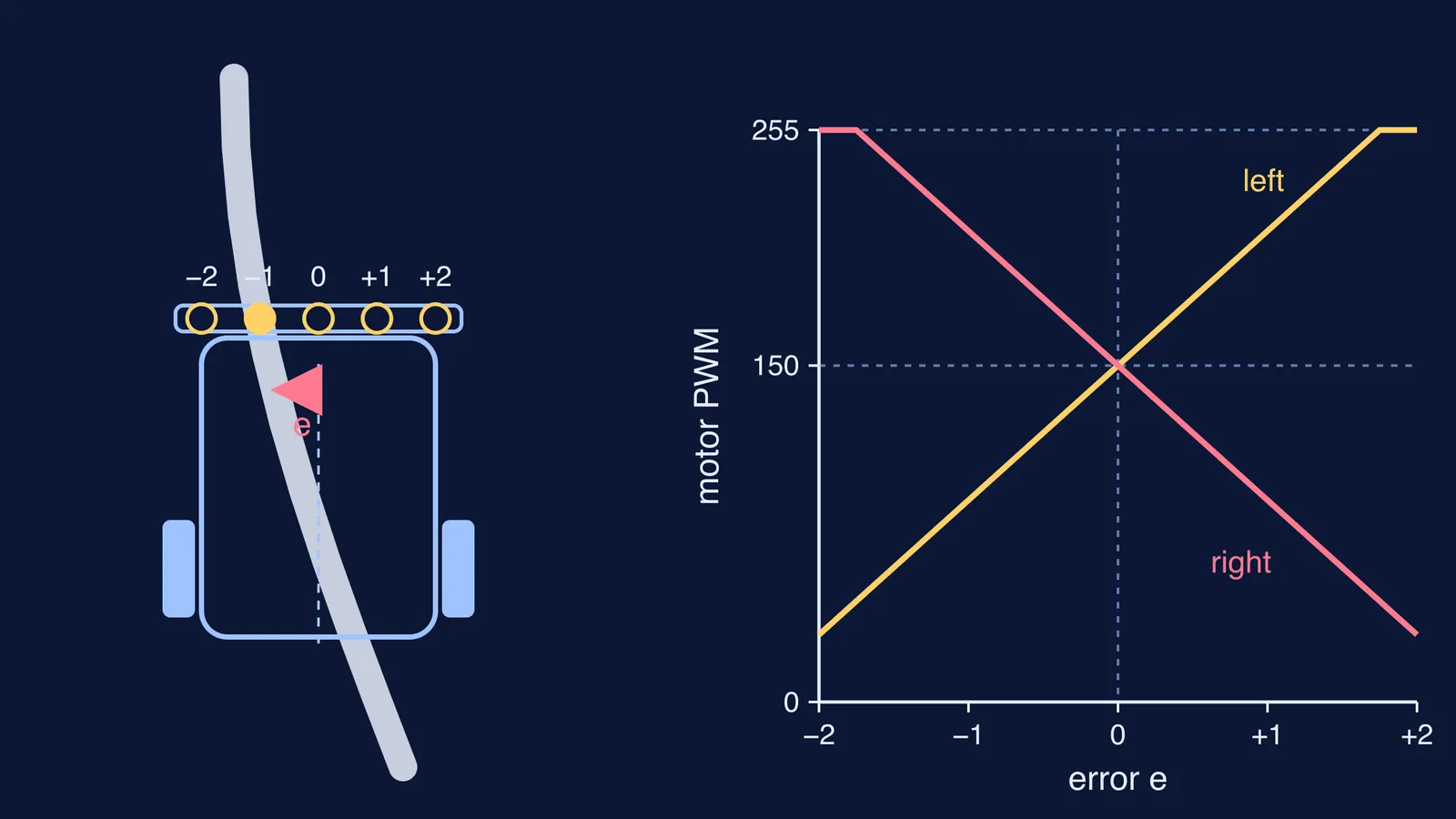
Give the sensors weights from left to right: -2, -1, 0, +1, +2.
The error e is the average weight of the sensors that see black. If only the -1 sensor sees black, e = -1: the line is slightly to the left. If -1 and 0 both see black, e = -0.5.
If no sensor sees black, keep the last error, so the robot keeps turning towards where the line was.
Steer: left speed = base + Kp × e, right speed = base - Kp × e.
Keep both speeds between 0 and 255, because analogWrite() takes values from 0 (always off) to 255 (always on) (Arduino analogWrite reference). With base = 150 and Kp = 60, an error of -1 gives the left motor 90 and the right motor 210, so the robot turns left, back towards the line.
How do you tune a line follower robot?
Test driving straight with the sensors ignored: send both motors the same value. If the robot drifts, note the weaker motor and give it a small fixed boost.
Start with a low base speed and a small Kp. If the robot runs off the line on curves, raise Kp in small steps.
When it starts zig-zagging on straight sections, Kp is too high. Back it off a little.
Raise the base speed in small steps, rechecking curves each time.
Only then add a damping term: Kd × (e - previous e), added to the left speed and subtracted from the right. It calms the zig-zag.
Change one number at a time and log it: base, Kp, Kd, lap time and what you saw.
That log doubles as material for a project report. For a track to aim at, see our list of robotics competitions for school students in India.
What mistakes do beginners make with line follower robots?
Sensors mounted too high. The datasheet peak is a few millimetres, so keep the strip close to the floor.
Powering motors from the Arduino's 5 V pin. The board can reset when the motors start; give the motors their own battery.
No common ground. The Arduino, driver and motor battery must share a ground wire.
Hard-coded thresholds. Lighting changes between your room and a competition hall, so recalibrate on the real track.
Sensors spaced wider than the tape. The line falls between two sensors and the robot sees nothing.
Tuning on a fresh battery, then racing on a tired one.
Changing three things at once.
If words like phototransistor, PWM or feedback are new, the Fermi Concept Library has its own lesson for each concept in physics and computing, so you can read up on just the part that confuses you.
Once your robot laps the oval, try one of these beginner Arduino projects for school students to reuse the same parts.