
On this page
Most students don't lose notes because they picked the wrong app. They lose them because the notes are spread across three places: a notebook app on the tablet, a Downloads folder full of coaching PDFs, and a Google Doc from a group project. The fix is one home for everything, one way of naming things and a ten-minute tidy-up every week.
Notebook app, folders or cloud documents: which should you use?
Each option is good at a different job. Choose by what you mostly produce, not by what your friends use.
Notebook-style apps (notebooks, sections and pages, as in OneNote, GoodNotes or Notability) suit you if you mostly write by hand on a tablet, or mix handwriting with pasted diagrams.
Plain folders on a laptop or phone suit you if most of your material arrives as files: coaching DPPs, scanned pages, NCERT PDFs, test papers.
Cloud documents (Google Docs, Word online) suit you if you mostly type, work with classmates, or move between a school computer and your phone.
You can use two of these, but only if one is the home and the other is a source. For example, you handwrite in a notebook app, then every Sunday you export each finished chapter as a PDF into your subject folders. Check that any app you pick can export notes as PDF. For messy phone and laptop folders, see our guide to organising study files on your phone and laptop.
Does it matter if you type or handwrite your notes?
Less than you may have heard. In three experiments published in 2014, Pam Mueller and Daniel Oppenheimer found that students who typed lecture notes on laptops did worse on conceptual questions than students who wrote by hand, and linked this to typists copying the lecture word for word (Psychological Science).
When Kayla Morehead, John Dunlosky and Katherine Rawson repeated and extended that work, results did not consistently differ between laptop, longhand, eWriter and no-notes groups, and they concluded that naming a winner was premature (Educational Psychology Review, 2019).
The useful lesson from both papers: writing ideas in your own words matters more than the device. Whatever you use, don't transcribe.
How you use your notes matters too. In Henry Roediger and Jeffrey Karpicke's experiments, students who took recall tests on a passage remembered more of it two days and one week later than students who simply reread it, even though rereading did better on a test five minutes later (Psychological Science, 2006). So end every chapter's notes with three or four questions you can test yourself on.
How do you name and file notes so you can find them?
Good search doesn't replace good folders. In two studies of computer users, Ofer Bergman and colleagues found that people estimated they reached their own files by browsing folders 56-68% of the time and by searching only 4-15% of the time; better desktop search had only a limited, inconsistent effect on that (ACM Transactions on Information Systems, 2008).
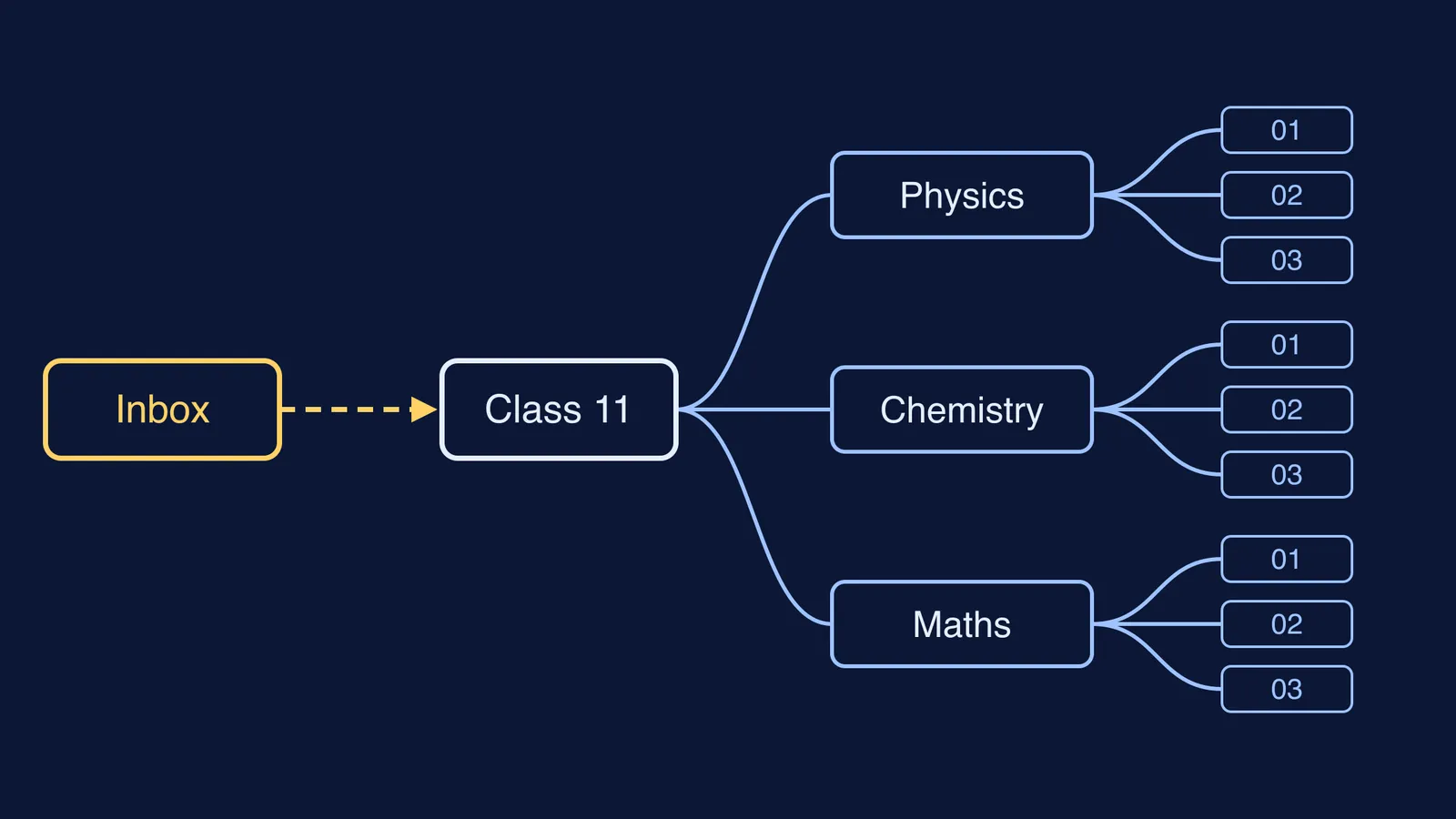
A worked example for a Class 11 science student, using three levels:
Subject: one folder, notebook or document folder each for Physics, Chemistry and Maths.
Chapter: one per chapter, numbered as in your NCERT book, such as "05 Laws of Motion".
Item: subject code, chapter number, what it is, then the date written year-month-day so files sort in order, such as "PHY-05-notes-2026-10-12", "PHY-05-DPP3-2026-10-14" and "PHY-05-mistakes".
Add one extra folder or section called Inbox. Anything new, such as a screenshot or a coaching PDF, lands there first. Nothing stays in Inbox longer than a week. To jump straight to a topic in a long notebook, add a contents page as in our guide on how to index your notes.
How do you keep one system going all year?
Every Sunday, spend ten minutes on this:
Empty the Inbox: rename each item using your pattern and move it to its chapter.
Delete duplicates and any screenshot you have already copied into your notes.
Add self-test questions to each chapter you studied that week.
Check your backup: is sync on, or have you copied the week's files to a second place? Our guide to scanning and backing up handwritten notes covers paper pages.
If you study with Fermi's AI tutor, your progress, notes and everything generated during a session stay in your library there. On Sunday, file what you want to keep into the right chapter at home. If sorting shows you that a chapter's notes are thin because you never really understood it, the Fermi Concept Library has a lesson for every concept in physics, chemistry, biology, mathematics and computing.
This week, pick your home, make the three levels and the Inbox, and do your first ten-minute sort on Sunday.