On this page
A notebook can go missing in a hundred ordinary ways: left on a coaching-centre bench, soaked in a monsoon bag, lent to a friend who forgets to return it. If it holds a year of derivations and reactions, you feel the loss most in the weeks before an exam. The fix is a short weekly routine, and it only needs the phone you already have.
How do you scan handwritten notes with your phone?
You don't need a separate scanner app. The free apps on most phones can already do it.
On Android, tap the camera button in the Google Drive app. A blue line outlines the page to show where the picture will be cropped. You can crop and rotate the image, clean off stains and fingers, add more pages, and save the scan as a PDF or JPG, according to Google's Drive help page on scanning. On an iPhone, open the Notes app, tap the attachment (paperclip) button and choose Scan Documents. You can then drag the corners to fit the page, as Apple's iPhone guide explains.
A few habits make scans you can still read in March:
Scan in daylight near a window, with the page flat on a dark table so the edges stand out.
Hold the phone straight above the page, not at an angle.
Choose PDF, and put one chapter or one class in one file, not one file per page.
Zoom in on the hardest line of your handwriting before you save. If you can't read it on the screen, rescan it.
How should you name and store scanned notes?
A scan you can't find is as good as lost. Don't count on text recognition to read your handwriting for you. Google's guide to converting PDFs and photos to text says files should be 2 MB or smaller and tells you to use common fonts such as Arial or Times New Roman. It says nothing about handwriting. Handwritten notes are not Arial, so the file name has to do the work.
Use one pattern for every file: subject, chapter number, topic, and the date written as year-month-day. Putting the year first means files sort in order on their own.
Here is a worked example for one week of Class 11 notes:
Physics_Ch05_LawsOfMotion_2026-10-20.pdf
Physics_Ch05_LawsOfMotion-Friction_2026-10-23.pdf
Chemistry_Ch04_ChemicalBonding_2026-10-21.pdf
Maths_Ch03_Trigonometry-Identities_2026-10-24.pdf
Then make one folder per subject, with a subfolder per chapter. Keep a short “00_Index” document in each subject folder listing chapters and dates, so you can see a gap at a glance. If you already colour code your pages, the system in how to colour code notes with four colours shows up in a colour scan too.
What is the 3-2-1 backup rule?
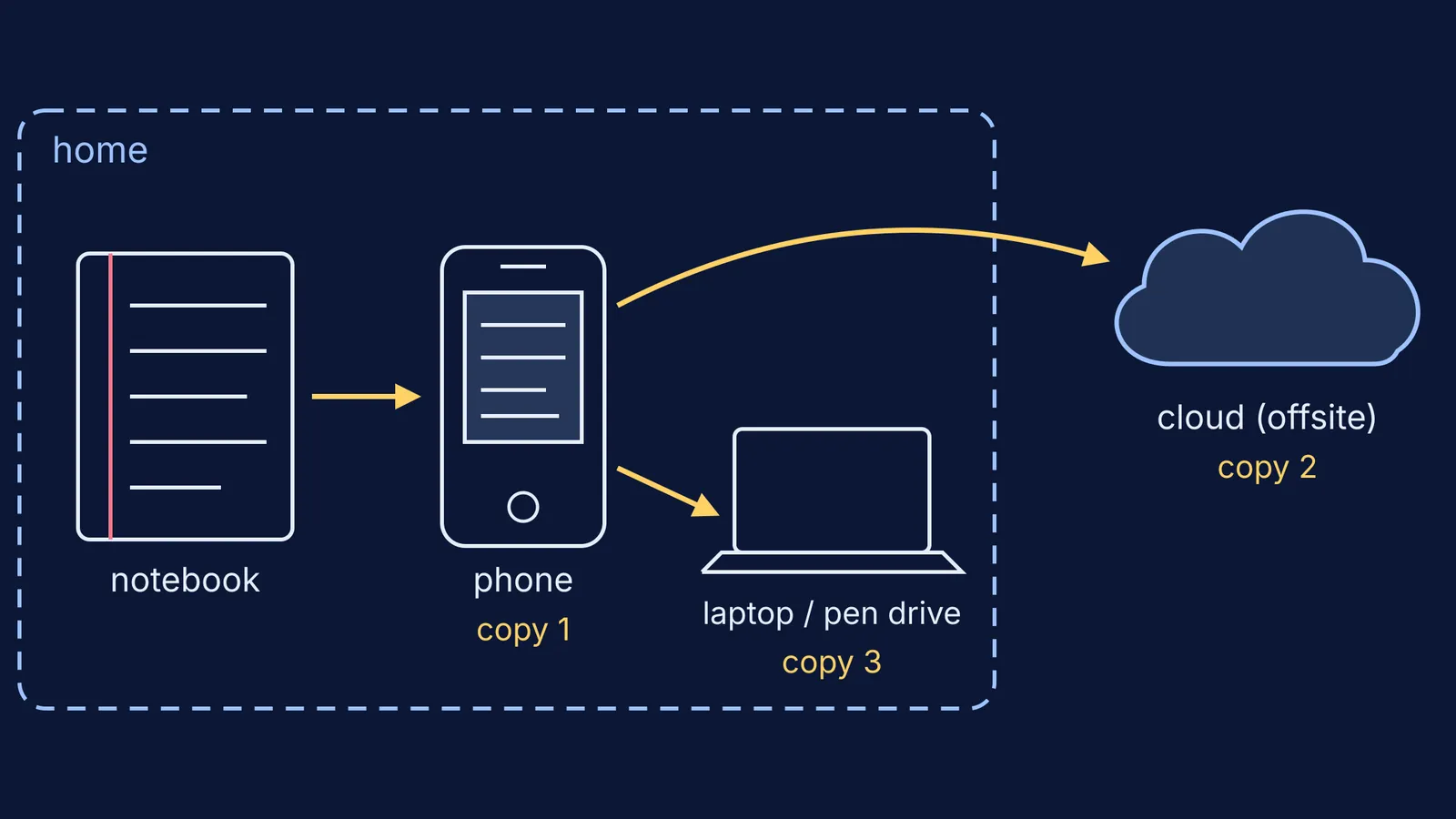
The 3-2-1 rule means keeping 3 copies of any important file (1 primary and 2 backups), on 2 different media types, with 1 copy stored offsite, as set out in the US-CERT paper Data Backup Options. The same paper warns that saving just one backup file may not be enough.
For a student, it can look like this:
Copy 1, your phone: the PDF you just scanned.
Copy 2, the cloud (your offsite copy): a folder in Google Drive or iCloud. Each Google Account includes up to 15 GB of storage, shared across Gmail, Google Drive and Google Photos, according to Google One help.
Copy 3, a different medium at home: a pen drive or the family laptop, updated once a month.
The paper notebook stays on your desk as a bonus copy, not as the only one.
How often should you back up your notes?
Tie it to a fixed slot in your week, such as Sunday evening after dinner. A short routine:
Scan every page written since last Sunday.
Rename each file using the pattern above.
Move the files into the right subject and chapter folders.
Check that the phone has synced them to the cloud.
On the first Sunday of the month, copy the whole notes folder to your pen drive or laptop.
If you study mostly on one device, preparing for JEE or NEET on only a phone has more ideas for keeping a small screen organised.
Scanned notes can be study material as well as insurance. You can bring a topic, a problem set or a scanned assignment to Fermi's AI tutor. It works out what you already know and builds a plan for the session, and the notes made along the way stay in your library. If re-reading a scan shows that you copied a step without understanding it, the Fermi Concept Library has a lesson for each concept in physics, chemistry, biology, mathematics and computing.
How can parents help?
Ask to see the folder, not the notebook. A quick look on Sunday (“Is this week's chemistry in there?”) builds the habit without nagging. Keep sharing settings to the family only, and avoid scanning pages that carry phone numbers or addresses. For teens buried in coaching handouts, how to help your teen organise messy coaching notes pairs well with this routine.