On this page
In exam month, the problem is rarely that you never made the notes. It is that the formula sheet is somewhere in WhatsApp downloads, the photo of a solved problem is buried in your camera roll, and the unit test you need is called Document (3).pdf. Here is one system that works the same on your phone and your laptop, and a plan to set it up in 30 minutes.
How should you organise study files on phone and laptop?
Keep everything in one cloud folder that both devices can see, such as Google Drive, OneDrive or iCloud.
Keep it shallow. In a study of how people find their own files, Ofer Bergman and colleagues asked 296 people to retrieve 1,131 of their files (Journal of the American Society for Information Science and Technology, 2010). The files were retrieved from a mean depth of 2.86 folders, in small folders holding 11.82 files on average, and people reached 94% of their files, taking 14.76 seconds on average. Because retrieval time and success depended on folder size and depth, the researchers judged that avoiding both deep trees and very large folders was a sensible choice.
So use three levels at most:
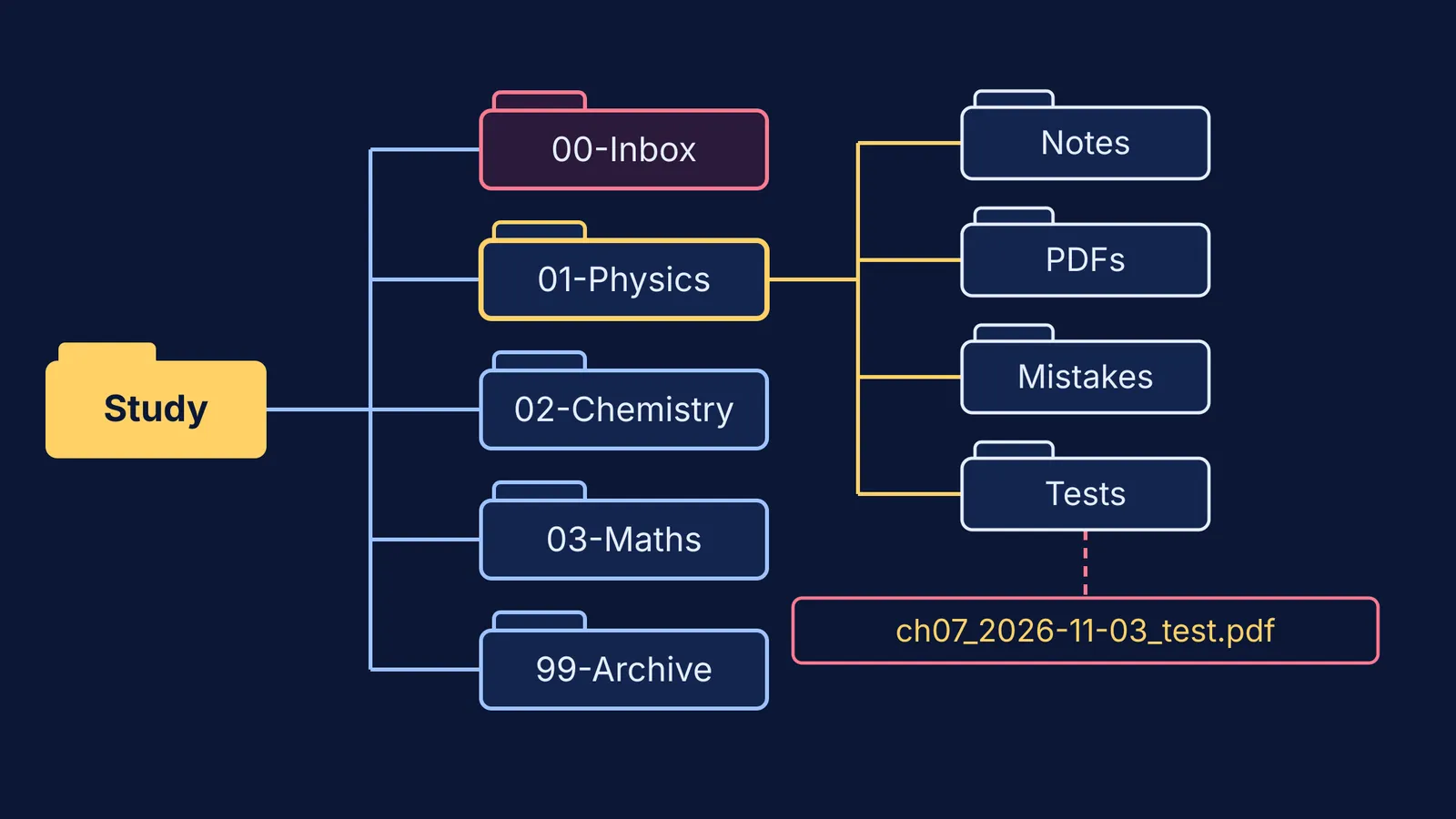
Study-2026-27, the one top folder
00-Inbox, where everything new lands first
01-Physics, 02-Chemistry, 03-Maths (or Biology), one folder per subject
99-Archive, for last year's material and anything you are unsure about deleting
Inside each subject, make the same four folders: Notes, PDFs, Mistakes and Tests. The numbers at the front keep the order fixed, because file apps sort names alphabetically.
What is a good file naming system for students?
Use one pattern for every file: chapter, date, what it is. For example, ch07_2026-11-03_notes.pdf.
Write chapter numbers with two digits (ch07, not ch7), so ch10 lines up after ch09 instead of after ch1.
Write dates as year-month-day, so alphabetical order is also date order.
Stick to letters, numbers, hyphens and underscores. Windows reserves colons, question marks, slashes, backslashes, asterisks, quotation marks, the pipe sign and angle brackets in file names (Microsoft Learn), so a file called Rotation: doubts? cannot keep that name on a Windows laptop.
Here is what renaming one Physics week looks like:
IMG_20261103_191422.jpg becomes ch07_2026-11-03_torque-sign-error.jpg, filed in Physics, Mistakes
Document (3).pdf becomes ch06_2026-10-28_worksheet.pdf, filed in Physics, PDFs
Unit test FINAL final.pdf becomes ch05-07_2026-11-09_unit-test.pdf, filed in Physics, Tests
What should you do with screenshots and WhatsApp PDFs?
Give them one route: once a week, spend ten minutes moving study items from Downloads, WhatsApp documents and Screenshots into 00-Inbox, then rename and file each one or delete it. If you cannot name a screenshot in ten seconds, it probably will not help you in exam month.
If you screenshot explanations from an AI tutor, a better habit is to save AI explanations as notes instead of screenshots. Parents sorting paper handouts too can use this guide to help your teen organise messy coaching notes.
Then back up. The US cybersecurity agency CISA calls the 3-2-1 rule a trusted guideline: three copies of important files, on two different types of storage, with one copy stored off-site, away from your location (CISA). For a student, that can be the cloud folder, the synced laptop copy and a pen drive you update monthly and keep away from your laptop.
Why keep a Mistakes folder and a Tests folder?
Because those two folders are your revision. In experiments by Henry Roediger and Jeffrey Karpicke, students who took recall tests on a passage remembered more of it two days and one week later than students who restudied it the same number of times, even though restudying made them feel more confident (Psychological Science, 2006). A 2013 review by John Dunlosky and colleagues rated practice testing and distributed practice as high-utility techniques, and rereading and highlighting as low-utility (Psychological Science in the Public Interest).
So in exam month, open Mistakes first, cover the solution and redo the problem. For a fuller routine, see how to review weekly test mistakes with AI.
When a mistake comes from a concept you never quite understood, find its lesson in the Fermi Concept Library. If you cannot decide where to start, Fermi's AI tutor works out what you already know and builds a plan for the session.
What does the 30-minute setup plan look like?
Minutes 0 to 5: create the folder tree in your cloud drive.
Minutes 5 to 10: open the same cloud app on your phone and check the tree appears.
Minutes 10 to 20: move every study file from Downloads, WhatsApp documents and Screenshots into 00-Inbox. Do not rename yet.
Minutes 20 to 27: rename and file only this month's chapters and recent tests. Move everything older into 99-Archive as it is.
Minutes 27 to 30: set a weekly ten-minute reminder for the inbox sweep, and start the pen-drive copy.
Parents, the most useful help is to sit in on those 30 minutes, then ask once a week whether the inbox is empty.
Start with this week's chapter, and by exam month every file you need will be a few taps away.