On this page
When an AI tutor explains a difficult concept, the response can feel like an instant breakthrough. The steps are neat, the language is clear, and your confusion vanishes. For most students, the immediate reflex is to press power and volume-down to take a screenshot. You tell yourself you will revise it before the weekend exam. Yet weeks later, that image sits buried beneath hundreds of photos. You remember seeing the explanation, but you cannot reproduce the derivation on a blank sheet.
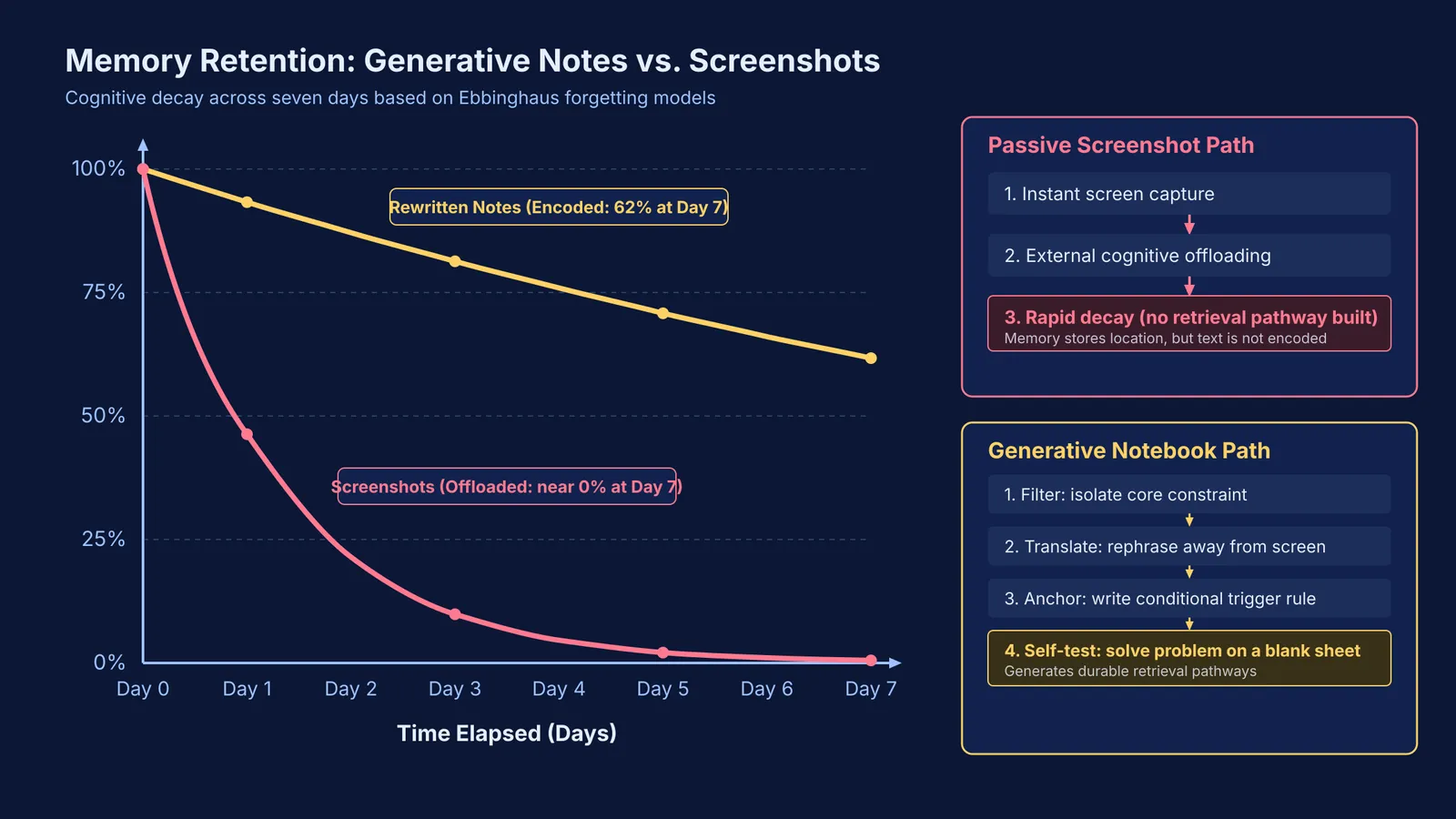
Capturing a screenshot creates an illusion of competence. In Henkel's 2014 study in Psychological Science, participants who photographed items remembered fewer objects and fewer details than participants who simply observed them. When you take a screenshot, your brain treats the image file as external storage. As shown in a 2011 memory experiment published in Science by Betsy Sparrow, Jenny Liu, and Daniel Wegner, expecting a computer to store information leads people to offload cognitive responsibility: they remember where the file is stored, but fail to encode what the text meant.
If you want an explanation to survive until exam day, you must transform that passive snapshot into active handwriting. Our analysis of why interactive AI tutors teach better than chatbots showed that real understanding requires mental friction rather than effortless reception.
Why does screenshotting AI explanations fail?
Screenshots bypass the encoding stage of memory. Reading an AI response is a passive task where clear prose provides cognitive scaffolding. Psychologists call this fluency bias: because the explanation reads easily, your brain mistakes comprehension for retention. Screenshots preserve words, but build no retrieval pathways. In an exam hall without your phone, that unearned clarity disappears. Without having reconstructed the logic yourself, you recognise the question type but cannot begin the solution.
How should you extract the core idea from an AI answer?
Copying an AI's output verbatim into a notebook does not solve the problem. In Mueller and Oppenheimer's 2014 study in Psychological Science, students who transcribed notes word for word engaged in shallower processing and scored worse on conceptual questions than those who summarized in longhand. Our guide to research on longhand note-taking shows that comprehension happens during the active struggle to rephrase.
To convert an AI answer into durable memory, use the three-step Filter-Translate-Anchor framework:
Filter the pivot point. An AI explanation often runs across several paragraphs, but the breakthrough is usually a single sentence or constraint. Skip introductory text and identify the exact line where your own attempt failed.
Translate away from the screen. Turn your phone face down. Write that pivot point in your own words, using personal shorthand and standard textbook symbols. If you must look back while writing, you are copying rather than encoding.
Anchor the trigger rule. Finish with an explicit conditional rule: "When I see condition X, watch out for trap Y, and apply principle Z."
What does an effective notebook entry look like?
Consider a classic physics doubt: finding the work done by friction when a block is placed on a moving conveyor belt. Students often ask why friction does positive work on the block if friction opposes motion. An AI chatbot typically generates several paragraphs on relative velocity, contact forces, and frame dependence.
Instead of archiving that screen, condense the core insight into three handwritten lines:
Pivot: In the ground frame, kinetic friction accelerates the block forward, doing positive work (+½ m v²) on the block.
Trap: Total work across the belt-block system remains negative (−½ m v²), dissipated as heat.
Trigger rule: Always define the frame of reference before calculating the sign of work.
This translation forces generative learning. In Fiorella and Mayer's 2016 review in Educational Psychology Review, generative activities such as summarizing and self-explaining produced measurable gains in conceptual transfer. When you need step-by-step guidance, Fermi's AI tutor notices where you are stuck and decides whether to explain, ask or show, holding a line of reasoning across the session rather than delivering a passive answer all at once.
How do you turn saved notes into active retrieval practice?
Writing an explanation into your notebook secures the initial memory trace, but retention requires spaced retrieval. After writing your trigger rule, turn the page and solve the original problem on a blank sheet without looking at your notes. You can also prompt your tools to test you; our guide on asking an AI chatbot to quiz you explains how to generate practice variants testing the same concept. For additional practice, the Fermi Problem Library provides worked problems with a step-by-step solver that explains the reasoning rather than printing an answer.
A reliable daily workflow needs four habits:
Stop saving explanation screenshots into your photo library.
Keep a dedicated doubt notebook open beside your screen.
Condense every helpful AI answer into a three-line summary and a trigger rule.
Close the screen and test your recall on a blank sheet before moving on.