

On this page
Why build Arduino projects for physics?
Traditional physics laboratories often ask students to verify laws using pre-built equipment where the inner workings are hidden inside a plastic casing. Arduino changes this dynamic entirely. By building the measurement tool themselves from scratch, students move from passive observation to active learning, which studies show can raise average exam scores by 6% and significantly reduce failure rates.
Because microcontrollers offer extremely high precision—measuring events in fractions of a second rather than seconds—they allow students to validate physical laws with empirical data that is far more accurate than what a manual stopwatch or a human reaction time can ever provide. This precision builds confidence in the underlying mathematics.
What are the best Arduino projects for school students?
For beginners, the most effective projects combine simple, straightforward wiring with clear, measurable physical phenomena. Here are three introductory builds to start with.
1. The ultrasonic motion tracker (Kinematics)
This project replaces the traditional ticker-tape timer used in school labs. Using an ultrasonic distance sensor, the Arduino emits high-frequency sound waves and measures exactly how long they take to bounce back from a moving object, such as a toy car rolling down a ramp.
The physics: By logging distance against time at high speeds, students can plot precise position-time graphs. From there, they can calculate instantaneous velocity (v = Δx / Δt) and acceleration without relying on assumed values.
The setup: Wire the sensor's trigger and echo pins to the Arduino, and write a short script to sample the distance multiple times a second.
Next step: If a student struggles to translate these graphs into calculus equations, Fermi's AI tutor can teach them how to derive acceleration from velocity data step by step. If you want to dive deeper into the math behind the motion, read our guide on integrating variable acceleration.
2. The photogate pendulum (Simple Harmonic Motion)
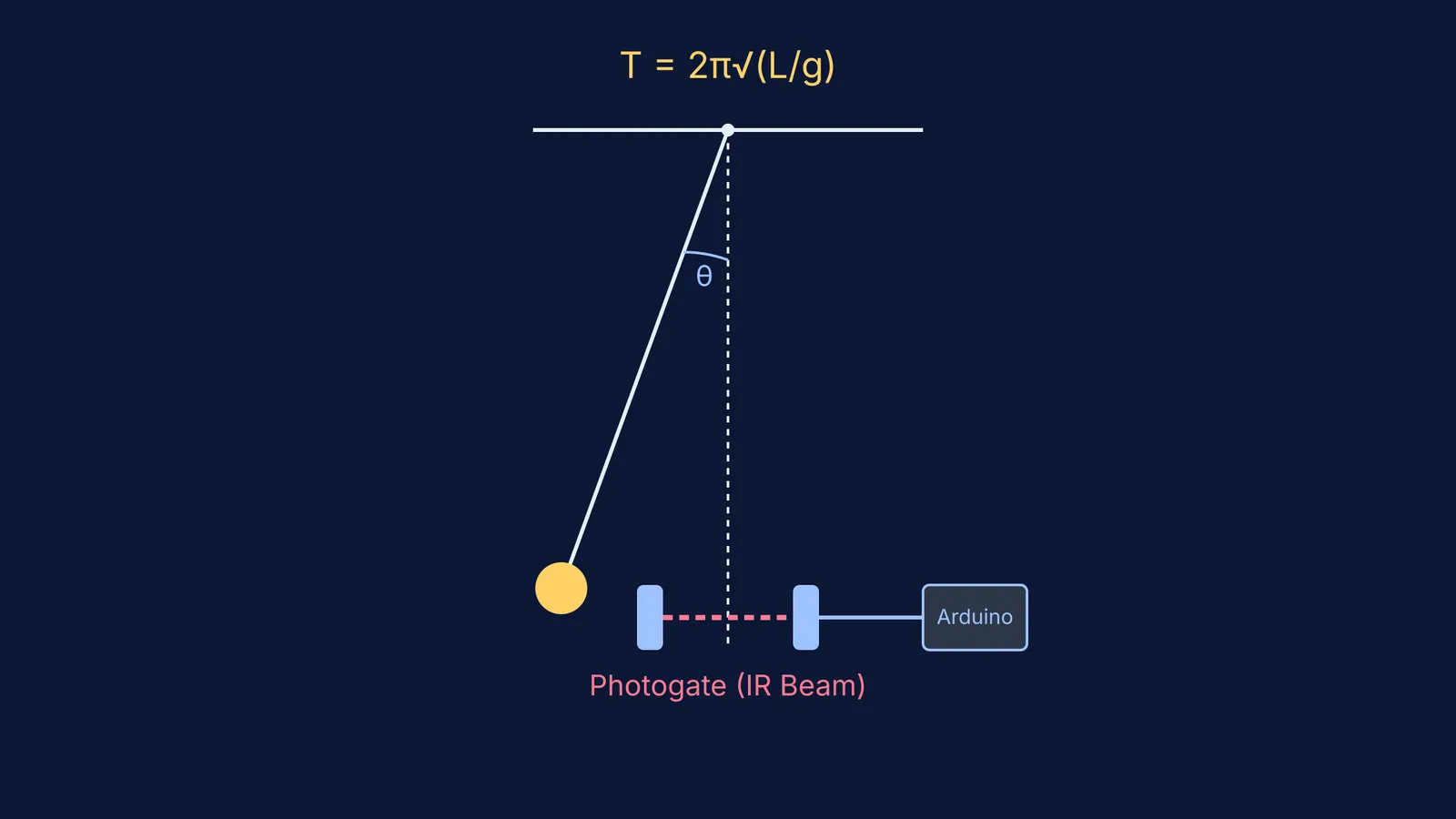
A standard mechanics lab requires students to time multiple pendulum swings with a stopwatch, introducing significant human error. An Arduino photogate removes that error entirely by automating the timing mechanism.
The physics: Students can empirically prove that the period of a pendulum (T = 2π√(L/g)) depends strictly on its length, not its mass or its initial drop height (for small angles). For more on the internal forces at play, see our breakdown of simple pendulum string tension.
The setup: Position a laser pointer or infrared LED so it hits a light-dependent resistor (LDR) across a small gap. When the swinging pendulum bob breaks the beam, the Arduino records the exact millisecond, allowing for precise period calculations across multiple swings.
Next step: Before taking the time to build the physical apparatus, students can test how gravity and string length affect the period in the Fermi Simulation Lab.
3. The thermal conductivity tester (Thermodynamics)
This project visualises how heat travels through different materials, making abstract thermal dynamics visible on a screen.
The physics: It demonstrates thermal conductivity, Fourier's law, and the comparative rate of heat transfer.
The setup: Attach two digital temperature sensors to the opposite ends of a metal rod, and submerge one end in a cup of hot water. The Arduino logs the temperature difference over time. Students can repeat the exact same experiment with a wooden dowel to mathematically compare conductors and insulators.
Which Arduino starter kit is best for school students?
You do not need to purchase expensive, specialized educational packages to get started. A standard Arduino starter kit is ideal for beginners and widely available online. It is affordable and includes everything required for the projects above: the microcontroller, a breadboard, jumper wires, LEDs, resistors, an ultrasonic sensor, and an LDR.
Because the Arduino runs on low-voltage direct current (supplied via a USB connection to a laptop), the circuits are entirely safe for school students to build, handle, and experiment with at a desk.
How should you structure your first experiment?
To get the most out of these projects, treat them as full scientific investigations rather than just coding exercises. Follow this four-step method for every new build:
Build the hardware: Wire the circuit cleanly on a breadboard before connecting power to the Arduino.
Write the logic: Write the C++ code to read the sensor and print the raw values to the Serial Monitor.
Run the trial: Collect the physical data as the event happens and paste the timestamped output into a spreadsheet.
Verify the law: Graph the results. If the data does not perfectly match the theory (for instance, due to air resistance or friction), use the Fermi Problem Library to work through the ideal mathematical model and compare it directly to your real-world findings.


