
On this page
The right first-year engineering laptop is the one that runs the software your branch will actually use, not the most expensive one in the shop. The specs that matter most are memory (RAM), the operating system, storage type and battery, roughly in that order. Here is how to match each one to your coursework, using the software makers' own published requirements.
Which laptop features do engineering students need?
Start with the work, not the brand. In first-year BTech, most branches share maths, physics, programming and engineering drawing, so the first-year load is light. The heavy software usually arrives later, in branches that use CAD and simulation.
That gives a simple order of priorities:
RAM, because CAD and simulation slow down without enough of it, and on some thin laptops it cannot be upgraded later.
Operating system, because some engineering software supports only Windows.
An SSD, which the CAD and MATLAB makers below suggest.
Battery and weight, because you carry it all day.
Graphics card, mainly for heavy 3D work.
How much RAM does CAD and simulation software need?
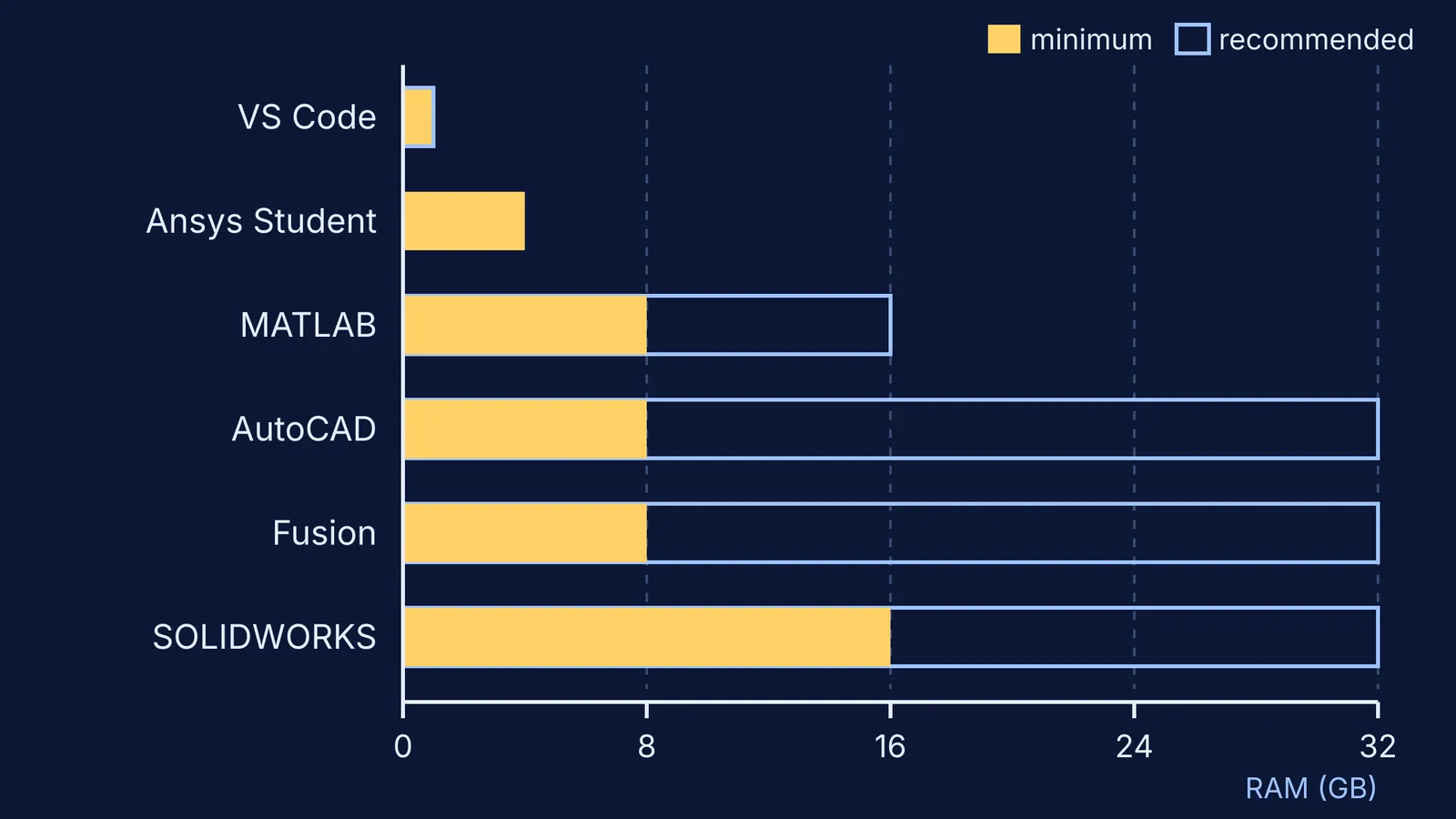
Coding: Visual Studio Code recommends just 1 GB of RAM and a 1.6 GHz or faster processor, so programming courses run on almost any laptop.
MATLAB: the MATLAB R2026b requirements for Windows list 8 GB of RAM as the minimum and 16 GB as recommended, and strongly recommend an SSD.
AutoCAD: AutoCAD 2026 for Windows asks for 8 GB basic and 32 GB recommended, with 10 GB of disk space on a suggested SSD.
Fusion: Autodesk Fusion lists 8 GB minimum and 32 GB or more recommended on Windows, and recommends 15 GB or more on a solid state disk.
SOLIDWORKS: an authorised Indian SOLIDWORKS reseller's summary of the 2026 requirements lists 16 GB or more for CAD with 32 GB recommended, and 32 GB or more for Simulation.
The pattern is clear. Around 16 GB of RAM is a sensible floor for any branch that touches CAD or simulation, while 8 GB is enough for programming-heavy courses. If the RAM is soldered to the board, buy now the amount you will need in third year.
Is a MacBook good for engineering students?
It depends on the branch. AutoCAD and Fusion publish Mac requirements on the pages above, MathWorks has a separate Mac page for MATLAB, and VS Code runs on macOS too. Two common engineering tools do not:
SOLIDWORKS 2026 lists only Windows 11 64-bit as its supported system, according to the reseller's summary.
Ansys Student is free for verified students but supports only Windows 10 and 11, 64-bit, and caps structural problems at 128K nodes or elements.
A mechanical, civil or aerospace student who expects SOLIDWORKS or Ansys should lean towards Windows. Computer science and electronics students have a freer choice. Ask a senior which software the labs use; you may not need everything on your own machine.
How long should a laptop battery last for college?
Treat the battery figure on the box with care, because your real run time depends on what you do. You can estimate it yourself. Battery capacity is printed in watt-hours (Wh), and run time is roughly capacity divided by the power the laptop draws.
Worked example, with illustrative figures: a 50 Wh battery powering a laptop that draws 8 W while you take notes lasts about 50 / 8, or roughly 6 hours. The same battery at 25 W while you rotate a CAD model lasts about 2 hours. So do heavy CAD work plugged in, and judge battery life by reviews that test real use. A laptop working hard also gets hot; our explainer on why laptops need cooling fans shows where that heat comes from.
A three-step plan before you pay
Check your branch's syllabus, or ask a senior, which software is used and in which semester.
Match it to a tier. Programming-focused branches: 8 GB and any operating system, since VS Code recommends only 1 GB. MATLAB or light CAD: at least 16 GB and an SSD, the MATLAB recommended spec. SOLIDWORKS or Ansys Student: Windows and 16 GB, or 32 GB if the budget allows.
Spend what you save on a warranty with a service centre in your college city and a padded sleeve.
If your engineering drawing course uses drafting software, check whether the college lab provides it first.
First-year physics and maths are full of ideas that are easier to see than to read. The Fermi Simulation Lab has interactive simulations for them, so your new laptop helps with understanding as well as assignments.