On this page
Your laptop gets warm because of a fundamental rule of physics: electrical resistance creates heat. While desktop computers have large cases for air to circulate, laptops pack high-performance chips into a space just a few millimetres thick.
Without a cooling system, the heat trapped inside would quickly damage the hardware. Here is the science of why your computer heats up and the physics of how it cools down.
Why do processors generate heat?
At the heart of your laptop is the central processing unit (CPU). This chip contains microscopic transistors that act as switches, turning on and off to perform calculations.
As electricity flows through the semiconducting material and tiny traces in the CPU, it encounters electrical resistance. Electrons collide with the atomic lattice of the silicon, transferring kinetic energy. This causes the atoms to vibrate more vigorously, which we feel as heat. According to Joule's First Law (P = I²R), this resistance converts electrical energy into thermal energy. Joule heating has a coefficient of performance of 1.0, meaning that every 1 joule of electrical energy consumed by a processor produces exactly 1 joule of heat (Wikipedia).
Modern chips use an enormous amount of power to run complex applications. The Intel Core i9-13900HX processor, for example, can draw a maximum turbo power of 157 watts (Intel ARK). This means it generates 157 joules of heat every second in a space smaller than a postage stamp.
How does a laptop cooling system work?
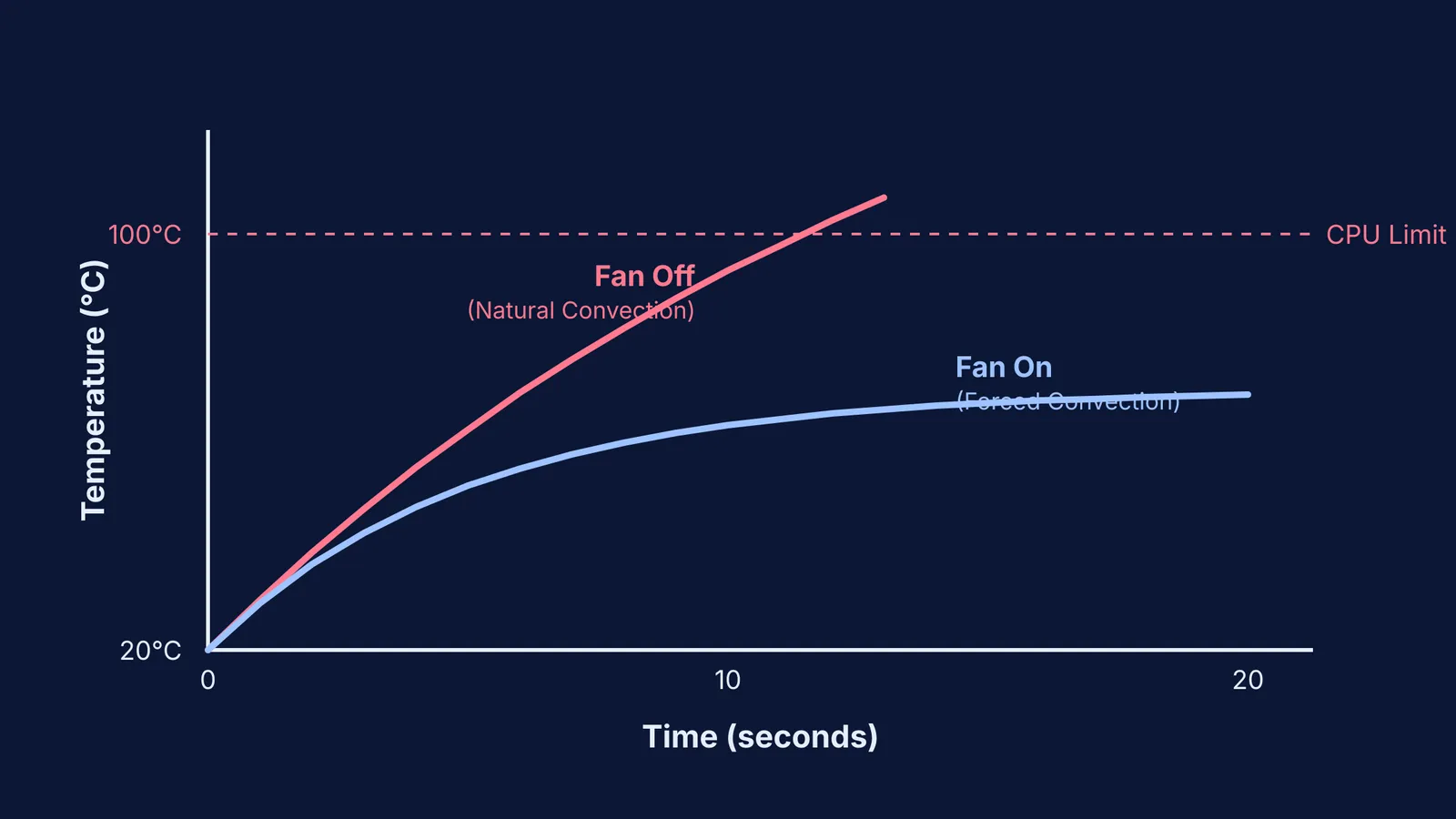
Without cooling, the silicon would quickly reach its maximum junction temperature of 100°C, forcing the chip to slow down to prevent damage (Intel ARK). To avoid this, laptops use a chain of heat transfer methods.
First, heat moves away from the chip through conduction. A copper plate sits directly on the processor, transferring thermal energy into copper heat pipes. These pipes are highly efficient conductors that pull heat away from the delicate electronics. Inside the sealed heat pipes, a tiny amount of liquid absorbs the heat and turns into a vapour. This vapour travels to the cooler end of the pipe, where it condenses back into a liquid, releasing its thermal energy. Capillary action then pulls the liquid back to the hot end to repeat the cycle. You can see this conduction principle in action when you notice why metal feels colder than wood at the same temperature—metal is excellent at moving heat.
Next, the heat pipes carry the energy to a heat sink, which is a stack of thin metal fins. These fins spread the heat over a much larger surface area, preparing it to be expelled.
Why do laptops need forced convection?
In a desktop computer, natural convection allows hot air to rise slowly and escape out of the top. A laptop case is too cramped for this. If the hot air is not removed, it forms an insulating blanket around the metal fins, trapping the heat and stopping the cooling process.
This is where the cooling fan comes in. The fan creates forced convection by pulling in cool air from outside and blowing it rapidly across the metal fins. The fast-moving air wicks the heat away and pushes it out through the exhaust vents on the side or back of the machine. The human body uses a similar principle to cool down when we are too hot, which is why we sweat when we exercise.
If you struggle to picture how heat spreads or how current creates heat in a circuit, the Fermi Simulation Lab provides interactive simulations for ideas that are easier to see than read. You can watch temperature gradients shift and experiment with variables directly.
How can you keep your laptop cool?
Because your laptop relies entirely on forced convection, blocking the airflow defeats the cooling system. Follow these three rules to keep the hardware safe and fast:
Use a hard surface: Beds, pillows and your lap block the intake vents on the bottom of the machine, choking the fan.
Keep vents clear: Do not push the exhaust vents flush against a wall or a stack of books, as the hot air will bounce back into the computer.
Clean the dust: Dust acts as an insulator on the metal fins. If your fan sounds loud but the air coming out is weak, the fins likely need cleaning.
A fan can only cool a laptop down to the temperature of the room. By understanding how the physics of your cooling system works, you can ensure your computer runs at peak performance for years.