On this page
If you took PCM or PCB and still fill your notebook margins with drawings, you do not have to pick one world. Animation and visual effects (VFX) are built on the maths and physics you already study. Here is which skills carry over, what software to learn, and a 12-week plan for a first portfolio.
Can a science student get into animation and VFX?
Yes. What you can show in a portfolio matters, and a science background helps most on the technical side. The AVGC Promotion Task Force, set up in 2022, projected around 20 lakh direct and indirect jobs in animation, visual effects, gaming and comics over the following ten years, according to a Press Information Bureau backgrounder on the AVGC-XR sector. The same backgrounder says the first campus of the Indian Institute of Creative Technologies (IICT), the national centre of excellence for the sector, opened at the NFDC Complex in Mumbai on 18 July 2025.
Artist roles (modelling, animation, lighting, compositing) reward an eye for form and timing. Technical roles (FX or simulation artist, rigger, pipeline developer) reward what science students practise daily: equations, logic and code.
For related routes, see our guides to careers for students who love physics, career options for students who are good at coding and BDes design career paths.
Which physics and maths skills carry over?
More than most people expect. Pixar in a Box, a free curriculum made by Khan Academy and Pixar Animation Studios, shows that the grass in Brave was made with parabolic arcs, that animators bring characters to life with animation curves, and that sets are built with geometric transformations.
Here is where your syllabus shows up:
Kinematics and gravity: every jump, throw and fall has to feel right.
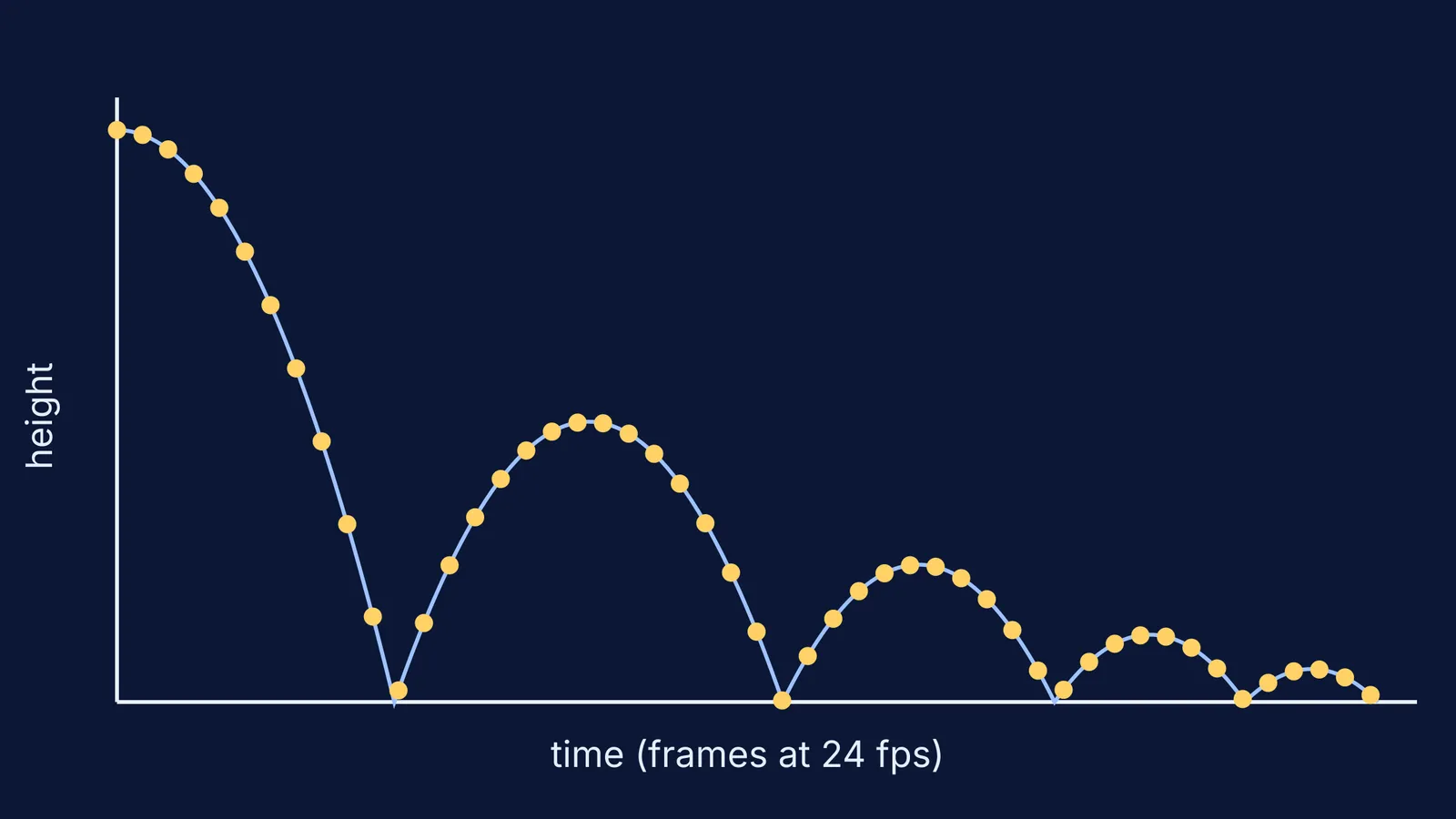
Collisions: a bouncing object loses energy at each impact, so each peak is lower than the last.
Vectors and coordinate geometry: moving, rotating and scaling objects in 3D is transformation maths.
Graphs: an animation curve is a position-time graph that you edit by hand.
Programming: many 3D tools can be scripted; Blender, for example, has a Python API.
If vectors or projectile motion still feel shaky, the Fermi Concept Library has a lesson for each concept, so you can fix the gap first.
Worked example: the bouncing ball
The bouncing ball is a common beginner exercise in animation, and it is also a Class 11 physics problem. Drop a ball from 1 m. With g = 9.8 m/s², it lands after t = √(2h/g), about 0.45 s. If you animate at 24 frames per second, that fall takes about 11 frames.
Now give the ball a coefficient of restitution of 0.7. The rebound speed is 0.7 times the impact speed, so each peak is 0.7² = 0.49 of the one before: 0.49 m, then about 0.24 m. Near the top of each arc the ball barely moves between frames; near the ground it moves a lot. That uneven spacing makes the ball look heavy, and it is just v = u + at. The diagram at the top plots exactly these numbers.
If this motion is hard to picture, explore the interactive simulations in the Fermi Simulation Lab, then copy what you see into your keyframes.
What software should you learn first?
Start free, and learn one tool well.
Blender is free and open-source software released under the GNU General Public License, so you may use it for any purpose. Its feature list covers modelling, animation and rigging, rendering, simulation built on the Bullet and MantaFlow libraries, motion tracking and compositing, plus a Python API that can script every tool.
Houdini Apprentice from SideFX is a free version of Houdini FX for personal, non-commercial projects. Renders are capped at 1920×1080 and most output formats are watermarked.
Blender is enough for a beginner portfolio; add Houdini later if simulation is what you enjoy most.
How do you build an animation portfolio from scratch?
Aim for a short showreel of your best pieces, plus a breakdown of how you made each. Here is a 12-week plan at about six hours a week:
Weeks 1-2: learn Blender's interface; model, light and render one simple object.
Weeks 3-4: animate the bouncing ball from the worked example, then a heavy ball and a light ball side by side.
Weeks 5-6: animate a pendulum or a ball rolling down a ramp, and check the timing against your own calculation.
Weeks 7-8: run a rigid-body or smoke simulation, changing one setting at a time.
Weeks 9-10: write a small Python script that automates a repeated task.
Weeks 11-12: cut your best three or four pieces into a short reel, with a one-page breakdown for each.
The breakdown is where you stand out: show the equation, the setting you tuned, and the before and after.
This week, open Blender and make one ball bounce. The physics is already in your notebook.