
On this page
Your child may already juggle logins for a school portal, email, games and an exam practice site. The old advice, a short word with a capital, a number and a symbol bolted on, is out of date. Official guidance now favours long passphrases, a different one for every account, kept in a password manager.
What makes a password strong for a child?
The US standards body NIST says a password used on its own should be at least 15 characters long, and that websites should not force mixes of character types on users (NIST SP 800-63B, Revision 4). NIST also tells sites to check new passwords against a list of commonly used, expected or leaked ones. A password like "Virat@18", a famous cricketer's name and shirt number, is the kind of expected choice that list is meant to catch.
The US cybersecurity agency CISA recommends passwords of at least 16 characters, built from a memorable phrase of 4 to 7 unrelated words, with a different one for every account (CISA).
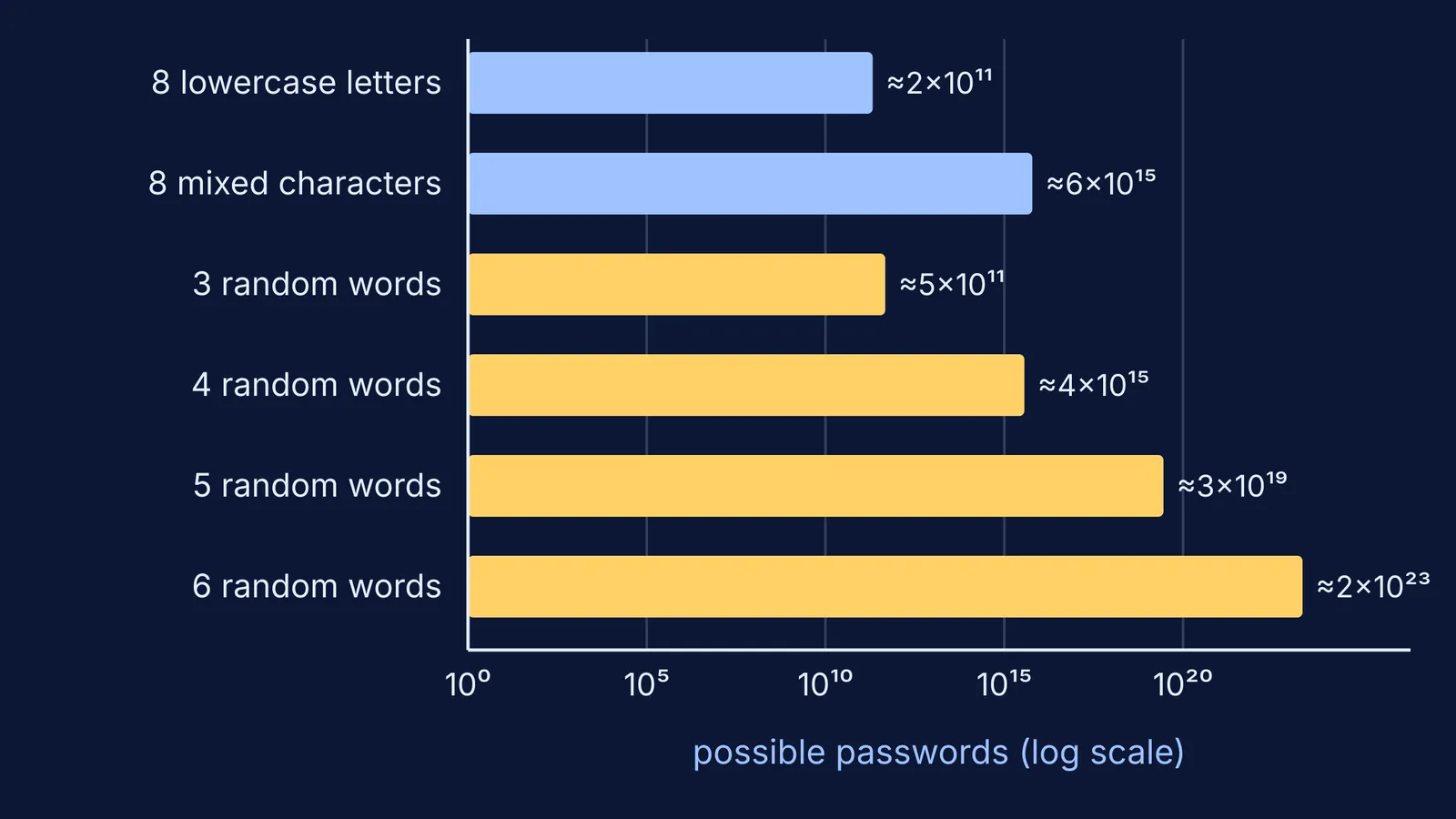
The EFF long dice word list has 7,776 words, one for every result of rolling five dice, since 6⁵ = 7,776 (EFF long word list). Each randomly chosen word multiplies the number of possible passphrases by 7,776:
4 random words: 7,776⁴, about 3.7 × 10¹⁵ possibilities, close to the 6.1 × 10¹⁵ of a fully random 8-character password using all 94 keyboard characters.
6 random words: 7,776⁶, about 2.2 × 10²³ possibilities, about 36 million times as many as that 8-character password.
The difference is that a 12-year-old can remember "violin mango kite ladder river". Nobody remembers "k#9Tq!2z". If your child enjoys this kind of counting, exponents and powers have their own lessons in the Fermi Concept Library.
The catch is the word random. A favourite cricketer, a pet, a birthday or the school's name are the first things a friend would guess.
How do you make a passphrase with your child?
Use five dice and a printed dice word list, or open a dictionary at random and point without looking.
Pick five words for everyday accounts and six for email or the password manager itself.
Keep the words you get, even boring ones. Hand-picked words are easier to guess.
Join them, with spaces if the site allows. CISA notes that you can use spaces between words (CISA).
Ask your child to picture a silly scene that links the words, then recall it the next morning.
A worked example: Meera, 12, rolls "violin", "mango", "kite", "ladder" and "river". With spaces, that gives a 30-character passphrase, which she remembers as a violinist eating a mango while flying a kite from a ladder over a river. (It is published now, so don't use it.)
Why shouldn't kids share passwords with friends?
Password sharing among teens is common. In a 2011 US survey, 30% of online teens said they had shared a password with a friend, boyfriend or girlfriend, and the figure was 36% among 14 to 17 year olds, against 17% of younger teens (Pew Research Center). The data is old and American, but sharing still feels like trust. Friendships change, and a shared password keeps working after they do. An ex-friend can post as your child, read private chats or lock them out, and a reused password opens several accounts at once.
A script your child can use:
"I'll send you the notes, but my password stays with me. It's a family rule, not about you."
How does a family password manager work?
A password manager remembers every password so your child only has to remember one strong passphrase, the one that opens the manager (CISA).
Both major phone platforms can share chosen passwords:
Apple's Passwords app lets you share passwords and passkeys with a group of contacts, on iOS 17, iPadOS 17, macOS 14 or later (Apple Support).
Google Password Manager lets you share a password only with members of your Google family group, and the shared password is saved in their account for autofill (Google Help).
Share household logins such as Wi-Fi, the streaming app and the parent login for the school portal. Leave a teenager's own accounts in their own vault. Teens can read our guide to choosing a password manager as a student.
What should your family do this weekend?
Each person makes one six-word passphrase for their password manager.
Change any password that is a name, a birthday or "123".
Give email accounts a passphrase first, because whoever controls your email can often reset the passwords of your other accounts.
Move shared household logins into a family group.
Agree on the house rule: passwords are never shared with friends.
If an account is misused, report it on the national portal, cybercrime.gov.in. If money is lost, also call the national cybercrime helpline 1930, which is available 24 hours a day (Kerala Police notice).
Next, read how to teach your child about scams and OTPs, or use our cyber safety talk for a ten-year-old with younger children.