On this page
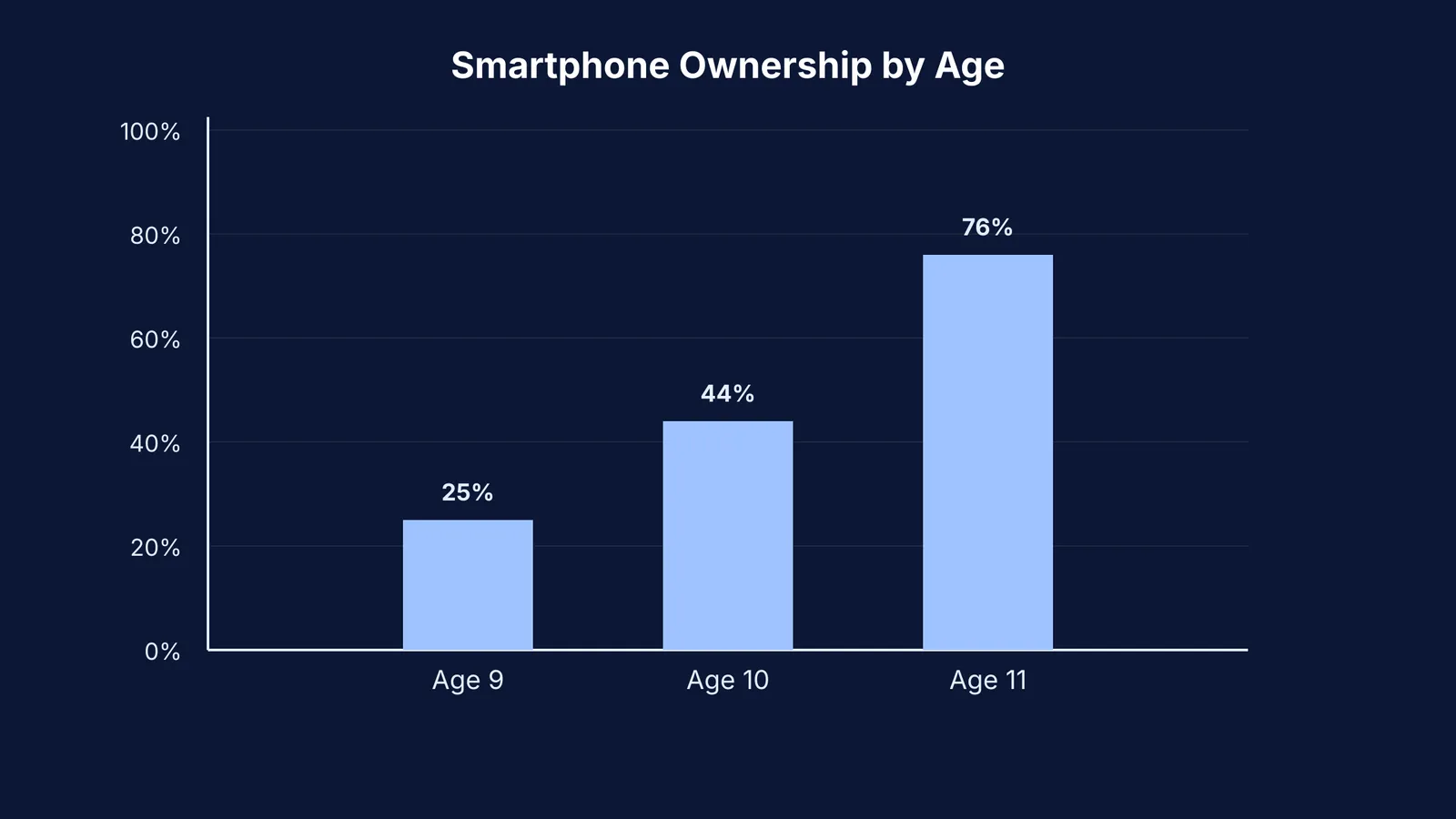
In its 2024 report on children and parents, Ofcom found that 44% of 10-year-olds own a smartphone. This is a big jump from the 25% ownership seen at age nine. By age 11, that number jumps to 76%. Before you hand over that device, you need a clear plan.
A talk about online safety should feel like a team meeting, not a lecture. Here is how to guide a 10-year-old through the big three rules: passwords, strangers, and asking for help.
How should you start the conversation?
A talk about online safety will only work if your child feels respected. If you sit them down and list a series of strict warnings, they are likely to tune out. Instead, approach it as a milestone of independence.
You can say, "Since you are old enough for this device, you are going to see more things and talk to more people. I want you to have that freedom, but we need to make sure you know how to handle the adult parts of the internet." This makes them feel mature and responsible, rather than restricted.
Why is age 10 the right time for this conversation?
The jump in device ownership means children have more unmonitored access to the internet. The same Ofcom report shows that 51% of children under the age of 13 use social media. This happens despite most platforms setting their minimum age at 13.
When children bypass these limits, they lose the privacy protections built for younger users. This is a good time to review Privacy in learning apps: what parents should check in India and ensure apps are used with their real age, so platforms apply the correct safety filters.
How do you explain passwords and privacy?
At 10 years old, a child understands the concept of keeping a secret, but they might not realise that sharing a password with a best friend is risky.
Give them a concrete rule: passwords are like house keys. You only give a house key to the people who live with you. Tell them, "You can share your password with me, but never with a friend, even if they promise not to tell." This protects their accounts from being misused if a friendship goes wrong.
You should also explain why platforms ask for strong passwords. Show them how to create a passphrase using three random words, rather than using their pet's name or birth year. Setting up their first secure password together is a practical way to teach digital hygiene.
What should they do about strangers online?
The word "stranger" can be confusing in online games where players are just avatars. A 10-year-old might think of a stranger as someone scary in a dark alley, not a friendly character offering them free items in a game.
Change the language from "strangers" to "people we do not know in real life." Give them a script. Say, "If someone you do not know from school or family asks for your real name, where you live, or wants to move to a private chat, tell them no, block them, and tell me."
Explain that online friends are not the same as real-life friends, no matter how much time they spend playing together. A good rule of thumb is that if they have not met a person face-to-face, they should never share personal information.
In many popular games, trading virtual items is a core mechanic. A common scam involves a player asking your child to share their login details in exchange for rare items. Remind them that if an offer seems too good to be true, it is likely a trick to steal their account.
For parents looking to create productive, closed environments for screen time, Fermi's AI tutor can work out what your child already knows and build a plan for the session, so they sit down to a clear next step instead of searching the open web. You can read more about setting up these sessions in Trying an AI tutor with your child: a 20-minute parent's guide.
How do you handle worrying content and asking for help?
The internet is unpredictable. An Ofcom report found that 32% of children aged 8 to 17 saw something "worrying or nasty" online in the last year. However, only 20% of those incidents were reported to the platforms. While many tell an adult, other children stay silent because they fear their device will be taken away.
You have to remove that fear. Tell your child, "You might see a video or a message that is scary, mean, or just feels wrong. If that happens, you are not in trouble. Close the app and come tell me. I will not take your phone away; we will just block the bad stuff together."
It is also helpful to show them exactly how to use the blocking and reporting tools on their favourite apps. Have them guide you through the process on their device. When they know where the 'block' button is, they feel more in control of their digital environment.
A strong foundation in digital safety built at age ten will serve them well as they move into their teenage years, when peer pressure and online time increase significantly. For more on setting boundaries, read Phones and homework: family rules that research supports.