
On this page
Every cookie banner that asks you to “Accept all” is asking permission to store data in your browser. Here is what you are agreeing to, and a quick way to decide.
What is a cookie on a website?
A cookie is a small piece of data a website's server sends to your browser, according to MDN Web Docs. Your browser stores it and sends it back to that site with later requests, which is how a site “remembers” you between pages and visits.
Cookies are deliberately small. The web's cookie standard, RFC 6265, asks browsers to support at least 4096 bytes per cookie and at least 50 cookies per domain. That is room for a short ID or a few settings, not your photos or files.
What do cookies actually store?
MDN lists three main purposes for cookies:
Session management: whether you are signed in, what is in your cart, your game score.
Personalisation: preferences such as display language and theme.
Tracking: recording and analysing how you behave.
A sign-in cookie typically holds only a random-looking session ID, and the site keeps what it knows about you on its own servers, linked to that ID. Session cookies are deleted when the browsing session ends, though session restore can keep them; persistent cookies stay until a date or time period the site sets. A cookie marked `Secure` travels only over encrypted HTTPS, and one marked `HttpOnly` cannot be read by the page's JavaScript, MDN explains.
What is the difference between first-party and third-party cookies?
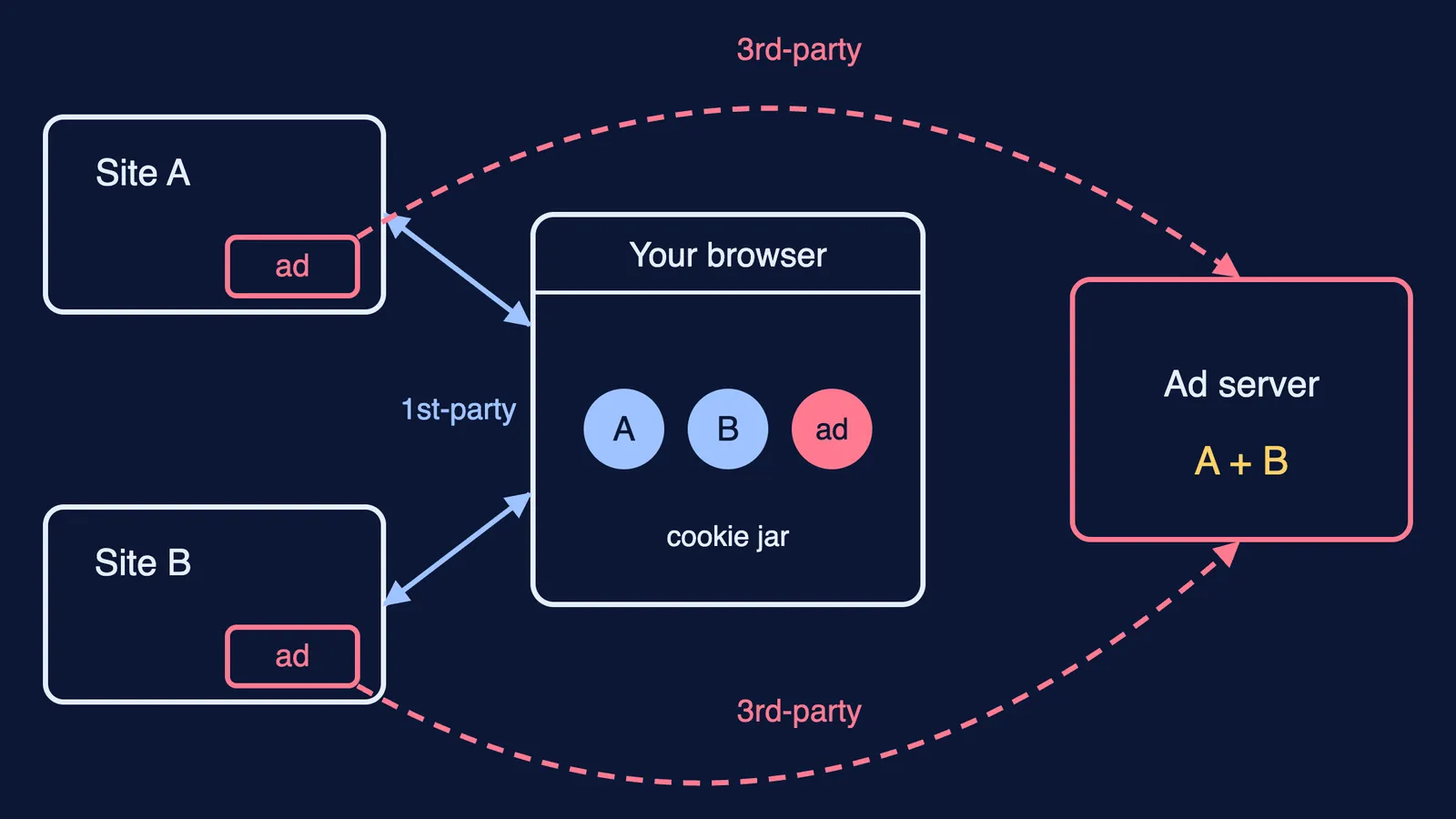
MDN's guide to third-party cookies defines it by the address bar. A first-party cookie comes from the site you are looking at. A third-party cookie comes from a different domain, usually something embedded in the page, such as an ad or an analytics script.
Third-party cookies are the ones that follow you. MDN explains that a third-party server embedded on many sites can combine its cookies into a detailed profile of your browsing history, interests and habits.
Worked example. You read a JEE physics blog (Site A) that shows an ad from an ad network. The ad network sets a cookie with the ID 7f3. Later you open a shopping site (Site B) that shows ads from the same network, and when your browser loads that ad it sends the same 7f3 back to the network. The network now knows one browser visited both sites, and can show you related ads while you shop. The blog's own first-party cookie, which only remembers your dark-mode setting, is sent only to the blog.
Browsers differ. According to MDN, Firefox and Safari switch on protections against third-party tracking by default, while Chrome does not block third-party cookies by default unless you use Incognito or change the setting.
What should you click on a cookie banner?
Banners group cookies into categories. Decide in this order:
Strictly necessary: leave on. Sign-in, security and your cart depend on them, and banners usually lock them on.
Functional or preferences: your call. They remember language or layout.
Analytics or performance: fine to reject. The site should still work.
Advertising, marketing or targeting: reject. These often include the third-party trackers.
A quick routine:
Look for “Reject all” or “Necessary only”. If it is there, press it.
If you see only “Accept all” and “Manage”, open Manage.
Turn off everything except strictly necessary, then press “Confirm choices” or “Save”, not “Accept all”.
On a shared family phone, sign out of portals when you finish.
The same read-before-you-allow habit helps when you check the permissions an AI homework extension asks for and when you stay safe on public wifi.
What does India's data law say about consent?
India's Digital Personal Data Protection Rules were notified on 14 November 2025, according to the Press Information Bureau. The PIB summary says consent must be clear, informed and easy to understand, that you may withdraw it at any time, and that organisations must give a separate consent notice explaining the specific purpose for collecting personal data. For a child's data, verifiable consent from a parent or guardian is required, except for essential services such as healthcare, education or real-time safety. The Rules give organisations an eighteen-month period for phased compliance.
The summary speaks of personal data, not cookies by name, but it gives you a fair yardstick: a banner where rejecting takes many clicks and accepting takes one is hard to call clear and easy to understand.
If the way browsers and servers talk makes you curious, the Fermi Concept Library covers computing alongside physics, chemistry, biology and mathematics, each concept with its own lesson. For sign-in safety next, read how students should manage passwords for exam portals.