
On this page
A homework helper extension lives inside your browser, not on one website. If you clicked "Add extension" without reading the pop-up, it may be able to read every page you open, including your school email and your bank. Here is what the warnings mean, what can go wrong, and a quick check to do with a parent.
What does "read and change all your data on all websites" mean?
It is Chrome's warning for an extension that asks to run on every site you visit. Chrome's permissions reference lists the exact text: "Read and change all your data on all websites."
The extension's code can run inside every page you open, read what is on screen and what you type, and change what the page shows. That is how an AI helper adds a "Solve" button to a quiz page, and how it could read a login page.
Other warnings from that list to watch for:
"Read your browsing history" for the tabs permission.
"Read data you copy and paste" for clipboard access.
"Manage your apps, extensions, and themes" for an extension that can control other extensions.
Why can a homework helper extension see your logins?
Because your logged-in pages are just more websites, and an extension allowed on all sites runs there too. A 2025 audit of ten popular generative AI browser assistants by researchers at UC Davis, UCL and other universities found that, when in use, they collect and share webpage content, "often the full HTML DOM and sometimes even the user's form inputs, with their first-party servers". The HTML DOM is the page's full structure and text. According to UCL's summary of the study, one assistant, Merlin, captured "form inputs such as online banking details or health data."
The second risk is that a safe extension can change. In December 2024, attackers took over Cyberhaven's Chrome Web Store account and pushed a malicious update to its extension, which TechCrunch reported could send "authenticated sessions and cookies" to the attackers. Stolen session cookies can get around passwords and two-step codes, the same report explains.
Updates are also where you get a say. Chrome's developer documentation on permission warnings says that when an update asks for new permissions that carry a warning, the extension is disabled until you accept them.
Two-step verification is still worth turning on (see our guide on how to turn on two-step verification for your study accounts), but it cannot protect a session an extension has already copied.
Are AI homework browser extensions safe to install?
Some are, if their access matches their job. A helper that only works when you click it does not need every site. Chrome offers developers an activeTab permission that gives access only to the current tab after you click the extension, and it shows no warning at install.
Before you click "Add", run this check:
Read the pop-up. If it says "all your data on all websites", ask why a homework tool needs your bank's website.
Check who made it: a named company with a privacy policy that says what it sends and keeps.
Look for extra powers: history, copy-and-paste, or managing other extensions.
Ask if a normal website would do. A website in its own tab sees only what you paste into it.
Never install a "free premium" version shared in a group chat. The same logic applies to apps, as in our post on installing APK files from study groups.
How do you review or remove a Chrome extension?
Chrome Help gives these steps:
Open the three-dot More menu, then Extensions, then Manage extensions.
Select Details on an extension to see its permissions.
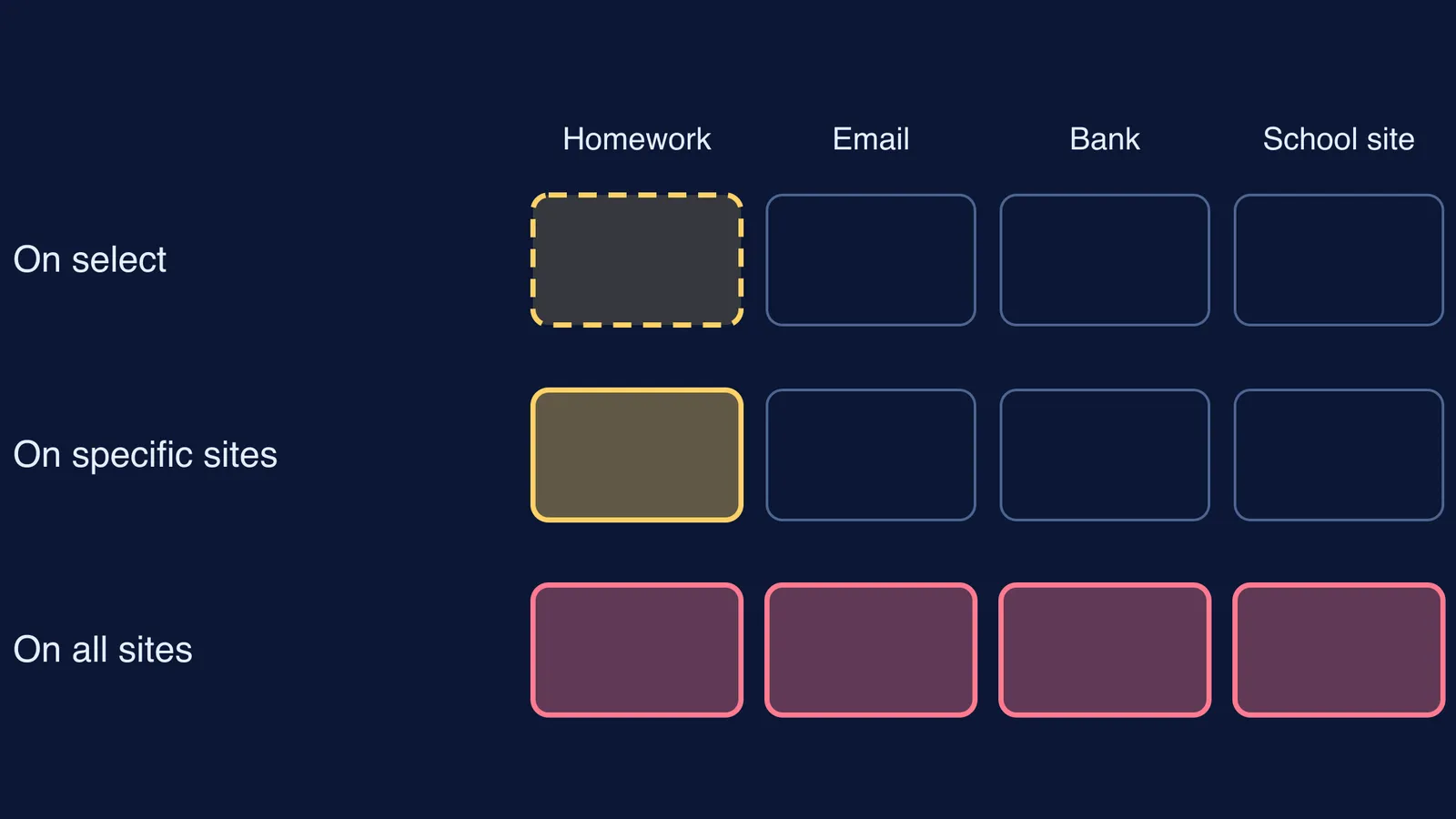
Next to "Allow this extension to read and change all your data on websites you visit", choose On select, On specific sites or On all sites.
To delete it, select Remove and confirm.
On select is the narrowest of the three. The same Help page says the matching "When you select the extension" setting lets it access only the current site in the open tab, and only when you select it.
How can a family check extensions together?
Sit together, open Manage extensions, and for each one the student answers: what is it for, when did I last use it, and does it need all sites? Remove anything unused for a month. Move the rest to On select. A parent can say: "I'm not checking your homework. I'm checking what can see our bank tab."
If money or an account was taken, our guide to reporting cybercrime in India walks through the official steps.
What to use instead of an answer extension
A pasted answer teaches you least. If you are stuck on a method, work it through in a separate tab: the Fermi Problem Library has worked problems with a step-by-step solver that explains the reasoning rather than printing an answer. Nothing has to read your other tabs for that.