
On this page
Your teen revises at a cafe after school, or opens a laptop in the coaching centre lobby while waiting for the next class. The free wifi is right there. Most of the time it is fine, but one habit (typing a password into whatever page pops up) is how accounts get stolen. Here is what to teach.
Is public wifi safe for teenagers?
Mostly, yes, for ordinary browsing. The US Federal Trade Commission says that because most websites now use encryption, connecting through a public wifi network is usually safe. You can check a site is encrypted by looking for the lock symbol and "https://" in the address bar.
The catch is in the same FTC guidance: encryption protects data on its way to a site, but if you are on a scammer's website, your data is not safe from the people running it. The US cyber agency CISA adds that many public access points are not secured and the traffic they carry is not encrypted. So the risk is less "someone reads your WhatsApp" and more "you hand your password to a fake page".
What is a fake wifi network?
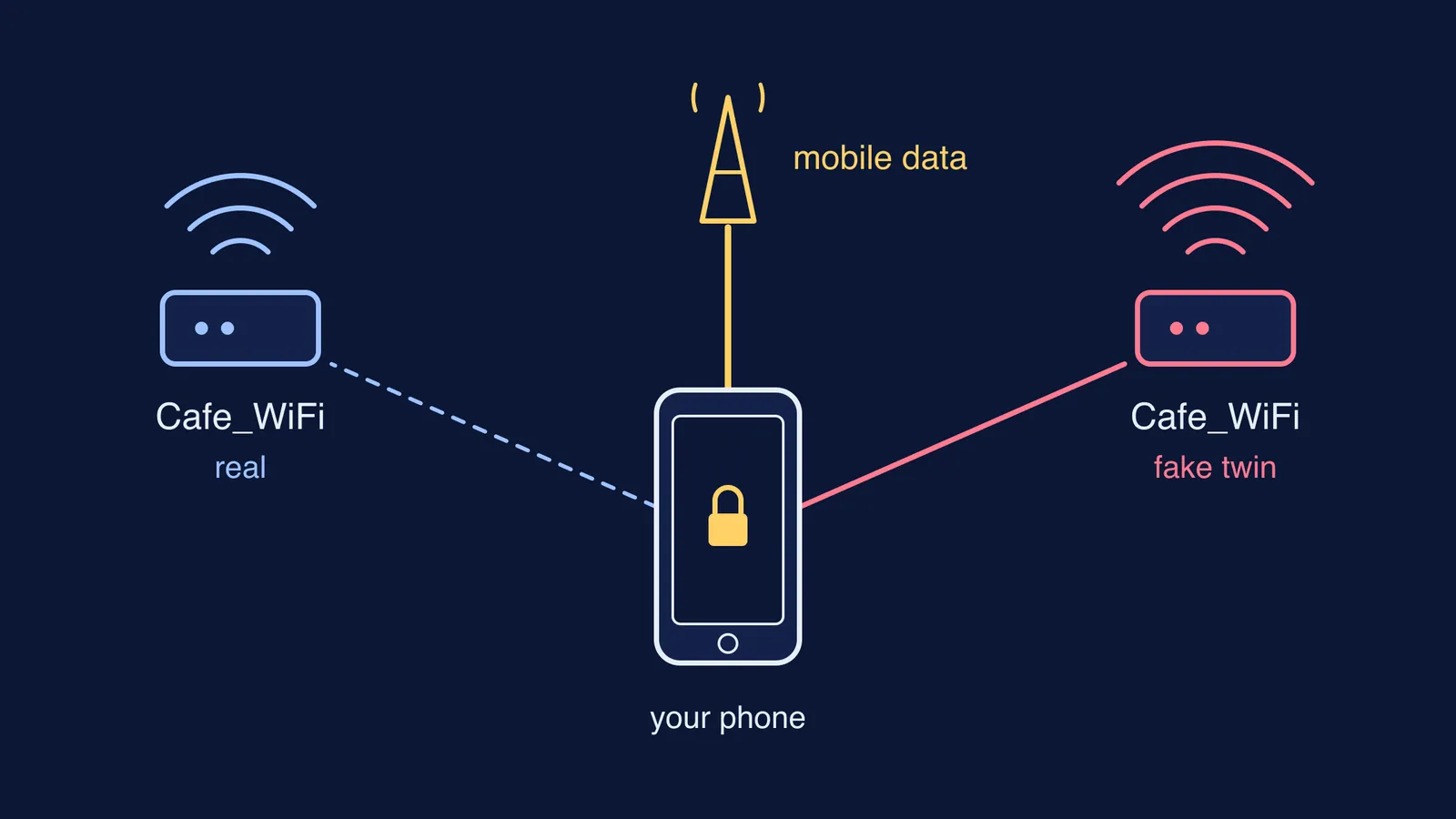
An evil twin is a fake hotspot that copies the name of a real one. CISA describes it this way: an attacker gathers information about a public access point, then sets up their own system to impersonate it, often with a stronger signal so devices pick it.
This is not a theory. In 2024 the Australian Federal Police charged a man over fake free wifi networks at airports in Perth, Melbourne and Adelaide and on domestic flights. According to the AFP's sentencing release, his device listened for phones looking for networks they had joined before, instantly created a network with the same name, and showed a page asking people to log in with an email or social media account. The logins were saved to his device. In November 2025, after pleading guilty to 15 offences, he was sentenced to seven years and four months in prison.
The AFP's advice from that case is the single most useful line for any family: "To connect to a free WiFi network, you shouldn't have to enter any personal details."
What rules should a teen follow on cafe and coaching centre wifi?
Five rules cover nearly everything. Papua New Guinea's National Cyber Security Centre, for one, advises people to consider using mobile data or a phone hotspot instead.
Logins go on mobile data. Email, bank or UPI apps, the school portal, test-series accounts: switch wifi off first. Reading notes or watching a lecture on public wifi is fine.
Ask for the exact network name. Check it with the counter or the front desk. CISA's advice is to confirm the name and password of a public hotspot before using it. Two networks with near-identical names is a reason to use neither.
Never type an account password into a wifi page. A real cafe sign-in page might ask you to accept terms. It should not want your Google or Instagram login.
Turn off file sharing and auto-join. CISA says to allow file sharing only on home or work networks, never on public ones. The AFP suggests turning wifi off before going out, so the phone cannot quietly join a copycat.
Keep two-step verification on and apps updated. The FTC recommends strong passwords with two-factor authentication and automatic updates, which limit the damage if a password does leak.
How do you talk to your teen about it without a lecture?
Teens tune out "the internet is dangerous". They listen to a specific trick. Try this, in your own words:
"Quick one. There was a case in Australia where a guy made fake free wifi at airports with the same names as the real ones. People connected, a page asked them to log in with their email or social media, and he kept the logins. So here's the deal: if any wifi page asks for a password, close it and use your data. And anything with a login, use data anyway. If you ever think you typed something in by mistake, tell me straight away. You won't be in trouble; we just change the password fast."
Then make it easy: agree on a data pack that covers study logins.
What if they already typed a password into a fake page?
Act quickly and calmly.
Change that password from a trusted connection, and anywhere else the same password is used.
Turn on two-step verification if it was off, and sign out of other sessions in the account settings.
If money or a UPI app is involved, call the bank, and report it on India's National Cyber Crime Reporting Portal at cybercrime.gov.in or on the 1930 helpline, run under the Indian Cyber Crime Coordination Centre.
Once the connection question is settled, the study session can get on with studying. If your teen sits down at the cafe unsure where to begin, Fermi's AI tutor works out what they already know and builds a plan for the session, so the hour goes on learning rather than scrolling.