On this page
Type a Hindi word on your phone and send it to a friend in Chennai, and the same letters arrive. Only numbers travelled. Unicode gives every character a number, and UTF-8 turns that number into bytes. Here is how both work, with the bits for one Devanagari letter worked out by hand.
What was ASCII, and why couldn't it write Hindi?
ASCII was the text code used by many early computers. When it was adopted for the network that became the internet, RFC 20, dated October 1969, called for "standard 7-bit ASCII embedded in an 8 bit byte". Seven bits give 2 to the power 7, or 128, different codes. That covers English letters, digits, punctuation and a few control signals, and nothing more.
That left no room for क, த or any other Indian letter. India built its own code, ISCII. The Unicode Standard's chapter on the official scripts of India says its Devanagari block "is based on ISCII-1988". With many national codes, a file made sense only if the reader knew which one wrote it.
How does Unicode give every Hindi letter a number?
Unicode is a single list of characters covering the world's writing systems, and each character in it has a number called a code point, written like U+0915. The Unicode Character Database reserves U+0900 to U+097F for Devanagari, U+0B80 to U+0BFF for Tamil and U+1F600 to U+1F64F for emoticons.
Every code point also has an official name. In the UnicodeData file, U+0915 is DEVANAGARI LETTER KA, U+0BA4 is TAMIL LETTER TA and U+1F600 is GRINNING FACE. The grinning-face emoji is just a character with a bigger number.
Unicode 18.0, released on 16 September 2026, contains 172,808 characters. Code points run from U+0000 to U+10FFFF, the range that RFC 3629 lets UTF-8 encode.
How do you turn क into UTF-8 bytes?
A code point is a number, but files and networks store bytes of 8 bits each. UTF-8 is the rule that turns one into the other. RFC 3629, the UTF-8 standard, writes every character as 1 to 4 bytes, using four templates:
U+0000 to U+007F: 0xxxxxxx (1 byte, exactly as in ASCII)
U+0080 to U+07FF: 110xxxxx 10xxxxxx (2 bytes)
U+0800 to U+FFFF: 1110xxxx 10xxxxxx 10xxxxxx (3 bytes)
U+10000 to U+10FFFF: 11110xxx 10xxxxxx 10xxxxxx 10xxxxxx (4 bytes)
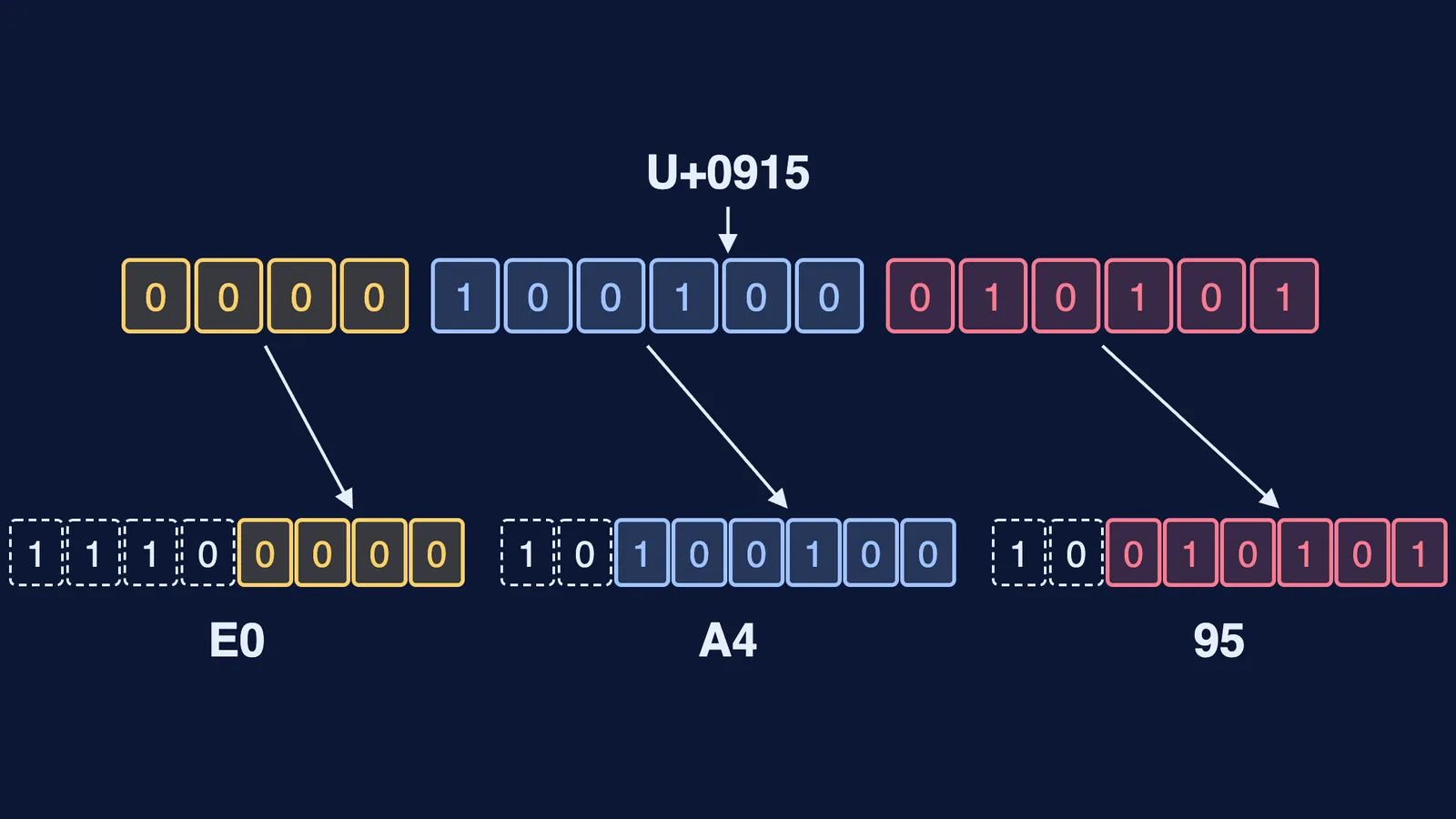
Now encode क (U+0915) by hand:
Pick the template. Hex 0915 falls between 0800 and FFFF, so क needs 3 bytes, which have 16 x slots between them.
Write the number in binary as 16 digits: 0915 becomes 0000 1001 0001 0101.
Split those bits into groups of 4, 6 and 6: 0000, then 100100, then 010101.
Drop each group into its slots: 1110 0000, then 10 100100, then 10 010101.
Read each byte in hex: 11100000 is E0, 10100100 is A4 and 10010101 is 95.
So क is stored as three bytes: E0 A4 95. In Python, "क".encode("utf-8") prints b'\xe0\xa4\x95', the same three bytes.
Tamil த (U+0BA4) works the same way and becomes E0 AE A4. The grinning-face emoji (U+1F600) is above U+FFFF, so it needs the 4-byte template: F0 9F 98 80.
Why does क्ष take nine bytes?
What you see as one letter is not always one character. The Unicode chapter on Devanagari defines a dead consonant as a consonant followed by a virama, and gives क्ष as the sequence 0915, 094D, 0937: KA, then VIRAMA, then SSA. At three bytes each, क्ष is stored as E0 A4 95 E0 A5 8D E0 A4 B7, nine bytes for one shape on screen.
The joined shape is the job of the font and rendering software. The same chapter says conjunct glyphs "are not encoded as Unicode characters because they are the result of ligation of distinct letters." So a Hindi word uses more bytes than its letters suggest, and a weak font may show क् and ष side by side instead of क्ष.
Why does Hindi text sometimes turn into gibberish?
UTF-8 is now the web's default. W3Techs reports that UTF-8 is used by 99.1% of the websites whose character encoding it knows.
Gibberish usually means a program read UTF-8 bytes with an older code that treats every byte as its own character, so each Hindi letter turns into three odd symbols. When that happens:
Check that the file or form is saved as UTF-8, not ANSI or an older Indian-language encoding.
If you see empty boxes or a detached virama, the bytes are fine but the font lacks Devanagari or Tamil shapes; switch fonts.
When a box limits length in bytes rather than letters, Hindi fills it faster: under RFC 3629 each Devanagari character takes three bytes, an English letter one.
The same numbers sit underneath how AI translates between Indian languages, and counting bits works much like calculating password strength. If binary and hex are where you get stuck, the Fermi Concept Library has a lesson for every concept in mathematics and computing, each with its place in the map.
Try it now: encode the Tamil letter த by hand, and check your answer against E0 AE A4.