
On this page
A password checker’s coloured bar is estimating one number: how many guesses it would take to hit your password by trial. You can work that number out yourself with school maths, counting and logarithms. Once you do, the advice to stick a “!” on the end looks much weaker than adding a few more letters.
How do you calculate password strength?
Count the possibilities. If each of L characters is picked at random from an alphabet of N symbols, there are N × N × … × N = N^L possible passwords. Someone trying them all would, on average, find yours about halfway through.
Those counts get huge, so we take a logarithm. Password entropy is log₂ of the number of equally likely possibilities, which for a random password is H = L × log₂N bits. The bit as a measure of information was set out in Claude Shannon’s 1948 paper A Mathematical Theory of Communication. One bit is the answer to one yes-or-no question with two equally likely answers. If you have played the game of guessing a number from 1 to 100 in seven tries, you have already used it: log₂100 is about 6.64, just under 7.
The values of log₂N you need:
lowercase letters only, N = 26: 4.70 bits per character
lowercase and digits, N = 36: 5.17 bits
upper case, lower case and digits, N = 62: 5.95 bits
all 94 printable keyboard characters (26 + 26 + 10 digits + 32 symbols): 6.55 bits
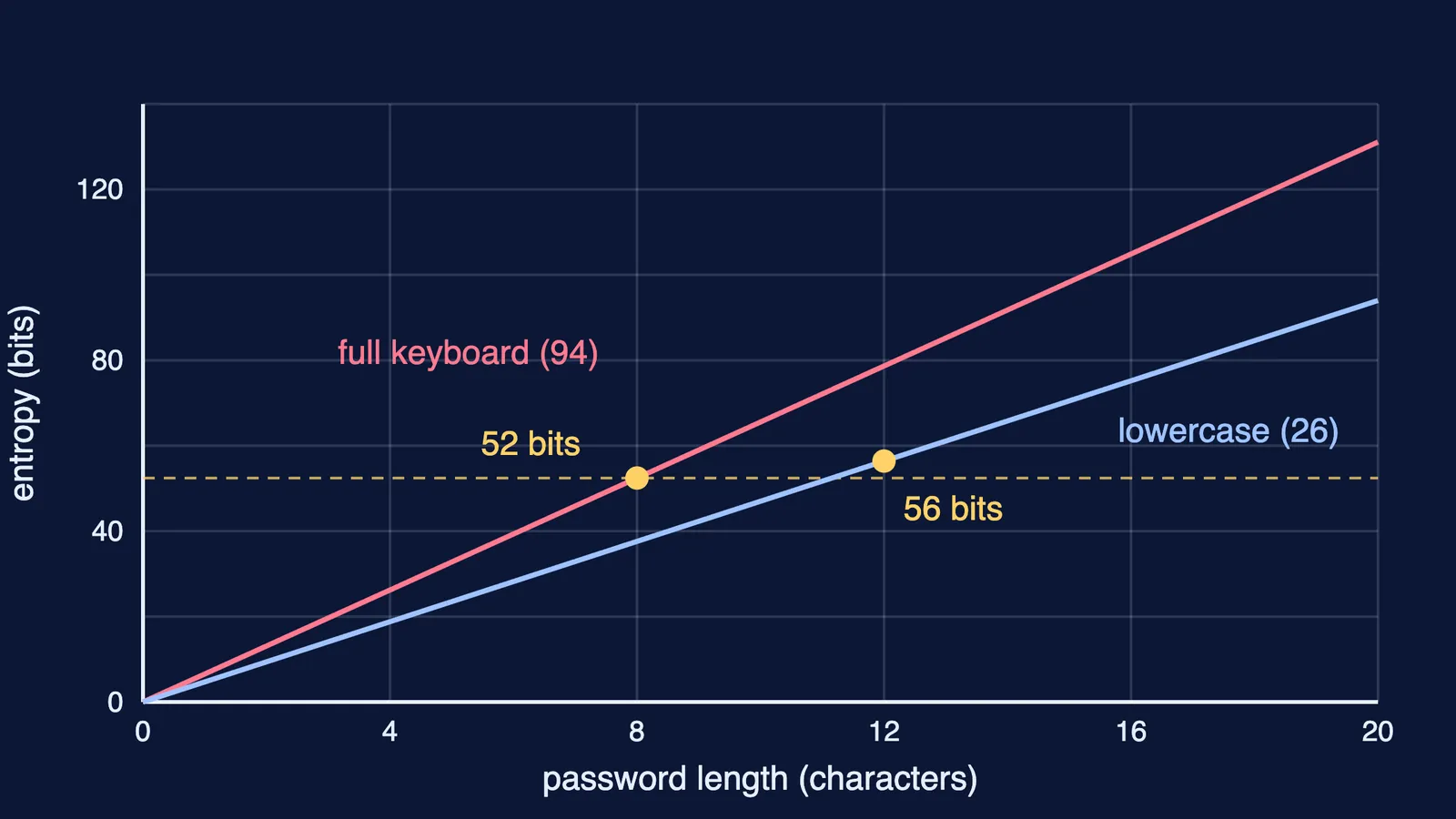
Worked example: 8 characters with symbols, or 12 lowercase letters?
Many sites ask for “8 characters with a symbol”. NIST’s current guidelines, SP 800-63B-4 no longer allow either part of that rule for a password used on its own. Compare two random passwords:
8 characters from all 94: 8 × 6.55 = 52.4 bits, about 6.1 × 10^15 possibilities.
12 lowercase letters: 12 × 4.70 = 56.4 bits, about 9.5 × 10^16 possibilities.
15 lowercase letters: 15 × 4.70 = 70.5 bits.
The plain 12-letter password has about 16 times as many possibilities as the symbol-heavy 8-character one. Going to 15 letters adds another 14 bits, a further factor of more than 16,000.
Why does length beat symbols?
Look at where each choice sits in H = L × log₂N. Length is the multiplier outside: one more character adds a whole log₂N, 4.70 bits even if it is just another lowercase letter. The alphabet sits inside a logarithm, which grows slowly: widening it from 26 to 94 raises log₂N from 4.70 to 6.55, a gain of only 1.85 bits per character. At any guessing speed, bits are what decide the attacker’s time.
NIST, the US standards body, now writes its rules this way. SP 800-63B-4 says a password used on its own must be at least 15 characters, that services should permit at least 64, and that they “SHALL NOT impose other composition rules (e.g., requiring mixtures of different character types) for passwords.”
When does the entropy formula lie?
The formula assumes random choice, and people are not random. The UK’s National Cyber Security Centre explains in the logic behind three random words that “the enforcement of these complexity requirements results in the creation of more predictable passwords.” Its example, Pa55word!, would score 9 × 6.55 = 59 bits by the formula, yet the NCSC calls it “quite guessable”, because attackers know the common words and familiar swaps people use. That is why NIST requires services to check new passwords against a blocklist of “known commonly used, expected, or compromised passwords.”
For passphrases, count words, not letters. The NCSC suggests combining three random words, such as applenemobiro. If an attacker knows you used words from a 10,000-word list, each word adds log₂10,000, about 13.3 bits: three words give 39.9 bits, four give 53.2 and five give 66.4. So for an account that matters, add a fourth or fifth word.
A three-step check for your own password
Ask how it was chosen. If a generator picked it, the formula applies. If you did, assume an attacker tries your pattern first.
Count the bits: L × log₂N for random characters, or words × log₂(list size) for random words.
Set a floor. NIST’s 15-character minimum is a sensible one; never reuse a password across accounts.
A password manager generates random passwords for you; see our guide to managing passwords for exam portals. Parents of younger children can start with teaching kids to make strong passwords that stick.
If log₂ was the step that lost you, the Fermi Concept Library has every concept in mathematics and computing, each with its own lesson, so you can fill that gap first.
Try it now: work out the bits in the password you use most.