
On this page
Usually an AI chatbot that gets something wrong just gives you a wrong formula. Now and then it says something worse: a risky home-experiment shortcut, a cruel remark, or advice about hurting yourself. Here is how to tell the difference, which buttons to press, and when to hand it to an adult.
What counts as a harmful AI answer?
A wrong answer costs you marks; a harmful one could hurt you or someone else.
Google's Gemini policy guidelines spell out what its chatbot should not produce. They include instructions for suicide and other self-harm, including eating disorders; help with activities that might cause real-world harm, such as buying illegal drugs or building weapons; medical information that conflicts with established medical consensus; and incorrect information that puts physical safety at risk.
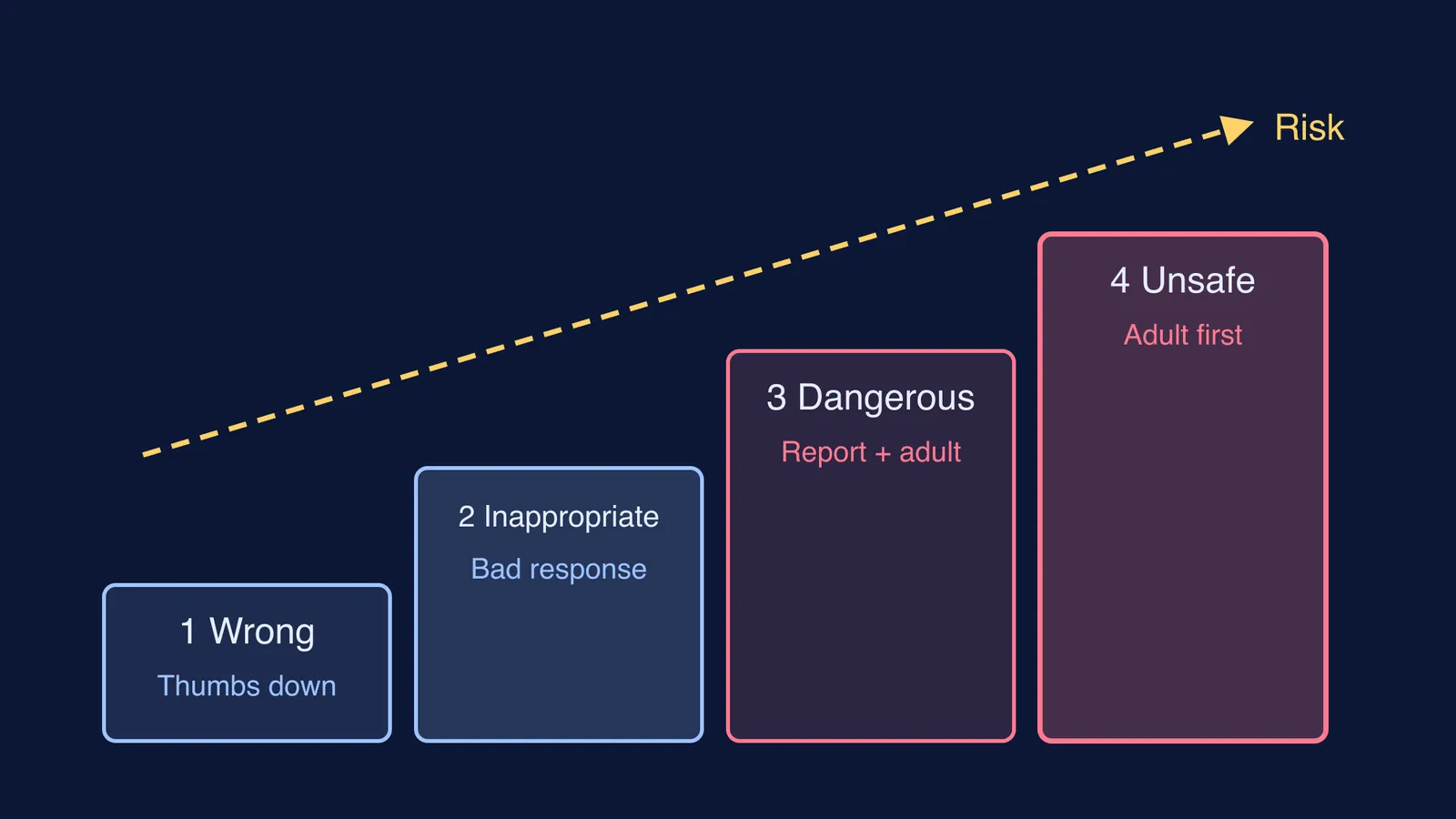
The same page admits Gemini may sometimes break these guidelines, especially with challenging prompts, and Google's help page on Gemini responses warns that it may sometimes produce inaccurate, offensive or inappropriate information. So sort what you see into four levels:
Wrong: a mistaken formula, date or step. Check it against NCERT or your notes.
Inappropriate: a rude, biased, sexual or mocking reply, or a chatbot that keeps steering towards a topic you did not ask about.
Dangerous: anything about hurting yourself or others, weapons, drugs, risky experiments at home, or health advice that contradicts your doctor.
Unsafe for you right now: a reply that frightens you, or a chat that asks for your photos, address or secrets.
How do you use the feedback and report buttons?
Most chatbots put small buttons under each reply. Gemini is a good worked example, using Google's feedback help page:
Bad response sits below each reply. You can pick a reason, add a note, and click Submit.
Report legal issue is under More, below the reply. You choose a reason and follow the on-screen steps.
Send feedback, under Settings and help on gemini.google.com, is for a general problem and lets you attach a screenshot.
Other tools use different names but the same shape; Microsoft's feedback page for Copilot in Microsoft 365 apps describes a thumbs-up and thumbs-down with space to say what went wrong.
Know what you are sending. Google adds your prompts, Gemini's replies and uploaded files to your feedback; Microsoft collects your prompt and the response. Check the chat holds no phone number, address or friend's name first.
Match the button to the level:
Wrong: thumbs-down or Bad response, and type the correct answer with its source.
Inappropriate: Bad response with a reason, then start a fresh chat.
Dangerous: the report option, plus telling an adult.
Unsafe for you: an adult first, the report later, together.
A useful report is short and specific, like this:
What I asked: How do I make my baking soda and vinegar volcano fizz more?
What it said: Seal the bottle tightly so the gas builds up.
Why it is harmful: A sealed bottle filling with gas can burst, which is a physical safety risk for a school student.
When should you tell a teacher or parent?
Tell an adult the same day if the answer was level 3 or 4, if it upset you, or if the chatbot keeps doing it after you report. If your school set up the tool, tell your teacher too: other students use it.
Try this: "I was using a chatbot for my chemistry homework. It said something I think is unsafe. Here is the screenshot, and I have reported it. Can we look at it together?"
Parents: thank your child, read the screenshot together, and do not take the phone away, so telling you feels safe next time. For the everyday version, see what to say when an AI tutor gives your child a wrong answer, and write the reporting rule into a family policy for AI chatbots.
UNESCO's guidance on generative AI in education suggests considering an age limit of 13 for using these tools in the classroom, according to UN News. Younger children should use AI with an adult nearby; see how Class 6 to 8 students can use an AI tutor safely.
If an answer leaves you thinking about hurting yourself, or you are worried about a friend, call Tele MANAS on 14416 or 1800-891-4416, a free, 24x7 national helpline from the Ministry of Health and Family Welfare, as listed by IIT Kanpur's counselling centre. If someone uses a chatbot or app to threaten, blackmail or cheat you, report it on the National Cybercrime Reporting Portal or call 1930, a toll-free 24x7 helpline, says a Press Information Bureau release.
What should a study tool do instead?
A study tool should stay on the lesson. Fermi's AI tutor teaches rather than just answering: it works out what you already know, builds a plan for the session and checks understanding as it goes. The steps above apply to every AI tool, ours included.