
On this page
More of school and college now happens on a keyboard: online assignments, application essays, coding practice and computer-based tests. Typing improves with a few minutes of the right practice each day, and research on how people actually type shows which habits matter.
What does words per minute actually measure?
Typing speed is counted in words per minute (wpm), where one word means any five characters (Aalto University, How We Type).
Accuracy matters as much. Every wrong letter costs a backspace and a retype, and in code one wrong character can stop a program running. Note both numbers when you test yourself.
Do you need all ten fingers to type fast?
Not necessarily. In a 2016 study, Anna Maria Feit, Daryl Weir and Antti Oulasvirta at Aalto University recorded 30 people typing with motion capture and compared self-taught typists with people who had taken a touch typing course (How We Type, CHI 2016; project page).
Their most surprising finding was that self-taught typists could reach performance comparable to touch typists, even with fewer fingers. Three habits predicted high performance:
Unambiguous mapping: the same letter is always pressed by the same finger.
Preparing the next keystroke: a finger starts moving towards its key before the current one is finished.
Minimal hand motion: the palms stay roughly in place and only the fingers move.
Touch typing still has value: the project page says it is still the best known way to reach very high typing speed, and that reaching the level of the study's fast typists through touch typing takes several hundred hours of deliberate practice (How We Type FAQ). They add that the ten-finger system helps less with tasks like gaming and programming.
A larger online study from the same group, of 168,000 volunteers, found that faster typists generally make fewer errors, and that rollover, pressing the next key before releasing the previous one, is surprisingly common and can indicate faster typing (Dhakal et al., CHI 2018; project page).
So if you already type without looking, keep your style and fix the three habits. If you look down at the keys, home-row touch typing gives you a fixed finger for every key.
What are the touch typing basics?
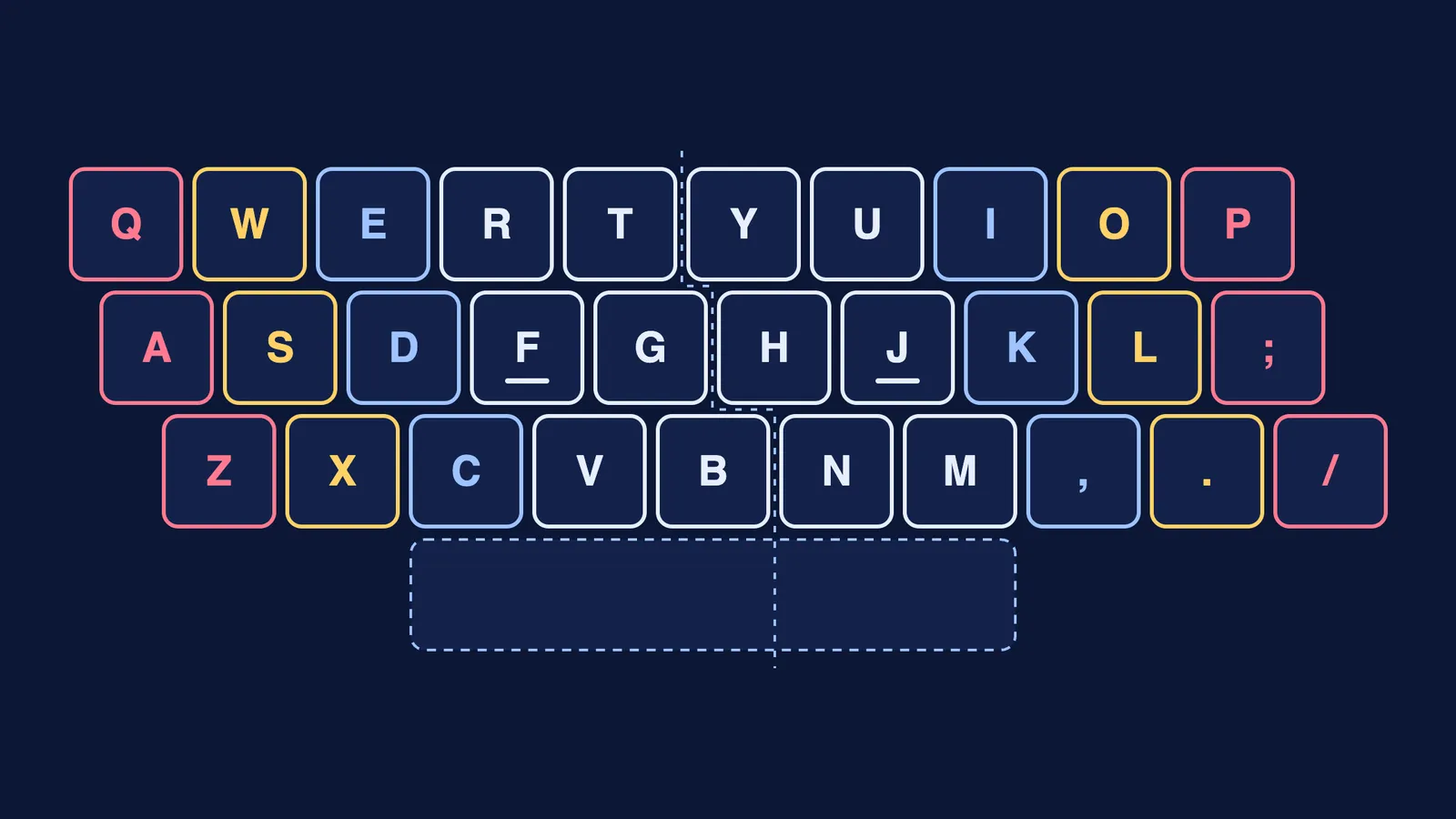
Rest your left fingers on A, S, D and F, and your right fingers on J, K, L and the semicolon. The small bumps on F and J let you find them without looking.
Each finger owns its column of keys, as in the picture above. The index fingers cover two columns each, and the thumbs share the space bar.
After every key, return the finger to its home key.
Keep your eyes on the screen. If you cannot stop glancing down, drape a dupatta or a hand towel over your hands while you practise.
Keep your wrists relaxed. If typing causes pain that does not go away, see a doctor.
What is a good three-week plan to increase typing speed?
Three weeks will not make you an expert, since the Aalto researchers estimate that touch typists need several hundred hours of deliberate practice to match the study's fast typists (How We Type FAQ). It is enough to fix your finger mapping and make it a habit. Practise for 15 minutes a day and keep a small log.
Day 1: baseline. Take a one-minute online typing test. Write down your wpm and your accuracy. Do the same test again on day 21.
Week 1: home row and accuracy.
Days 1-2: home-row keys only (A S D F J K L ;), eyes on the screen.
Days 3-4: add the top row, one finger's column at a time.
Days 5-7: add the bottom row and Shift. Aim for accuracy, not speed.
Week 2: words and rhythm.
Type common short words at a steady, even rhythm, as if to a metronome.
Each day, pick the one key your finger keeps missing and drill words that use it.
Mix words that alternate hands ("they", "work") with one-hand words ("were", "only").
Start reaching for Shift, Backspace and Enter early, as the Aalto researchers suggest.
Week 3: real text.
Type a paragraph of your own notes, or the steps of a worked solution from the Fermi Problem Library, whose step-by-step solver explains the reasoning, so you practise on symbols and units you will actually type.
If you code, type short programs from your notes: brackets, semicolons and the equals sign are all right little-finger keys.
Take the one-minute test every other day, and the same test as day 1 on day 21.
What should you do after three weeks?
Keep typing real work the new way, even if it feels slower. If your board exams are still on paper, see how to write faster and neater for board exams. Before you switch all your class notes to a laptop, read what studies found about typing versus handwriting notes. And pair your new speed with these computer shortcuts that save time on assignments.