
On this page
If you have ever built a fraction in a word processor by clicking through menus, then watched the page jump when you added one more line, LaTeX is the tool made for that problem. The fastest way to learn it is not to read a manual first, but to write one small, real document, such as a physics lab report, adding one feature at a time.
What is LaTeX, and how is it different from Word?
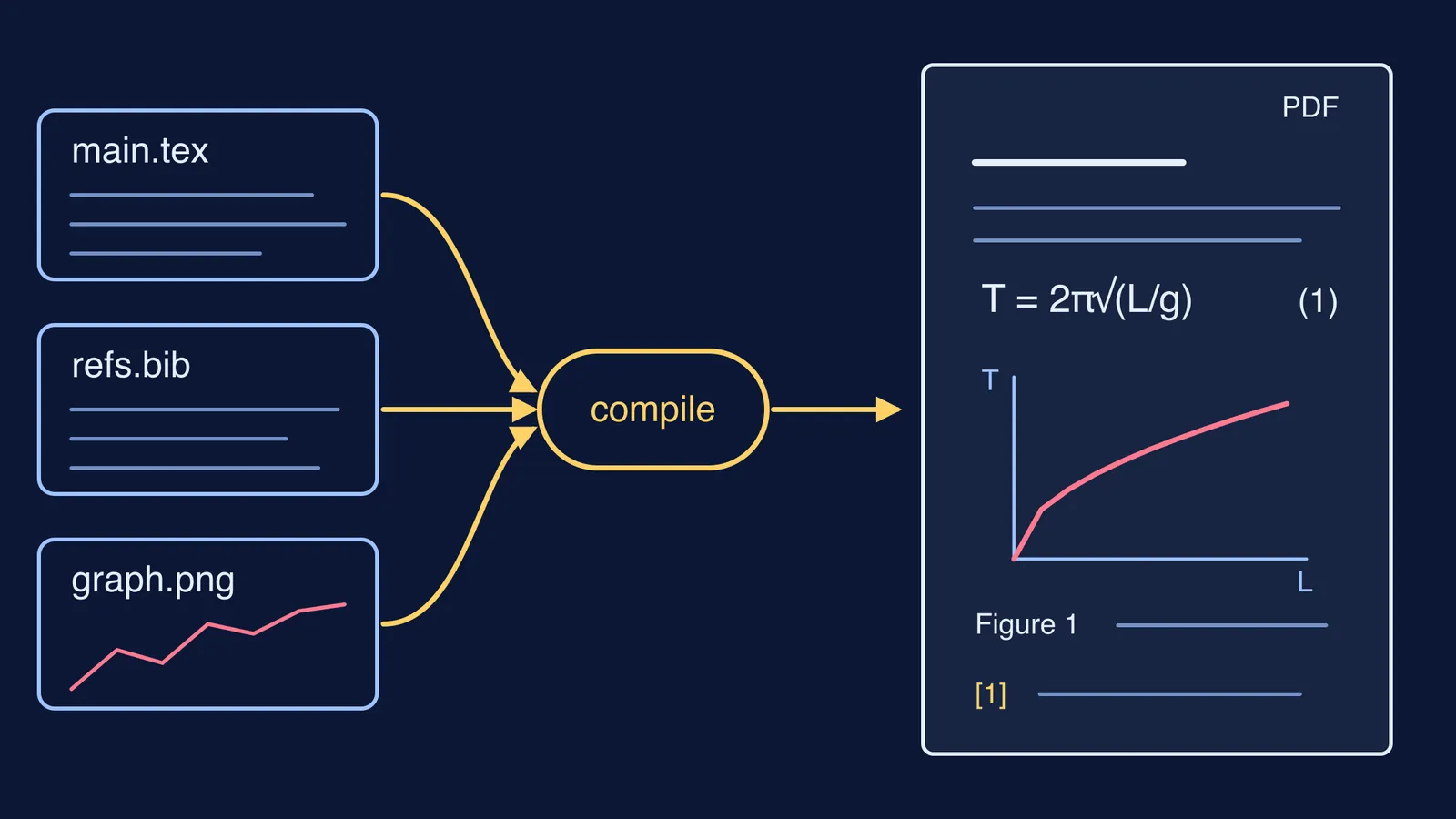
The LaTeX Project defines LaTeX as "a document preparation system for high-quality typesetting" and says plainly that it is not a word processor (LaTeX Project). You write plain text with commands in a `.tex` file, then compile it into a PDF. You say what something is (a section, an equation, a figure) and LaTeX decides how it looks and keeps the numbering right. It is free software, released under the LaTeX Project Public License (LaTeX Project).
You do not need to install anything to start. The LaTeX Project lists online services such as Overleaf, Papeeria and CoCalc, and notes that several offer free plans with some restrictions (LaTeX Project: Get LaTeX). If you later want to work offline, the same page recommends MiKTeX or TeX Live on Windows, MacTeX on a Mac and TeX Live on Linux.
How do you write your first LaTeX document?
Take a real assignment, a short report on a simple pendulum, and build it in this order, compiling after every step so mistakes stay small. The commands come from Overleaf's Learn LaTeX in 30 minutes guide and its biblatex guide.
The skeleton. Type `\documentclass{article}`, then `\begin{document}`, one sentence, and `\end{document}`. Compile. A PDF with your sentence means everything works.
Structure. Add `\section{Aim}`, `\section{Theory}` and `\section{Results}`. LaTeX numbers them for you.
An inline equation. Put maths inside dollar signs within a sentence: `$T = 2\pi\sqrt{L/g}$`.
A numbered equation. Put the same formula between `\begin{equation}` and `\end{equation}`, with `\label{eq:period}` inside. Then write `Equation~\ref{eq:period}` in your text, and LaTeX prints the right number even if you add equations above it later.
A figure. Add `\usepackage{graphicx}` before `\begin{document}`, upload your graph, and place `\includegraphics[width=0.75\textwidth]{graph}` inside a `figure` environment with `\caption{...}` and `\label{fig:graph}`. Refer to it with `\ref{fig:graph}`.
A reference. Create a file called `refs.bib` with one entry for your textbook, add `\usepackage{biblatex}` and `\addbibresource{refs.bib}` before `\begin{document}`, cite it with `\cite{}` and the key you gave the entry, and put `\printbibliography` at the end.
Those six steps cover most school and first-year college reports. For more practice with the maths commands alone (fractions, powers, Greek letters, matrices), our guide to typing any maths equation in LaTeX goes symbol by symbol.
When does LaTeX beat a word processor?
A useful test comes from a usability study by Markus Knauff and Jelica Nejasmic, published in PLOS ONE in 2014 (doi:10.1371/journal.pone.0115069). In it, 40 researchers reproduced sample texts in either Microsoft Word or LaTeX, with 30 minutes per text. On plain continuous text and on text with tables, LaTeX users wrote less text and made more formatting mistakes than Word users. On the text full of equations, LaTeX users made significantly fewer formatting mistakes and wrote more text, though they made more spelling and grammar errors. LaTeX users also more often said they enjoyed their software.
So LaTeX pays off for particular jobs, not for every document. Before you choose:
Choose LaTeX if the document has many equations, numbered equations or figures you refer back to, or a long reference list.
Choose LaTeX if a journal, department or preprint server asks for LaTeX source. arXiv, for example, explains that TeX source keeps the link between equations and their labels, and between references and their numbers (arXiv: Why submit TeX?).
Choose a word processor for essays, letters, and anything with little maths.
Choose a word processor when co-authors do not know LaTeX, or the deadline is tonight.
For why it works this way, read how Leslie Lamport built LaTeX.
What should you practise in your first week?
Practise on your own material with this five-day plan:
Day 1: compile the skeleton, then add a title with `\title{}`, `\author{}` and `\maketitle`.
Day 2: retype one page of your maths or physics notes with inline and numbered equations.
Day 3: add a figure and refer to it by its label.
Day 4: build a small `.bib` file with your textbook and two other sources, and cite them.
Day 5: write a real assignment end to end, then compare it with what you would have made in a word processor.
If you can typeset the pendulum formula but cannot say why the mass is missing from it, the Fermi Concept Library has a lesson for every concept in physics, chemistry, biology, mathematics and computing. For the derivations in your report, the Fermi Problem Library has worked problems with a step-by-step solver that explains the reasoning rather than printing an answer.
Next, our guide to writing a project report in college covers what goes in each section.