On this page
If you have ever typed a maths doubt as "x^2+1/2a" and had it misread, LaTeX is the fix. LaTeX is "a document preparation system for high-quality typesetting", and it is free software, according to the LaTeX Project. For a student, the useful part is a handful of commands that turn keyboard text into a proper fraction, root or integral. For its history, read how Leslie Lamport built LaTeX.
How does LaTeX maths work?
Three rules cover almost everything.
Maths goes between markers. Inside a sentence, wrap it in `\( ... \)` or `$ ... $`; on its own line, use `\[ ... \]`, as Overleaf's guide to mathematical expressions shows.
A backslash starts a command: `\frac`, `\sqrt`, `\alpha`.
Curly braces group things. LaTeX applies `^` and `_` "only to the following character", so anything longer needs braces, according to Overleaf's page on subscripts and superscripts.
So `x^{10}` gives x to the power 10, while `x^10` gives x to the power 1 followed by a 0. That missing pair of braces is a common beginner mistake.
How do you type fractions, powers and roots in LaTeX?
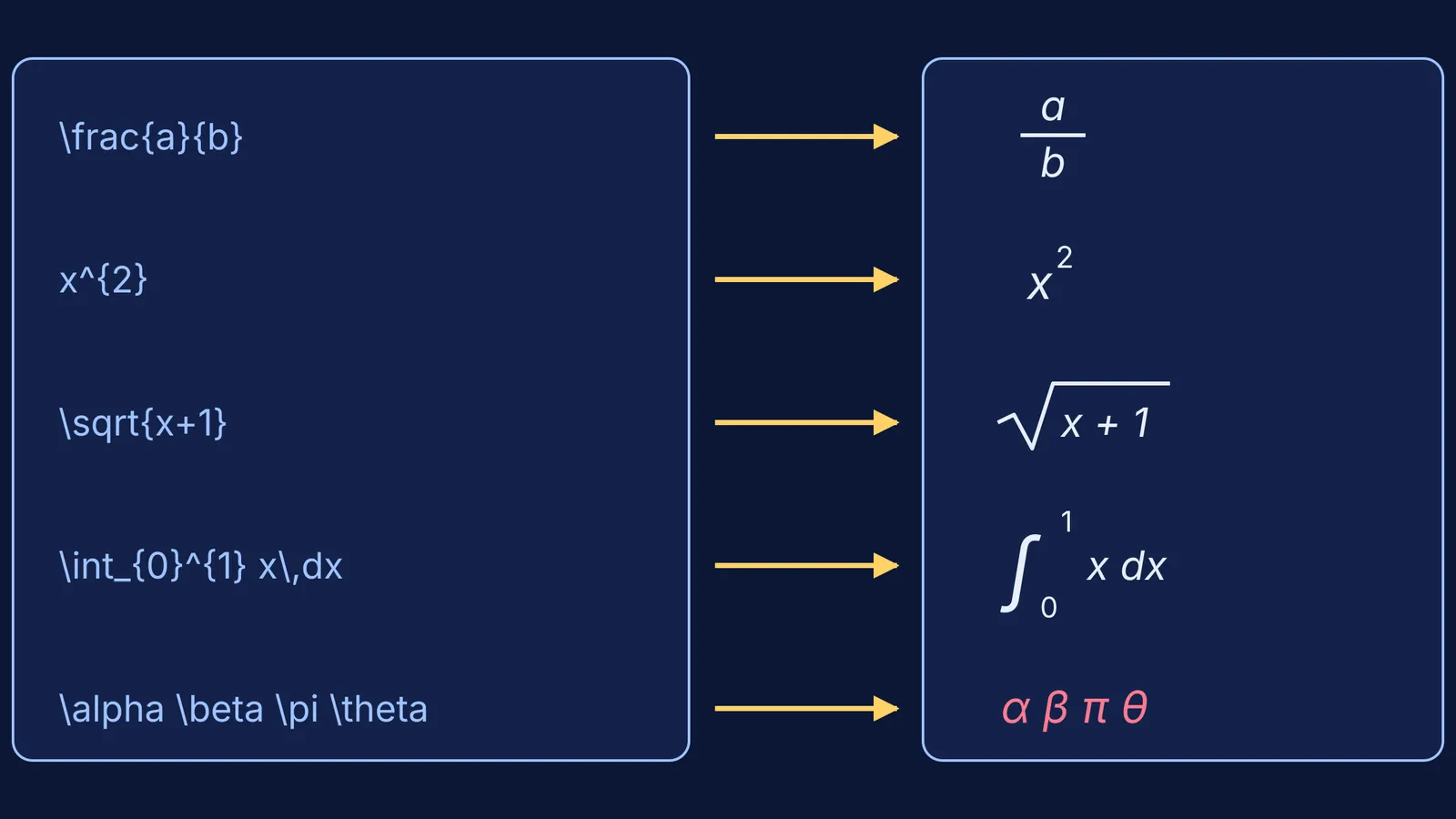
Fraction: `\frac{numerator}{denominator}`, so `\frac{1}{2}` is one half (Overleaf: fractions).
Power: `x^{2}`; subscript: `a_{n}`; both at once: `x_{1}^{2}`.
Square root: `\sqrt{x^2+1}`.
Other roots: put the index in square brackets, so `\sqrt[3]{8}` is the cube root of 8. Wikipedia's formula help page uses the same form, `\sqrt[n]{2}`.
Commands nest inside each other. `\frac{\sqrt{3}}{2}` is root 3 over 2, the value of sin 60°.
How do you type integrals and Greek letters?
An integral with limits is `\int_{a}^{b} x^2 \,dx`, the form used in Overleaf's guide to integrals, sums and limits. The `\,` adds a small space before dx, as listed in Overleaf's guide to spacing in maths. Sums and limits follow the same pattern: `\sum_{n=1}^{\infty}` and `\lim_{x\to\infty}`.
Greek letters are their names after a backslash: `\alpha`, `\beta`, `\gamma`, `\theta`, `\pi`, `\lambda`, `\mu`, `\omega`. For capitals that look different from Latin letters, capitalise the first letter, as in `\Delta` and `\Omega`; a capital alpha is simply typed as A.
For functions, type `\sin x`, `\cos x` and `\log x`. These commands "print the name of the function in upright (Roman) text instead of italics", according to Overleaf's page on operators. Plain `sin` looks like s times i times n.
Worked example: the quadratic formula in four steps
Build long expressions from the inside out.
The part under the root: `b^2 - 4ac`
Wrap it in a root: `\sqrt{b^2 - 4ac}`
Make the numerator: `-b \pm \sqrt{b^2 - 4ac}`
Put it over 2a: `x = \frac{-b \pm \sqrt{b^2 - 4ac}}{2a}`
At the end, count braces: every `{` needs its `}`. Physics uses the same moves: Coulomb's law is `F = \frac{1}{4\pi\varepsilon_0}\frac{q_1 q_2}{r^2}`.
The one-page LaTeX cheat sheet
Copy this into the front of your notes. Every command below appears in the Overleaf or Wikipedia guides linked above, or in Overleaf's list of Greek letters and maths symbols.
Fraction: `\frac{a}{b}`
Power and subscript: `x^{n}`, `x_{n}`
Square root and nth root: `\sqrt{x}`, `\sqrt[n]{x}`
Integral with limits: `\int_{a}^{b} f(x)\,dx`
Sum and limit: `\sum_{i=1}^{n}`, `\lim_{x\to\infty}`
Greek: `\alpha \beta \gamma \delta \theta \lambda \mu \pi \sigma \omega`
Capital Greek: `\Delta \Sigma \Omega`
Functions: `\sin \cos \tan \log \ln`
Symbols: `\times`, `\pm`, `\leq`, `\geq`, `\neq`, `\infty`
Vectors and time derivatives: `\vec{F}`, `\dot{x}`
Inline and display: `$ ... $` and `\[ ... \]`
Where can you use LaTeX?
Microsoft Word and Outlook: press Alt + = to start an equation, then choose LaTeX as the input format on the Equation tab. Microsoft's support page lists Word and Outlook for Microsoft 365 and versions 2016 to 2024, and says the other Office apps support only UnicodeMath.
Google Docs: add an equation from the Insert menu, then type a backslash shortcut such as `\alpha` followed by a space, per Google's Docs help page. This is not full LaTeX, so test longer expressions.
Wikipedia: editors write formulas in a LaTeX subset inside math tags, as its help page explains.
Overleaf: describes itself as "an online platform where you can collaborate in LaTeX" on its about page, which suits a full project report.
arXiv: the research preprint site takes TeX and LaTeX source files and says it "fully supports" PDFLaTeX, per arXiv's submission help.
A practical plan: this week, type one page of your own notes in LaTeX using only the cheat sheet. If typing speed slows you down, try a two-week touch-typing plan. Before trusting any software's algebra, read when to use computer algebra or a chatbot for maths.
Typing a formula neatly is not the same as understanding it. When a formula still feels like a string of symbols, Fermi's AI tutor works through problems alongside you, writing on a board and checking understanding as it goes. The Fermi Problem Library has worked problems with a step-by-step solver that explains the reasoning rather than printing an answer.