
On this page
The Wi-Fi filter worked for months. Now videos are playing at 1 a.m., and the router shows your teen's phone talking to one address you don't recognise. A likely reason is a free VPN app. You can fix this, and most of the fix is a conversation, not a stronger lock.
What does a VPN actually do?
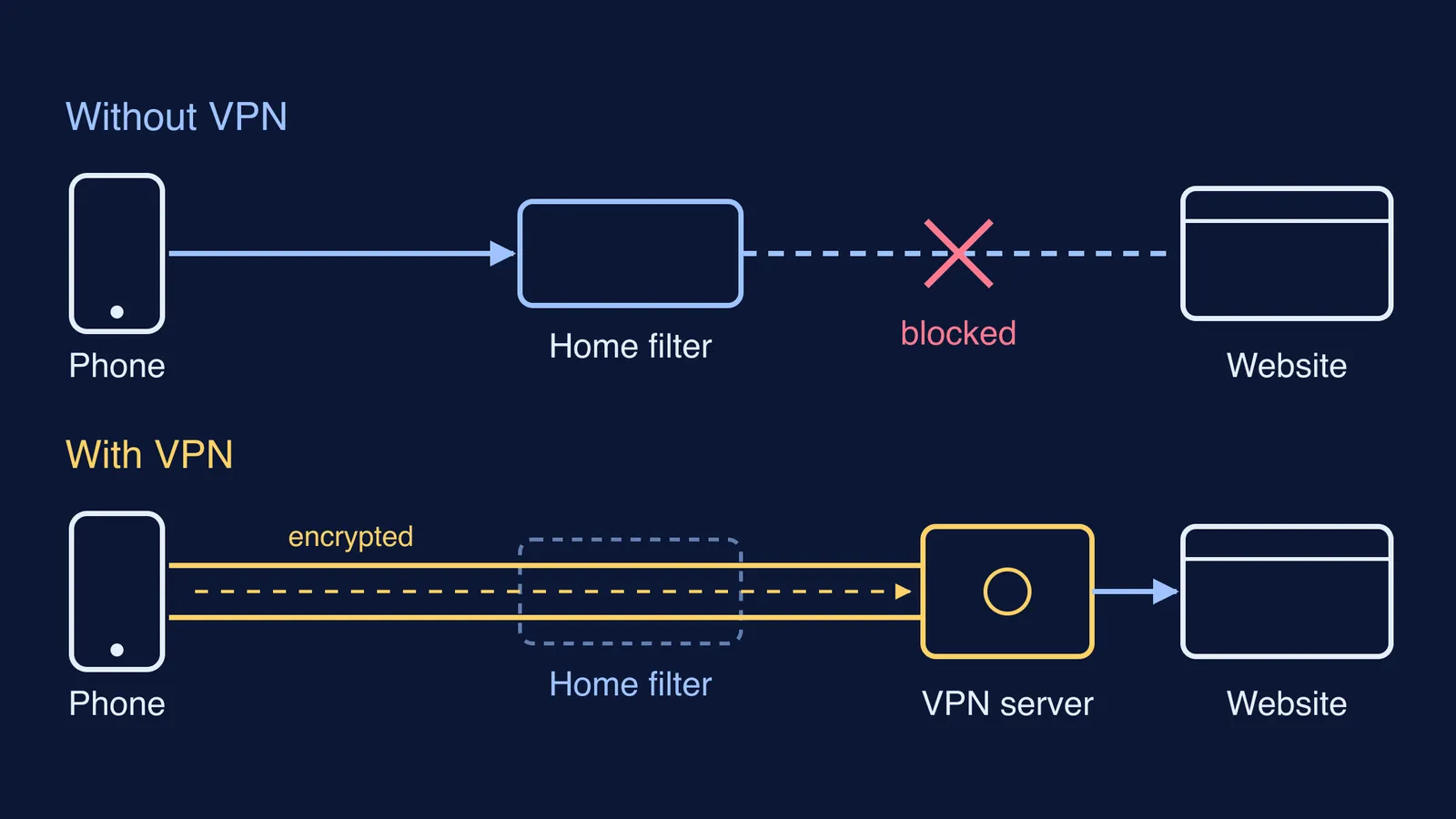
A VPN (virtual private network) is “a virtual network built on top of existing networks” that gives data a secure route between them, in the definition used by the NIST glossary. In plain words: the phone wraps everything it sends in encryption and sends it to a VPN company's server, and that server fetches the website.
According to the Electronic Frontier Foundation's guide to choosing a VPN, a VPN “hides your outgoing traffic from your ISP and the local network owner”, and websites see the VPN server's location instead of yours. The same guide warns that what the VPN hides from your network is visible to the VPN provider.
Why do parental controls stop working with a VPN?
Many home filters sit on the network: the router, a family-safe DNS setting, or a filter from your broadband provider. They work by reading where each request is going. With a VPN switched on, the router sees only encrypted traffic going to one VPN server. It can no longer tell a physics lecture from a gaming site, so its site blocks stop working.
A free VPN is a privacy trade, not just a loophole. Whoever runs the server can see your teen's browsing, and that is a better reason to talk than “you broke my rule”.
Indian rules target VPN companies, not users. Under CERT-In's directions of 28 April 2022, VPN service providers must keep customers' validated names, the IP addresses allotted to them and their stated purpose for 5 years or longer.
Which settings still work when a VPN is on?
Controls set on the device itself don't care which route the traffic takes.
Android with Google Family Link: you can require your approval for new apps on Google Play, and a blocked app should be blocked on all of your child's Android devices or Chromebooks (Google Families Help). A blocked VPN app cannot run.
Daily limits on Android: when time is up, the device locks; only apps you set as unlimited still work, though your child can answer calls and make emergency calls (Google Families Help on screen time).
iPhone with Screen Time: Ask to Buy sends you a request before your child downloads an app, and Time Allowances and Screen Time schedules control how long and when apps can be used (Apple Support).
What no setting covers: a friend's phone, school Wi-Fi, or an old handset in a drawer.
Heavy controls also have a cost. A 2018 study analysed 736 Google Play reviews of 37 mobile online safety apps written by children aged 8 to 19, and found that 76% of the reviews gave a single star; children said the apps felt overly restrictive and invasive of their privacy, and hurt their relationships with their parents (Ghosh and colleagues, CHI 2018).
What should I say to my teen about the VPN?
Pick a calm time, not the moment you find it, and try this script:
Say what you noticed, not what you suspect. “The router filter stopped seeing your phone last week. I think a VPN is on. Can you show me?”
Ask what it was for. “What were you trying to get to?” It might be a blocked game, a link from a friend, or simple privacy.
Name your real worry. “I'm less worried about the rule and more about who runs that free VPN and what they can see.”
Offer an honest swap. “If the filter blocks something you need, tell me and we'll look at it together within a day. In return, no workarounds.”
Say what changes on the device. “Until we've reset things, new apps need my approval.”
If the VPN was a route to late-night scrolling, our guide on whether a teenager should keep the phone in the bedroom at night has a plan for that.
When should we renegotiate the rules?
A workaround can mean the rules have fallen behind your teen's age. Sit down again:
at each new school year, especially Class 9 and Class 11, and after board exams;
when a real need appears, such as a coding course or a project site the filter blocks;
if the VPN comes back: tighten device settings for a fixed period, say two weeks, then talk again.
Our 3-bucket plan for teenage screen time helps you sort which hours are fixed and which are flexible. If study time is where the rules keep slipping because your teen doesn't know where to start, Fermi's AI tutor works out what they already know and builds a plan for the session, so the study hour starts with a clear next step.
Start with one question tonight: what were you trying to reach?