
On this page
Many home Wi-Fi routers can pause the internet on chosen devices at chosen times and filter what every device in the house can reach. Neither replaces a conversation with your child, and the research explains why.
How do parental controls on a Wi-Fi router work?
Schedules and pauses live in your router's admin page or app, usually under Parental Controls or Access Control. You pick a child's devices and set the hours they can go online.
Filters often work through DNS, the service that turns a website name into an address. Point the router at a family DNS service and every device on your Wi-Fi gets the filter.
Cloudflare's family DNS servers, 1.1.1.3 and 1.0.0.3, block malware and adult content, according to its setup documentation. OpenDNS FamilyShield, at 208.67.222.123 and 208.67.220.123, comes preconfigured to block adult content, per its setup guide and home security page. Setting the DNS on the router applies it to every device on your network, so you do not need to change each phone, Cloudflare's router guide notes.
How do you set parental controls on your Wi-Fi router, step by step?
Menu names differ by brand, but the order is the same.
Find the admin address on the sticker under your router or in its manual. Cloudflare's router guide says Netgear's is typically http://192.168.1.1 or http://routerlogin.net. Many brands also have a phone app.
Log in. If the admin password is still the one printed on the sticker, change it, or the controls last only until someone curious turns the router over.
Open the DNS settings, often under Internet or WAN. Write down the current entries first, as Cloudflare advises, then enter the family DNS pair and save.
Open Parental Controls. Create one profile per child and add their phone, laptop and tablet from the list of connected devices.
Set a schedule for each profile, then test it: at a paused time, the device should show no internet on home Wi-Fi.
One catch: phones hide their real hardware address. Android 10 and later use a random Wi-Fi address by default, generated separately for each network (Android documentation). On Apple devices set to Rotating, the private address can change every 2 weeks (Apple Support). If a profile stops working, look for a "new" device in the router's list, or ask your child to set the home network's private address to Fixed.
What does a sensible weekday schedule look like?
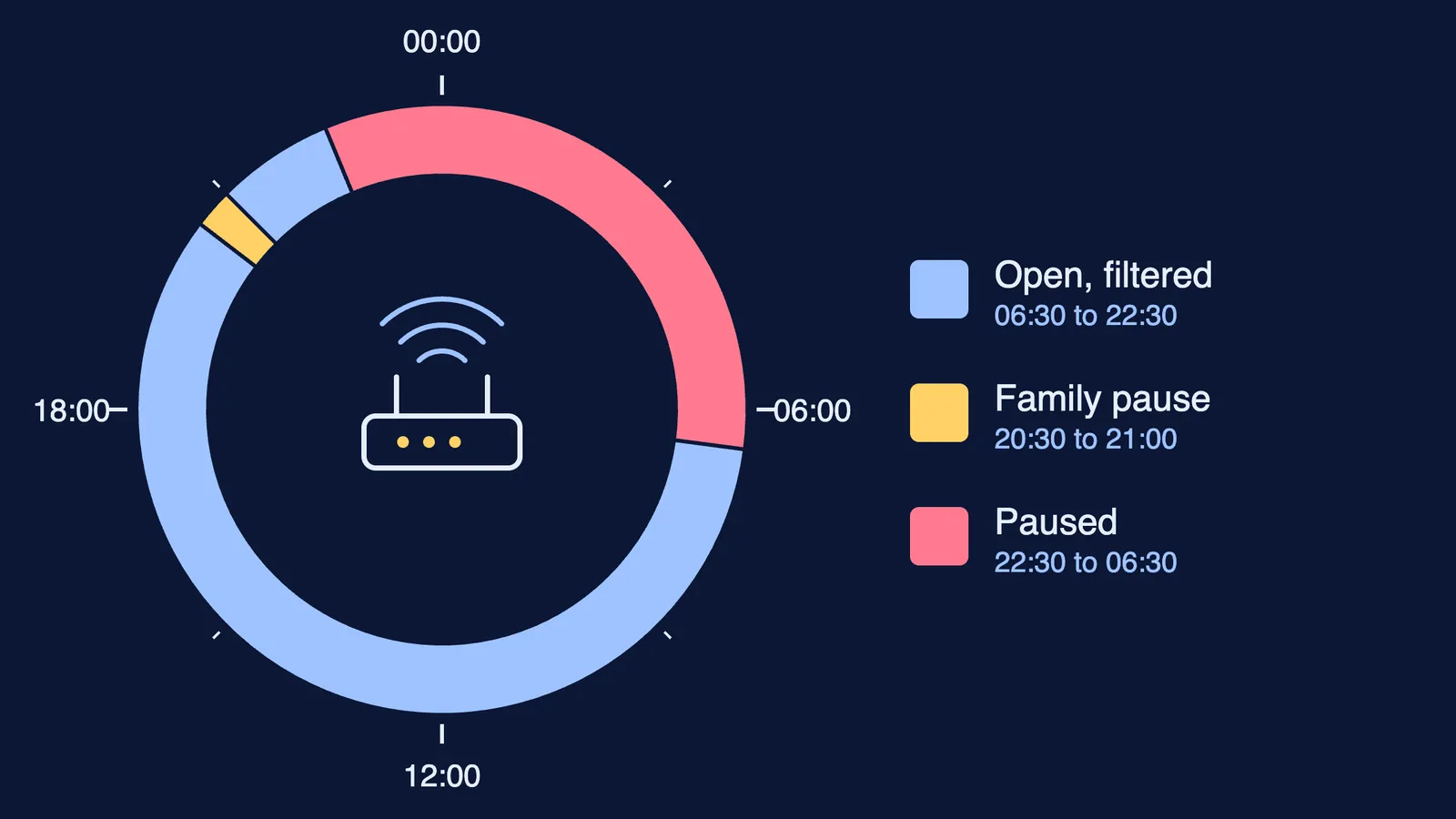
A worked example for a Class 11 student with a phone and a laptop:
06:30 to 22:30: open, with the family DNS filter on for everyone.
20:30 to 21:00: a family pause for dinner on every device in the house, parents' phones included.
22:30 to 06:30: the student's devices paused; the filter stays on for the house.
On weekends, move the overnight pause a little later. Agree on an exception route in advance: if a coaching test or online class runs late, your child asks, and you lift the pause for that night from the app.
If the open evening hours keep sliding into scrolling because your child does not know where to begin, Fermi's AI tutor can work out what they already know and build a plan for the session.
If you and your partner want different limits, start with agreeing on phone rules when parents disagree, and see our three-bucket screen-time plan for teenagers.
What can router controls not do?
Router rules stop at your Wi-Fi. A phone on mobile data, a friend's hotspot or a VPN goes around them; if that has already happened, read what to do when a teen uses a VPN to bypass parental controls. Filters also miss things, and no blocklist knows your child.
A 2023 rapid evidence review in the Journal of Children and Media screened 1,656 articles and coded 40 studies on parental controls (Stoilova, Bulger and Livingstone, 2023). Results were mixed: some uses brought benefits, others had no effect, and some had adverse results, for example on family communication. The review found little support for parental controls as a stand-alone strategy; parents valued them inside a broader approach to parental mediation and parent-child relations.
Why does talking still matter?
Families seem to be drifting the other way. The EU Kids Online 2026 study surveyed 28,465 children aged 10 to 16 in 19 European countries (LSE summary). Half of them said their parents talk to them about what they do online, compared with 66% in 2020, while parents increasingly rely on technical controls. The American Academy of Pediatrics' 5 Cs guidance puts the alternative plainly: "Talk about media early and often" (HealthyChildren.org).
A script for the evening you set it up, before anything goes live:
"We're setting up the Wi-Fi so your devices go offline at 10:30 on school nights. The dinner pause applies to all of us."
"Here is exactly what it pauses, what it filters, and when. I'm not reading your messages."
"If something online worries or upsets you, tell me. You won't lose your phone for telling me."
"We'll look at the schedule again in a month. Tell me what isn't working."
Put that review in your calendar, and keep it.