
On this page
Someone in your class group adds an AI assistant to help with doubts. It answers a physics question in seconds. But the bot is now a member of the group, and that changes who can see what you post next. Here is what the main apps say a bot can read, what its maker may keep, and rules your group can agree on in five minutes.
What can an AI bot in a group chat read?
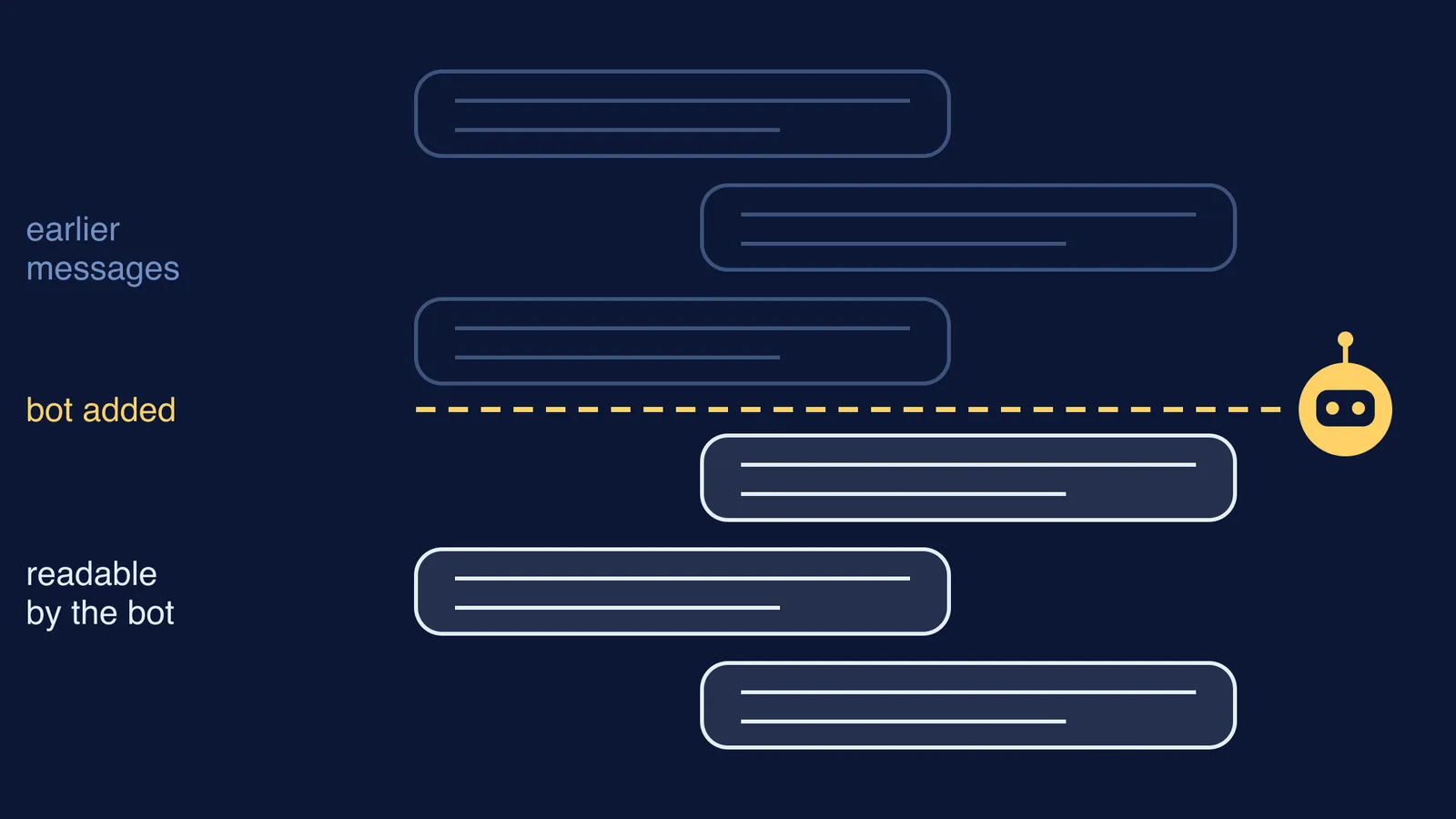
On WhatsApp, Meta AI added as a group member "will be able to read and respond to messages sent after it was added to the group", according to WhatsApp's help page on groups with Meta AI. The page describes access to messages sent after it joined, not the earlier chat history. The same page says admins can remove Meta AI from the group at any time.
That is different from simply typing @Meta AI in a chat. In that case, WhatsApp says, "only messages that mention @Meta AI, or that people choose to share with Meta AI, can be read by Meta", and your other personal messages stay end-to-end encrypted (WhatsApp Help Center).
On Telegram, bots run in "privacy mode" by default and receive mainly the commands meant for them and replies meant for them. The exception: "bot admins always receive all messages", says Telegram's bot documentation.
Other bots work in their own ways. If you cannot find a clear page that says what a bot reads, assume it reads everything posted after it joined.
Does the bot store what your group says?
WhatsApp's group page says "Meta may use your prompts, the messages you share, and feedback to improve AI quality" (WhatsApp Help Center). It also says you can ask for information you previously shared with Meta AI to be deleted. That is a separate request from deleting the message in the chat.
Meta's AI Terms of Service, effective 13 May 2026, are blunter: "When information is shared with AIs, the AIs will sometimes retain and use that information." The same terms advise: "Do not share information that you don't want the AIs to use and retain, such as information about sensitive topics."
There is also a consent problem: one member adds the bot, but every member's new messages can now reach it.
What should a study group stop sharing once a bot is present?
Questions, solutions and timetables are fine. Move these out of the group:
Passwords, OTPs and login links, including those for exam portals and the school's online system.
Phone numbers, home addresses and live location, yours or anyone else's.
Admit cards, roll numbers, marksheets and ranks, which carry your name, photo or exam details.
Aadhaar, bank or UPI details, even "just to split the canteen bill".
Health, family or money matters: the sensitive topics Meta's terms warn about.
Screenshots of other people's private chats and photos of classmates who have not agreed.
For a fuller list, see what personal information not to share with an AI chatbot. Files need the same care: read whether it is safe to install APK files from study groups.
How do you set bot rules for a class group?
An illustrative example: five Class 11 students run a "Physics doubts" group and add an AI assistant. A week later, someone posts a portal screenshot with their login visible, and another shares a friend's phone number. What they agreed:
Two groups, not one. The bot group is for questions and solutions only. The original group, without the bot, is for plans and anything with names or numbers.
The admin pins the rules (script below).
Anyone can ask for the bot to be removed, no reasons needed.
Mistakes get fixed fast. Delete the message, change any password that was shown, and request deletion from the bot's maker where the app offers it.
A message the admin can copy:
"Hi all, we've added an AI assistant for doubts. It can read new messages posted here, and the company that runs it may keep them. Please don't post passwords, OTPs, phone numbers, addresses, marks, admit cards or anything personal. Message the person directly for those. If you're not comfortable with the bot here, tell me and I'll remove it."
If the bot is mainly there for doubts, you can also take doubts out of the group. Fermi's AI tutor works one-to-one and teaches through a problem, so you can work on a weak topic without posting it in the class group. The Fermi Problem Library has a step-by-step solver that explains the reasoning.
What should parents know?
Ask your child which groups have a bot in them, and agree the one-line test together. If your child is under 18, our explainer on what India's data protection law says about children's data covers what apps owe your family.
Tonight, open your busiest class group, check the member list for a bot, and pin the rules if you find one.