
On this page
Press sin 30 and the screen shows 0.5 almost at once. The chip has no table of every angle. It may well have run a short loop called CORDIC, short for COordinate Rotation DIgital Computer, which needs nothing harder than adding and shifting digits. Here is how it works, with a rotation you can do by hand.
Where did CORDIC come from?
According to the Wikipedia article on CORDIC, Jack E. Volder conceived it in 1956 at Convair to replace the analog resolver in the B-58 bomber's navigation computer. He published it in 1959 as The CORDIC Trigonometric Computing Technique in the IRE Transactions on Electronic Computers.
The same article records that John Stephen Walther at Hewlett-Packard generalised it in 1971 into a unified algorithm for elementary functions, that this line of work led to the HP-35 in 1972, the first scientific handheld calculator, and that decimal CORDIC became widely used in pocket calculators (Wikipedia: CORDIC).
How does a calculator find sin and cos?
Start from the unit circle. If an arrow of length 1 points at angle θ, its tip sits at (cos θ, sin θ). So finding sin 30° is the same as turning an arrow from the x-axis to 30° and reading off where its tip lands. If the unit circle still feels shaky, our guide to sin and cos at 0°, 90°, 180° and 270° from the unit circle is a quick refresher.
Rotating a point (x, y) by an angle a gives x' = cos a (x − y tan a) and y' = cos a (y + x tan a). Normally that needs multiplication. CORDIC's trick is to rotate only by angles whose tangent is 1, 1/2, 1/4, 1/8 and so on: 45°, 26.565°, 14.036°, 7.125°, 3.576°, 1.790°. Multiplying by 1/2, 1/4 or 1/8 is a shift in binary, so each rotation becomes a shift and an add.
The cos a factor is left out at every step and fixed once at the end. The product of all those dropped factors is a constant, K ≈ 0.6073, listed in the CORDIC article, so the calculator multiplies by K once (or simply starts with an arrow of length 0.6073 instead of 1).
At each step the chip asks one question: is the angle still left to turn positive or negative? It turns anticlockwise if positive, clockwise if negative, and subtracts or adds that step's angle from what remains. The method converges with roughly one bit of accuracy per step, and 40 steps are enough for the 10th decimal place (Wikipedia: CORDIC). Before starting, the calculator folds any angle into a small range with identities such as sin(180° − θ) = sin θ.
Can you do a CORDIC rotation by hand?
Yes. Take θ = 30°, start at (x, y) = (1, 0), and keep z = angle still to turn. At step i you shift by 2^−i: x' = x − d·y/2^i and y' = y + d·x/2^i, where d = +1 if z is positive and −1 if negative.
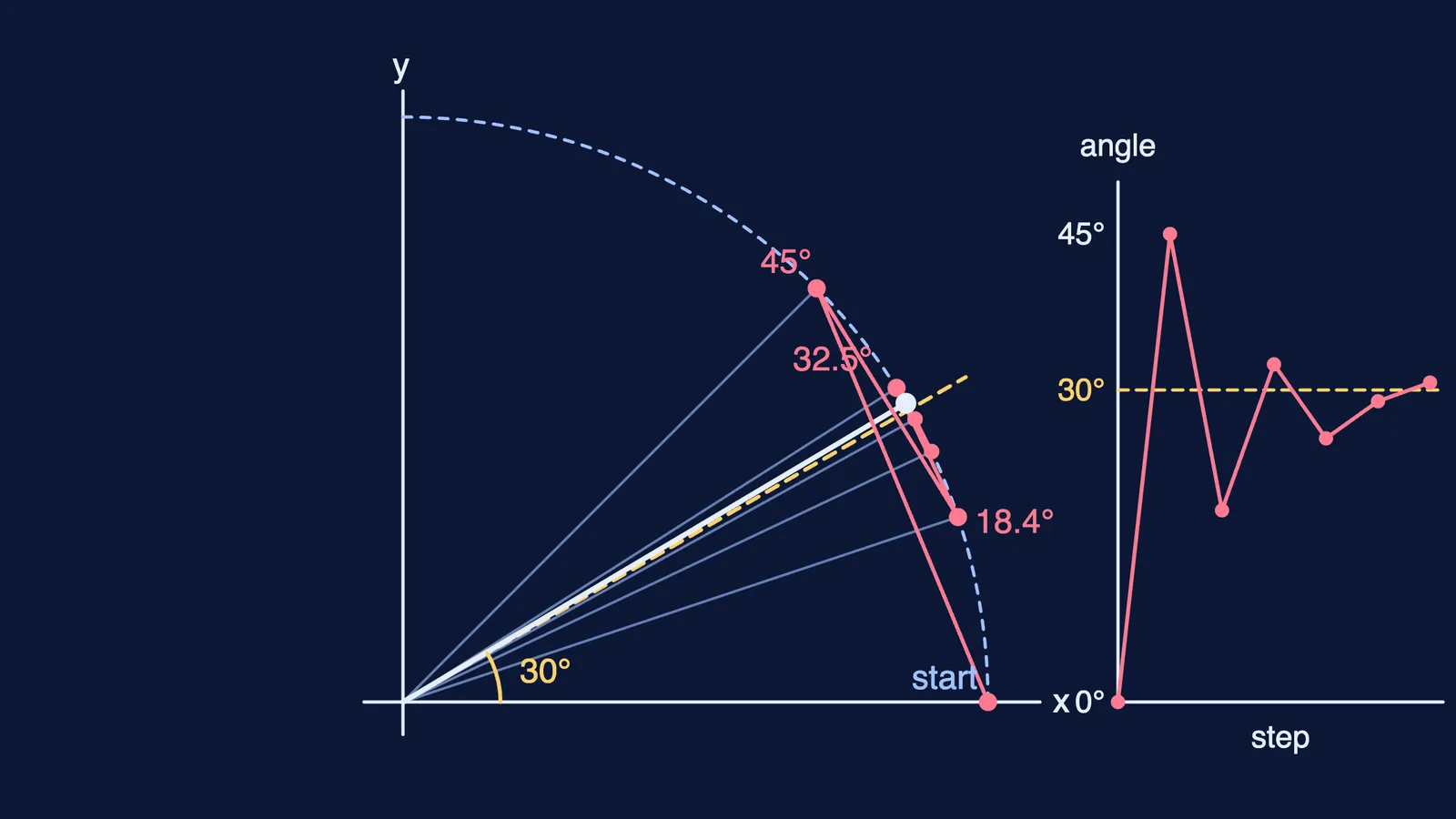
Step 0, z = 30 > 0, turn +45°: (x, y) = (1, 1), z = −15.
Step 1, z < 0, turn −26.565°: (1.5, 0.5), z = 11.565.
Step 2, z > 0, turn +14.036°: (1.375, 0.875), z = −2.471.
Step 3, z < 0, turn −7.125°: (1.4844, 0.7031), z = 4.654.
Step 4, z > 0, turn +3.576°: (1.4404, 0.7959), z = 1.078.
Step 5, z > 0, turn +1.790°: (1.4156, 0.8409), z = −0.712.
Multiply by K: 1.4156 × 0.6073 ≈ 0.8597 and 0.8409 × 0.6073 ≈ 0.5107. The true values are cos 30° ≈ 0.8660 and sin 30° = 0.5. After six steps you are only 0.712° away. One step can overshoot, but each step's angle is about half the last, so the worst-case error roughly halves with every step. The diagram above plots this zigzag.
Why is this worth knowing for exams?
CORDIC itself is not part of the JEE Main or Class 11 syllabus, but the ideas inside it are: the unit circle, vectors, compound-angle formulas and tan as a ratio.
It also shows a habit worth copying: turn a hard operation into many easy ones. The same idea runs through Bresenham's line algorithm, which draws straight lines on a screen using only integers. And CORDIC's small table of angles has a much older ancestor in Hipparchus's chord table, the earliest known trigonometric table.
If the rotation is hard to picture, a moving diagram helps more than another paragraph. The Fermi Simulation Lab has interactive simulations for ideas that are easier to see than to read, and the Fermi Concept Library gives every concept in mathematics its own lesson.
Next time you press sin, picture six little turns, left and right, settling on your angle.