On this page
Most students view video editing as an entertainer's craft reserved for YouTubers and film creators. Yet arranging moving pictures and spoken words is one of the most powerful active learning habits you can build in school.
When you edit a video, you cannot passively highlight sentences or skim past steps you do not understand. You have to decide what matters, cut what rambles, and match visual evidence to clear speech.
Why should students learn video editing?
Editing forces you to explain concepts sequentially. Educational research shows that explaining material produces deeper comprehension than re-reading.
In a study published in Contemporary Educational Psychology, researcher Vincent Hoogerheide and colleagues found that students who recorded video explanations of academic concepts to teach a peer achieved significantly higher comprehension test scores than those who restudied or wrote text explanations. Recording created social presence, prompting learners to structure ideas carefully.
Earlier work by Logan Fiorella and Richard E. Mayer in Contemporary Educational Psychology demonstrated that generating video lessons on scientific topics like the Doppler effect produced durable retention. Preparing and recording a demonstration prevents the passive illusion of competence that comes from re-reading notes.
Beyond exam prep, basic editing connects directly with technical communication skills like building your first mobile app and creative disciplines like career paths after design degrees.
Which free editing software works best on a student laptop?
You do not need an expensive computer or a paid subscription to produce clean video assignments. Several free tools run well on modest student hardware:
Shotcut is a free, open-source editor for Windows, macOS, and Linux with no watermarks. Shotcut requires only 4 GB RAM for standard-definition video and 8 GB RAM for 1080p editing. Its built-in proxy editing creates lightweight copies of clips during editing so your laptop preview does not stutter.
Microsoft Clipchamp comes pre-installed on Windows 11 and runs in web browsers, offering free 1080p exports without watermarks for personal media.
Kdenlive is an open-source desktop editor from the KDE community that provides full multi-track editing, title tools, and audio waveforms without paywalls.
DaVinci Resolve provides industry-grade color and audio tools in its free tier, but it requires at least 16 GB RAM and 4 GB GPU VRAM on Windows.
How do you build editing skills with 60-second practice projects?
Starting with a lengthy documentary quickly overwhelms beginners. Practice core cutting and timing habits with three short drills:
The silent procedural clip (30 to 60 seconds). Film your hands solving a three-step physics problem on paper. Import the clip, cut out pauses where your hand hesitates, speed up the writing sections, and insert text cards identifying key formulas.
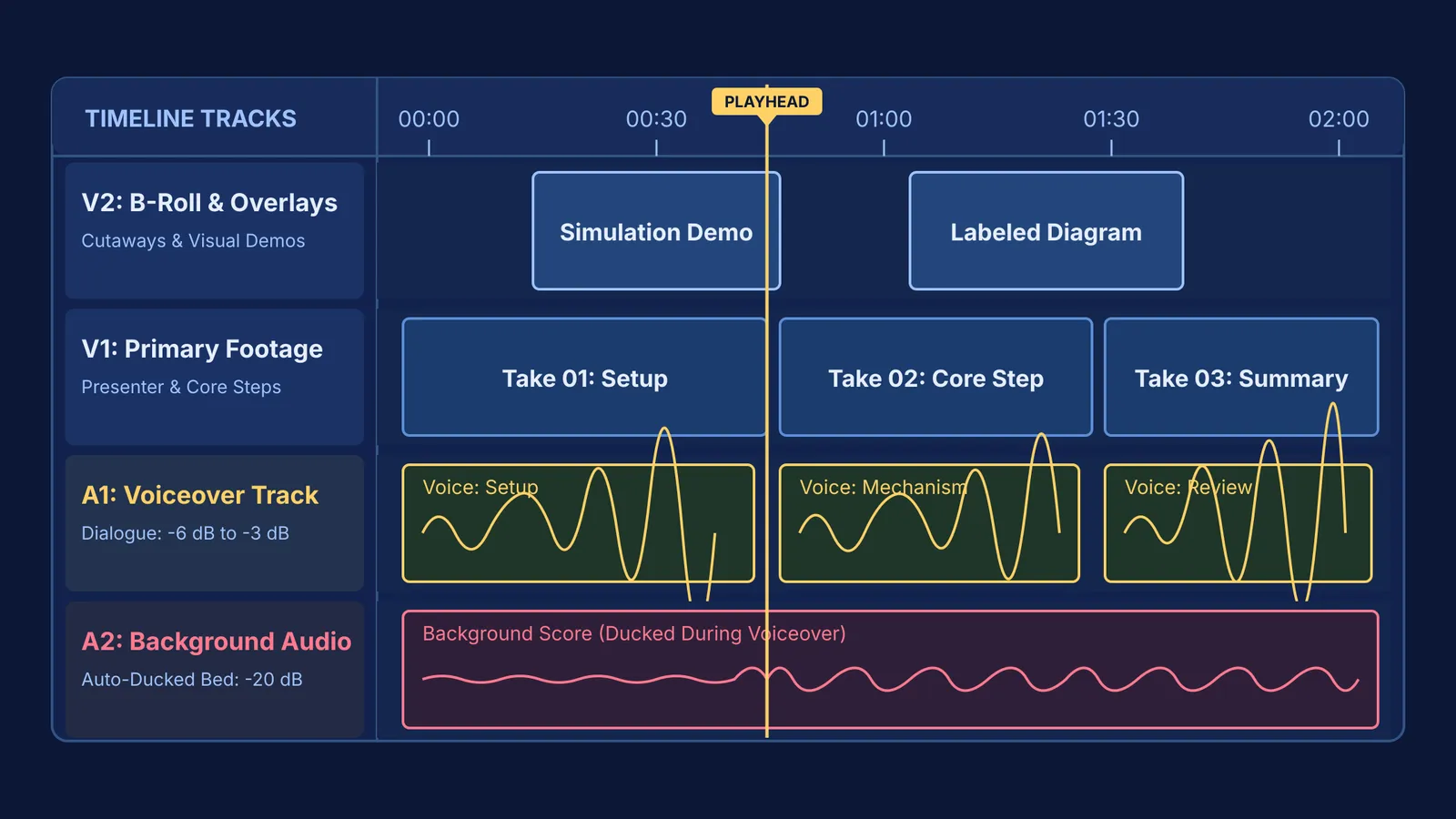
The voice-driven concept breakdown (60 seconds). Record one minute of voiceover explaining a single question, such as how concave mirrors form images. Place dialogue on Audio Track 1, trim pauses, and place still diagrams on Video Track 2 precisely where the relevant term is spoken.
The split-screen comparison (45 seconds). Place two clips side by side comparing related phenomena, such as series versus parallel circuits. Trim both clips so the comparative actions start and stop simultaneously.
How can you use video editing to improve school presentations?
While our guide on presentation slides for school details layout principles, editing lets you control timing and audience attention far more effectively than static slides.
Research on multimedia learning by Richard E. Mayer and Roxana Moreno in Educational Psychologist shows that temporal contiguity—presenting spoken narration and visual animations simultaneously—substantially reduces extraneous cognitive load. Controlling your timeline ensures viewers see a label precisely as you pronounce it.
Before editing, write a focused voiceover script. You can review the Fermi Concept Library, which covers every concept in physics, chemistry, biology, mathematics and computing, to verify scientific definitions and organize your explanation before recording.
For phenomena that are hard to film on a desk, you can record screen demonstrations in the Fermi Simulation Lab, which provides interactive simulations for ideas that are easier to see than to read. Dropping a short simulation clip onto your B-roll track lets you illustrate concepts smoothly.
What audio and pacing mistakes should beginner editors avoid?
Beginners often focus on flashy transitions while neglecting sound. In reality, viewers tolerate modest video resolution, but distorted audio ruins a presentation immediately.
Keep your microphone 15 to 20 cm away, speak across the capsule to minimize plosives, and record in a furnished room where curtains dampen echo. On your timeline, set primary dialogue to peak between -6 dB and -3 dB. If you use background music, duck it down to between -24 dB and -18 dB during speech so narration remains distinct.
Resist using decorative 3D transitions between clips. Professional editors rely primarily on simple hard cuts and occasional J-cuts, where incoming audio begins just before the video changes. Clean cuts keep attention on your subject rather than your tools.