

On this page
A 2023 survey by ASER found that 89% of rural Indian youth aged 14–18 have a smartphone in their household, but their primary activity is watching videos for entertainment. Instead of just consuming content, building a simple app flips your role to that of a creator. You do not need to learn a complex programming language to start; modern no-code tools let you piece together an app like a puzzle, teaching you the logical steps of computer science along the way.
Why shift from consumer to creator?
It is easy to spend hours scrolling through social media or playing games. The ASER 2023 'Beyond Basics' report surveyed rural Indian youth and found that while 92% know how to use a smartphone, they overwhelmingly use them for entertainment rather than creation. Building your own mobile app breaks this habit by turning the screen into a workshop.
A 2019 paper in *Communications of the ACM* by researchers at MIT argued that learning to code should move students from "computational thinking" to "computational action" (Source). Computational action means that instead of solving abstract logic puzzles in a classroom, students build functional tools that solve real problems in their own lives. When you build an app that manages your own study schedule or tracks your daily habits, you shift your identity. You stop being a passive user of technology and start seeing yourself as someone who can engineer solutions.
Which no-code tools are best for beginners?
You do not need to know Java, Swift, or Python to build a functioning app today. Block-based programming tools have removed the steep learning curve of traditional syntax, where a single missing semicolon can break the whole program and cause hours of frustration.
Platforms like MIT App Inventor or Thunkable allow you to build apps visually. The process involves two main screens. On the designer screen, you drag and drop buttons, text boxes, and timers onto a blank phone interface. On the blocks screen, you snap together colourful, puzzle-like pieces that tell those buttons what to do.
How do you build a simple study timer?
To build a study timer, you need to define three things:
The User Interface: A text label to show the time remaining, a "Start" button to begin the session, and a "Pause" button to stop it.
The Variables: You need a place in the app's memory to store the numbers. Create a variable called "Time Remaining" and set it to 25 minutes (or 1500 seconds).
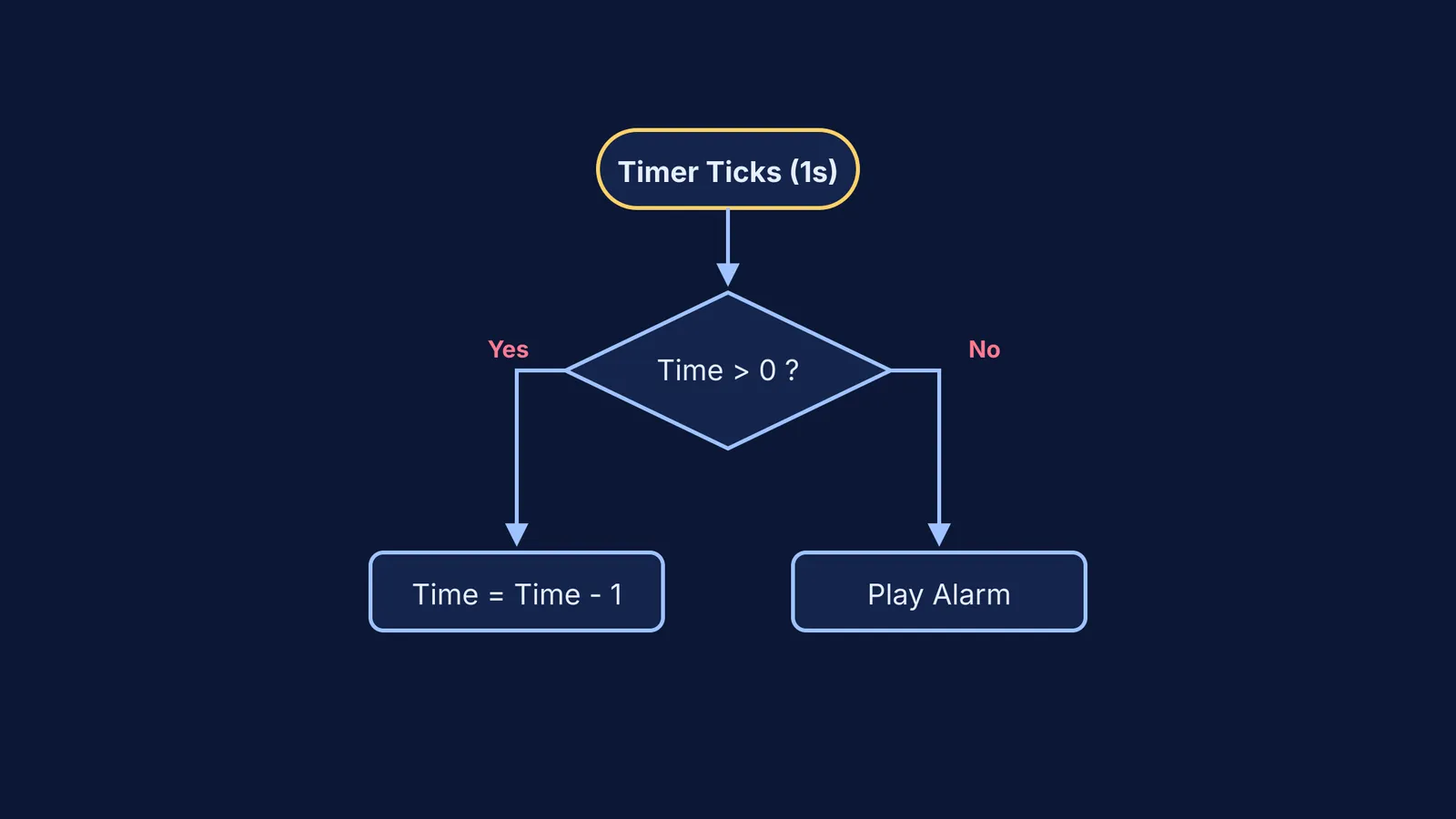
The Logic (The Loop): You add a Clock component that ticks automatically every second. When the clock ticks, the app checks a condition: is the time greater than zero? If it is, the app subtracts one second and updates the text label on the screen. If it reaches zero, it triggers a command to play an alarm sound.
If you get stuck trying to structure a loop or a condition, Fermi's AI tutor can work out what you already know, build a plan for the session, and explain the reasoning rather than just printing an answer.
How does building apps help with maths and physics?
Building a mobile app is an exercise in decomposition: breaking a large problem into smaller, manageable parts. If you want a button to reset your timer, you must tell the app exactly what "reset" means. You have to instruct it to change the variable back to 1500, update the text label on the screen so the user sees the change, and stop the clock from ticking in the background.
This structured thinking spills over into your academic subjects. Setting up the conditional statements for an app is just like setting up the constraints for a mechanics problem or writing out the steps of a geometry proof. You learn to spot logical gaps. When your app does not behave as expected, you are not failing; you are debugging. You learn to trace your steps backward to find the flaw, a habit that is invaluable whether you are fixing an algorithm or reviewing a chemistry derivation.
By starting with a simple idea and a block-based tool, you can build a working app in a single weekend. It is a practical way to build a study routine that lasts, showing you that the screen on your desk does not have to be a distraction that hurts your focus—it can be something you control. And when you need a break from studying, tinkering with your app is a great example of what to do in a study break that keeps your mind engaged while stepping away from the textbook.


