On this page
At-home proctored exams swap the test centre for your own room. On Pearson VUE's OnVUE, for example, a proctor watches you through your webcam and microphone (Microsoft Learn). Before question one, your room, laptop, Wi-Fi and ID are all checked, and ETS warns TOEFL home candidates that missing a requirement on test day means no test and no refund (ETS). Rules differ by exam, so read your own exam's page too.
What does the proctor check in your room?
For the GRE at home, ETS's at-home requirements say you must be alone with no one entering, sit on a standard chair at a desk (not on a bed), close doors, blinds and curtains, and move the camera to show a 360-degree view of the room. ETS's TOEFL rules add that glass walls, doors and large open windows must be covered.
Microsoft's rules for its exams on OnVUE ask you to unplug extra monitors, switch off other computers and keep books, notepads, sticky notes and pens out of arm's reach. The proctor ends the exam if anyone other than a child under 13 is in the room, so in a busy home, pick the room whose door shuts, not the one with the nicest light.
What laptop, camera and internet do you need?
The GRE at-home device rules are a useful baseline:
A desktop or laptop; no tablet, Chromebook, phone or Microsoft Surface Pro.
One screen and one keyboard.
Speakers and a microphone that are not part of a headset.
A charged phone or tablet to act as a second camera.
For OnVUE, Microsoft's guide says to run the official system test on the same computer and in the same place you will test from, to prefer a personal computer over a work one, and to use a wired connection if you can. ETS warns that other devices using bandwidth can cause problems, and suggests running its equipment check on the same day of the week and at the same time of day as your test.
What ID do you need, and when is it checked?
For Microsoft exams on OnVUE, you need a current government-issued ID whose name exactly matches your certification profile; renewal or name-change forms are not accepted (Microsoft Learn). You photograph your face, ID and exam area with your phone, and a greeter reviews the photos before the exam launches.
For the GRE at home, ETS asks you to verify your identity at least 72 hours before the test, through an app that captures your ID and a selfie (ETS). If your passport says “Priya Ramesh Iyer” and your booking says “Priya Iyer”, fix it this week, not at check-in.
Which behaviours get candidates flagged?
A 2021 remote-proctoring rules list from the National Certification Corporation, a US certification body, shows how proctors sort what they see. A major violation ends the exam; a minor one becomes major if repeated after a warning.
Major: leaving the room, talking to someone in it, using a phone, opening another app on your computer (even a notepad or calculator), covering the camera, photographing the screen.
Minor: reading questions aloud, talking to yourself, looking away from the screen, briefly leaving camera view, tapping your fingers or feet, eating or chewing gum, lighting that is too dim or too bright.
On OnVUE, greeters may also ask you to turn out your pockets and pull back long hair to show your ears, and drinks must be in a clear, spill-proof container (Microsoft Learn).
For those timed papers, see our month-by-month plan for chapter tests and full mocks and how to track time per question in mock tests. The Fermi Problem Library has worked problems with a step-by-step solver that explains the reasoning, so you can check your method after a silent, timed set.
Your exam-day checklist
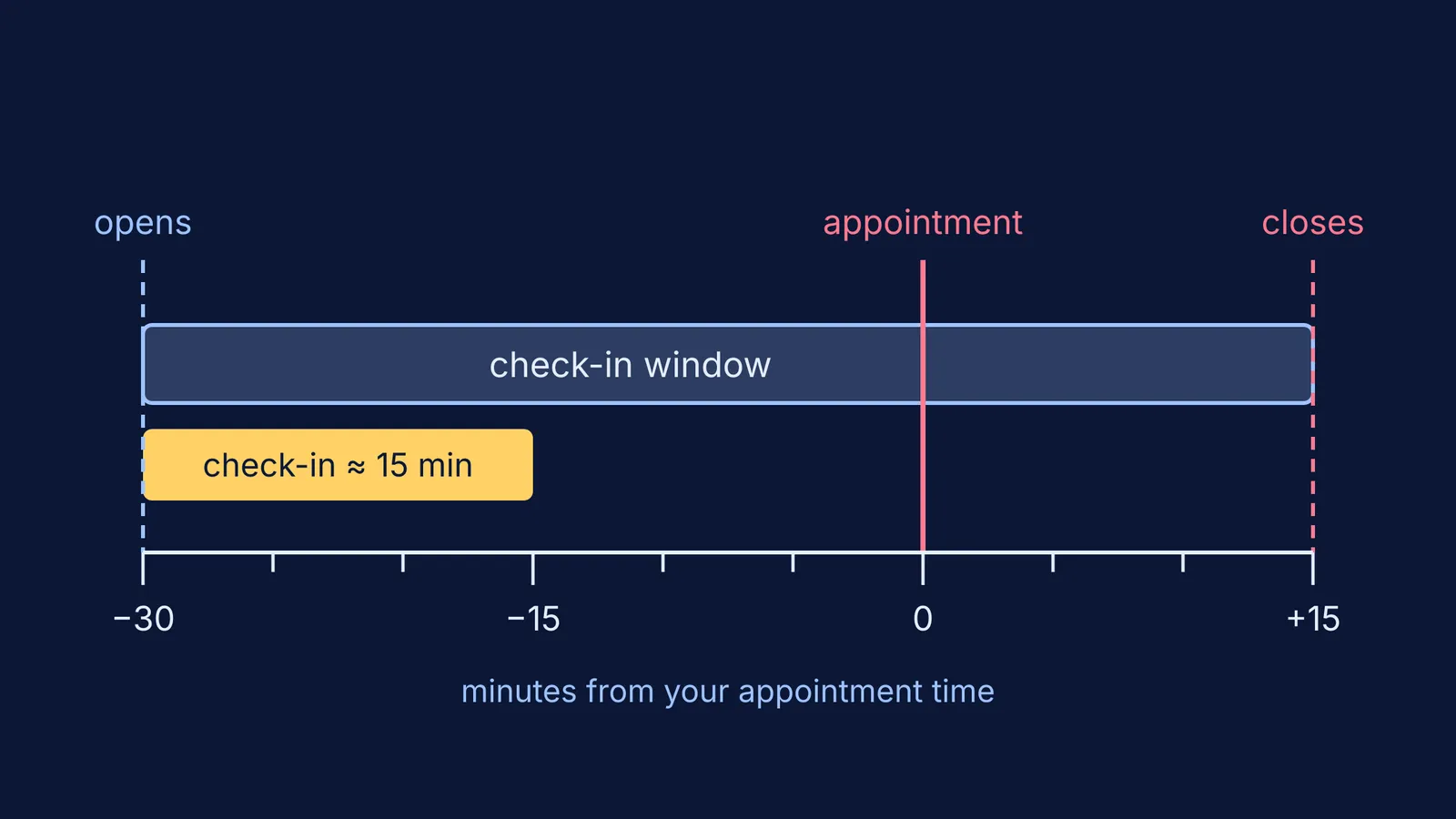
For Microsoft exams, OnVUE lets you check in from 30 minutes before to 15 minutes after your appointment, and check-in takes about 15 minutes (Microsoft Learn). Plan backwards:
The day before: run the official system or equipment check on the same laptop, in the same room, on the same Wi-Fi. OnVUE also asks you to run it again on exam day.
Match the name on your ID to your booking, letter by letter.
Clear the desk down to the computer and whatever note-taking item your exam allows.
Tell your family when the exam runs, that anyone walking in can end it, and to pause streaming.
Before you start: plug in the charger, close every other app and turn off pop-up blockers.
When the window opens: start check-in straight away, not at your appointment time.
After the photos: put your phone out of arm's reach but within earshot, in case the proctor calls.
If there is a technical problem, the proctor tries the chat window first and then your phone (Microsoft Learn). For trouble at a physical centre instead, see what to do about lateness, a missing admit card or the wrong centre.
Run the system check tonight: many at-home exam problems show up a day early if you look.