
On this page
Your college often announces an exam form deadline only once. It goes out by email or as a notice on the student portal, and the student who opened it that evening has a day’s head start on the one who sees it in a WhatsApp forward on the last date. The fix is not checking more often. It is checking at set times and doing one thing with every notice you open.
How often should you check college email and the portal?
Three short checks a day is enough for most students. In a two-week field experiment by Kostadin Kushlev and Elizabeth Dunn, 124 adults spent one week limited to checking email three times a day and another week checking as often as they liked. During the limited week they reported significantly lower daily stress, and lower stress went with higher well-being on a range of measures.
The participants were adults, not students, and the study measured stress, not missed deadlines, but it suggests fixed checks are calmer than constant ones. With checks at 8 am, midday and 8 pm, the longest a notice can sit unseen is the overnight gap, so anything sent late at night is read at breakfast.
How do you keep track of college notices without missing one?
Decide the when and where in advance. A meta-analysis by Peter Gollwitzer and Paschal Sheeran pooled 94 independent tests of if-then plans and found a medium-to-large effect on reaching goals (d = 0.65). An implementation intention is a plan that names the situation and the action in advance: “If it is 8 am and I have finished breakfast, then I open college email and the portal’s notice page.”
Set it up once:
Write your three if-then plans on a card: morning, midday, 8 pm.
Bookmark the portal’s notices or announcements page, not just the login page.
Make a filter or label for mail from your college domain and the exam cell, so it never mixes with promotions.
Keep one calendar, on your phone or on paper, for every date. Not the inbox, not screenshots.
On Sunday evening, do a 20-minute weekly sweep: scroll the past week’s portal notices, check attendance and internal marks, and read the next 14 days in your calendar.
Then every notice gets one of three moves the moment you open it:
Act if it takes under two minutes: fill the form, reply to your faculty adviser.
Date it if it cannot be done now: put the deadline in your calendar with a reminder a day or two earlier, and note what you will need (fee receipt, photo, roll number).
Archive it if there is nothing to do.
What does one notice look like from inbox to done?
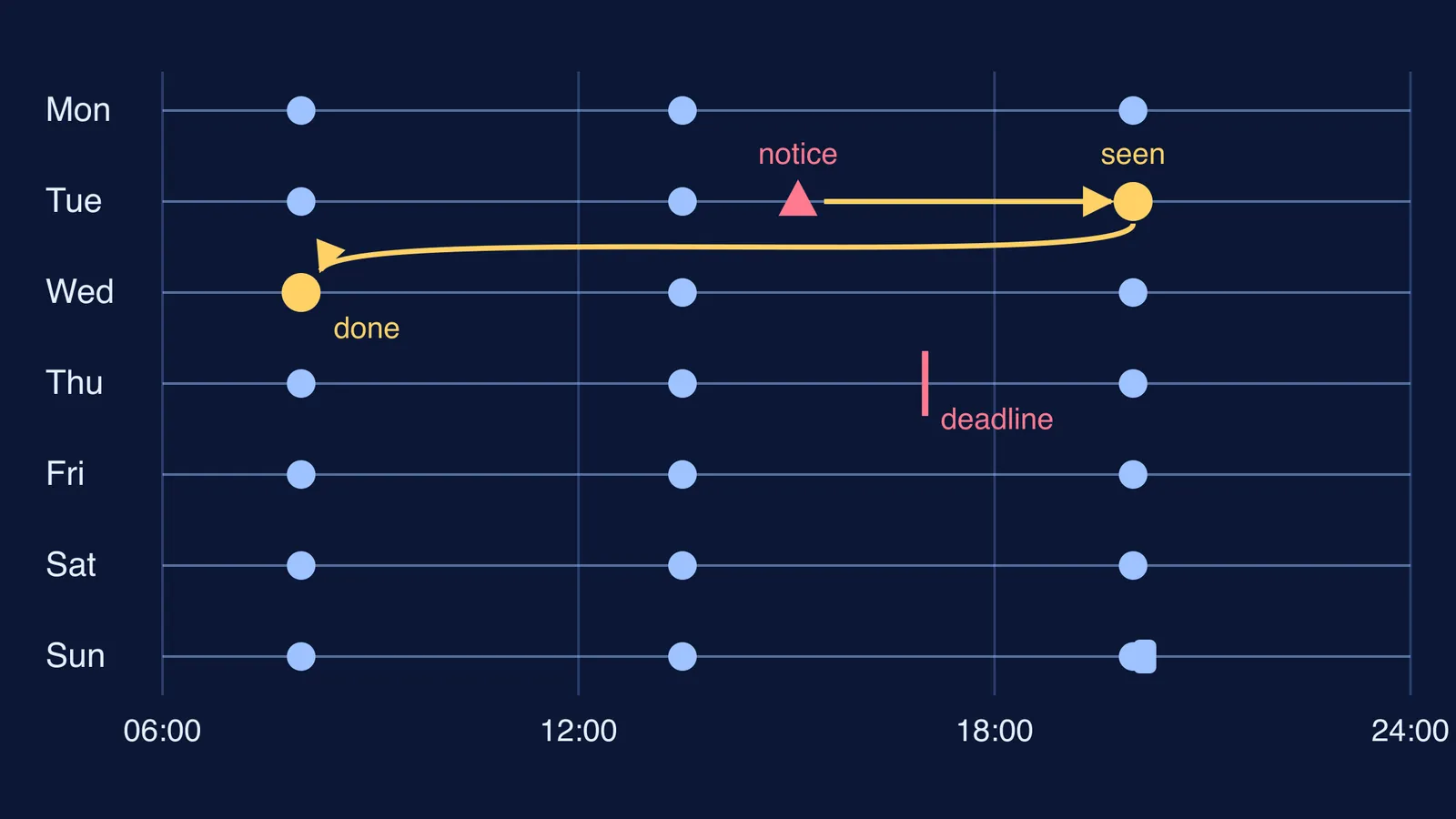
Suppose the exam cell posts a notice on Tuesday at 3:10 pm: mid-semester exam registration closes Thursday at 5 pm and needs your fee receipt. You are in a lab, so you see it at your 8 pm check. The receipt is buried in another email, so you date it: “Mid-sem registration”, Wednesday 8 am. On Wednesday morning you find the receipt, register, and save the confirmation as a PDF. The diagram at the top traces that route.
Read how much mid-semester exams and internals count to see why a registration like this is worth protecting. If the same notice tells you the exam is ten days away and you do not know where to start, Fermi’s AI tutor can work out what you already know and build a plan for the session, so your first study block has a clear next step.
How do you spot a fake college email?
Deadline emails are also what scammers copy. The Press Information Bureau’s October 2025 backgrounder on cyber frauds says phishing, where people are lured into revealing sensitive information through deceptive emails or messages, is on the rise. For college mail:
Never pay fees or type your portal password after clicking a link in an email. Open the portal yourself from your bookmark.
Check the sender’s full address, not just the display name.
If an urgent “last date” mail looks unfamiliar, confirm it on the portal or with the department office.
Your portal password matters as much as your inbox, so read how students should manage passwords for exam portals. If you have lost money to an online fraud, the same backgrounder says helpline 1930 gives immediate help, and complaints can be filed on the National Cyber Crime Reporting Portal.
What can parents do without hovering?
Parents do not need portal access. Try one relaxed weekly question instead of daily checking: “What’s on your calendar for the next two weeks? Anything from college you’re still waiting on?”
If the answer is “I don’t know”, sit through one Sunday sweep together, then step back. If a deadline has already been missed, the next move is a polite email to the department office that same day, saying what was missed and asking what options remain.
To fit the three checks into a full day of lectures and labs, start with a daily routine for engineering college students.