On this page
It is easy to fall into the trap of buying every educational tool that promises higher marks. The digital education market has exploded in recent years, leaving families with a dizzying array of options. You might subscribe to one app for timed mock tests, another for animated video lectures, a third for spaced-repetition flashcards, and a fourth simply to track your teenager's study progress. Parents often purchase these tools with the best intentions, hoping to provide their children with every possible academic advantage.
However, more apps do not mean more learning. The average American K-12 student uses 42 unique educational technology tools over the course of a school year, according to a 2023 report by LearnPlatform (covered by Edlink). This "app overload" fragments a student's attention, creates unnecessary administrative friction, and wastes a parent's money. When students have too many options, they often spend more time organising their digital workspace than actually mastering the material.
What is the hidden cost of app overload?
When a student has to juggle five different study platforms, they spend a significant amount of their dedicated study time simply navigating between different interfaces. Every time your teenager closes a video lecture on one app to open a separate question bank on another, their brain pays a cognitive penalty. They have to re-orient themselves to a new layout, remember different passwords, and manually connect the concept they just watched to the problem they are about to solve.
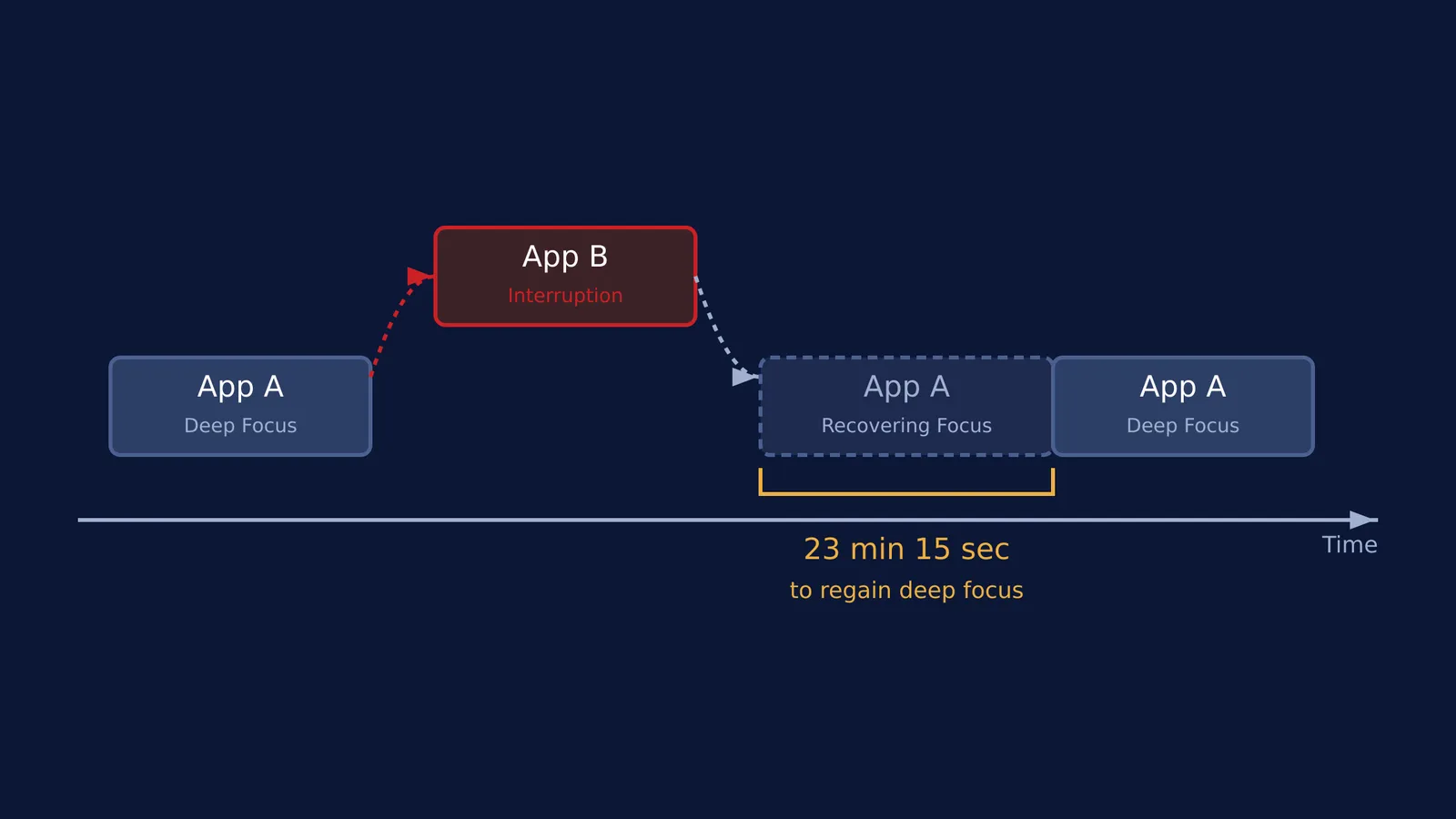
According to a classic study on the cost of interrupted work, it takes an average of 23 minutes and 15 seconds to regain deep focus after being interrupted by a task switch. This occurs because of "attention residue" — a phenomenon where a portion of a student's focus remains stuck on the previous task even after they have moved on. This constant multitasking while studying is a primary cause of student burnout and subscription fatigue for parents. The brain simply cannot process deep, complex information when it is constantly shifting contexts.
Why do families accumulate so many study tools?
The accumulation of study apps rarely happens all at once. It is usually a gradual process driven by specific academic anxieties. A poor mark in a mid-term maths exam might prompt the purchase of a dedicated maths practice app. A few weeks later, a struggle with organic chemistry might lead to a subscription for a science video platform.
Furthermore, there is a strong element of peer pressure involved. When a teenager hears that their classmates are using a specific gamified learning tool, they naturally want access to it as well. Parents, wanting to ensure their child is not left behind, often agree to the subscription. Over time, these isolated purchases build up into a sprawling, unmanageable collection of overlapping digital tools that are rarely used to their full potential.
How to run an app audit?
How do you know if you are paying for overlap? Sit down with your teenager and their devices. Use this simple audit checklist to clear out the clutter and streamline their digital learning environment:
Check the school's provision: Is your child's school already paying for a platform that does the same thing? Many schools provide comprehensive digital tools, from virtual labs to extensive question banks, that parents do not realise exist.
Track the 'last opened' date: Ask your child to show you the screen time or battery usage statistics on their phone or tablet. If a paid study app has not been opened in the last 14 days, cancel the subscription immediately.
Look for active vs passive learning: Are they just watching videos, or are they actively solving problems? Tools that only offer passive video lectures often duplicate what is already freely available online.
Identify the core requirement: Ask your teenager which subjects they actually need help with versus which subjects they are managing well with just their school textbooks. Target your resources only where they are strictly necessary.
Count the subscriptions: Are you paying for three different tools to cover chemistry, physics and biology separately?
How to choose one platform that does the heavy lifting?
Instead of a patchwork of disjointed apps, look for one comprehensive platform that reduces the need to switch tabs. Fermi's AI tutor works out what a student already knows, builds a plan for the session, and teaches through it. Because it is an integrated platform, your child does not need to leave the session to find a simulation or a practice problem.
For example, if your child is struggling to picture a physics concept, the Fermi Simulation Lab allows them to interact with it directly within the same learning environment. This cuts down the cognitive cost of switching between a video app and a separate problem-solving app.
When deciding between coaching, online classes or self-study, remember that any digital tool is only as good as the time spent focused on it. Just as setting up a good home study space means clearing away physical clutter, setting up a productive digital study environment means clearing away unused apps. Removing these digital distractions helps your child focus on what actually matters: engaging deeply with the material and learning.