On this page
Video games are designed to make spending frictionless. By converting real money into virtual currencies like 'Gems', 'V-Bucks' or 'Robux', games remove the normal hesitation we feel when handing over cash. For children, whose impulse control is still developing, this separation between real money and virtual items often leads to surprise credit card bills.
Why do children spend money on online games?
Virtual currency is an example of 'currency obfuscation', a psychological tactic that makes it harder for the brain to calculate the true cost of an item.
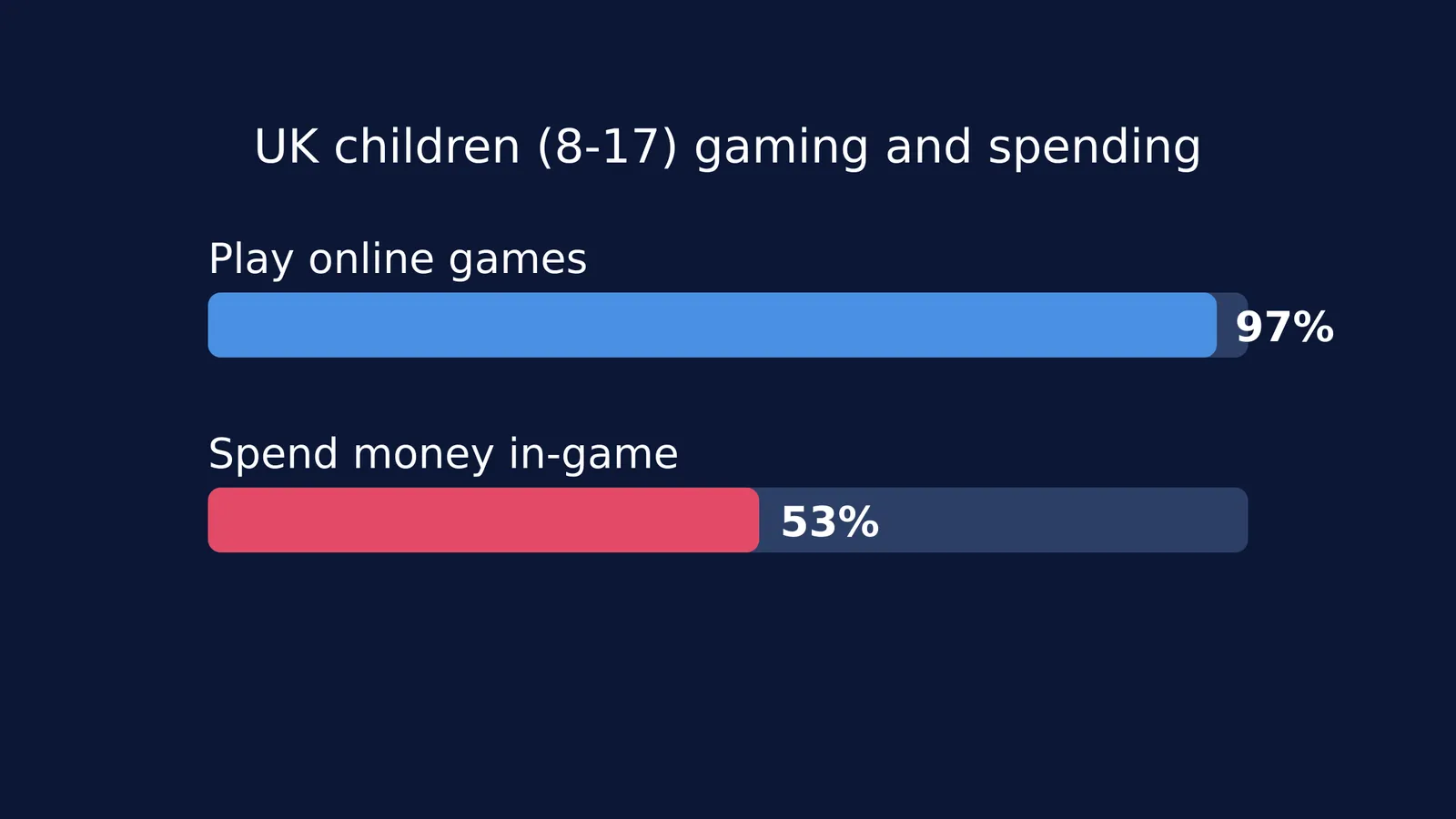
A 2025 Ofcom report on media use found that 97% of 8- to 17-year-olds play games online, and 53% of those players spend money within the games 1. The design of these games often causes confusion: the same report found that 42% of children found it unclear what they were actually buying, and 41% often spent more than they intended.
Because the money does not feel real, the purchases do not feel like real spending until a parent sees the bank statement.
Game developers also use several techniques to encourage players to spend real money. Loot boxes and mystery packs offer randomised rewards, using the same psychological mechanics as a slot machine to provide a dopamine rush when a rare item finally appears. Limited-time offers with countdown timers create a sense of urgency, pressuring children to buy immediately without thinking about the cost. Finally, for many teenagers, online games are their primary social space. Having the default character or skin can lead to teasing from peers, making digital purchases feel like a social necessity.
How can I explain virtual money to a child?
To a child, digital money can feel infinite because they do not see a physical wallet getting thinner. You can break this illusion by tying the virtual cost back to the physical world.
The physical trade-off: If your child wants a ₹800 in-game purchase, have them take physical cash from their own savings or piggy bank and hand it to you. This physical exchange helps them realise that the money is gone from the real world.
The work-to-play ratio: Explain money in terms of time. You might say, "This skin costs ₹2,000. That is the same as three weeks of your allowance, or two hours of my work."
Active screen time: Children who struggle with impulse control in games often benefit from structured, purposeful screen time in other areas. When studying, Fermi's AI tutor builds a plan for the session and holds a line of reasoning rather than just printing an answer. This helps them treat the device as a tool for learning, not just an entertainment shop.
How can I get a refund for an accidental purchase?
If you discover a large, unexpected charge on your card, act quickly. Do not immediately dispute the charge with your bank, as both Apple and Google may permanently ban your account for a chargeback.
Instead, use their official refund channels, which are often accommodating for accidental child purchases:
Apple: Go to reportaproblem.apple.com 2, sign in, choose "Request a refund", and select "A child/minor made purchase(s) without permission".
Google Play: You can request a refund through your Order History at play.google.com/store/account 3. Google generally offers a streamlined process if the purchase was made within the last 48 hours.
When you discuss the charge with your child, treat it as a mistake of misunderstanding rather than malice. Many children genuinely do not realise that clicking 'buy' in a game draws real money from your bank account. Once the immediate issue is resolved, you can have them 'work off' the refunded or lost money through household chores, which reinforces the real-world value of the money they spent.
How can I stop surprise in-game purchases?
The most effective way to stop unauthorised spending is to remove the ability to pay instantly. By adding friction to the payment process, you give your child time to pause and think.
Remove saved cards: Never save credit card details on a child's device or console.
Require passwords: Set up the device to require a password or fingerprint for every single purchase, and do not share the password with your child.
Use a digital allowance: Instead of linking a credit card, buy them a gift card for a specific amount. Once that credit is gone, it is gone. This teaches them to budget their spending without putting your bank account at risk.
For more on setting boundaries around devices, read our guides on video games and teenagers and managing screen time and homework rules.