On this page
When a child asks to borrow your phone or card for an online checkout, the request often sounds trivial: a small bundle of gems, a game skin, or an extra life. But hand over a card or leave saved details on shared devices, and digital checkouts quickly trigger unexpected statements, recurring debits, and family conflict. Protecting your finances requires combining technical guardrails with candid conversations about what digital money really is.
Why do children want to buy things online?
Digital purchases rarely feel like spending actual money to a child. In a developmental study by Young-eun Lee and Susan A. Gelman (2022) in the Journal of Experimental Child Psychology, researchers found that children evaluate digital property differently from physical items until around age 9, when understanding of intangible ownership matches adults.
This disconnect is amplified by app store design. In Marketing Science, behavioral economists Drazen Prelec and George Loewenstein (1998) showed that payment mechanisms alter the psychological "pain of paying." By decoupling consumption from the tangible loss of money, credit cards and digital tokens reduce the friction that prompts buyers to pause. When children buy virtual currencies like Robux or V-Bucks, payment decoupling becomes total: they spend fictional coins inside a software loop, insulated from the real money funding them.
What happens when payment cards are saved on family devices?
Modern apps eliminate friction through saved cards, autofill, and one-tap purchasing. While convenient for adults, leaving card details stored on a family tablet or phone removes the last barrier to impulse spending.
In landmark enforcement actions, the Federal Trade Commission (FTC) secured a 32.5 million dollar settlement with Apple in 2014 and a 19 million dollar settlement with Google after finding that 15-to-30-minute password grace period windows allowed children to rack up hundreds of dollars in unauthorized charges. An analysis by the OECD (2022) on dark commercial patterns highlighted that interface interference and disguised costs disproportionately harm minors, who lack the impulse control to resist artificial countdown timers.
How can parents set up purchase approvals and remove saved cards?
Securing family devices takes only a few minutes and permanently closes the door on surprise bills:
Remove saved payment methods: Open Google Play, the App Store, and shopping apps to delete stored cards and wipe autofill credentials.
Require Google Play authentication: Tap your profile icon, tap Settings, choose Authentication, select Require authentication for purchases, and choose 'For all purchases through Google Play on this device' as outlined by Google Play Help.
Turn on Apple Ask to Buy: In Family Sharing, enable Ask to Buy for your child's account following Apple Support. Every transaction, including free downloads, routes to your device for approval.
Safeguard Indian banking credentials: The Reserve Bank of India (RBI) mandates Additional Factor of Authentication (AFA) via one-time passwords (OTPs) for domestic online card transactions and enforces a ₹15,000 limit on recurring e-mandates. Never share SMS OTPs with your child or enable biometric autofill on shared screens.
What rules should families set for digital spending?
Technical barriers prevent accidents, but household rules build long-term financial judgment. Align these boundaries with research on video games and teenagers and screen-time rules for study hours:
The 48-Hour Delay Rule: Any non-essential digital purchase must sit on a wishlist for two full days. Fleeting impulses usually fade within hours.
Fixed allowances over card sharing: Never hand your card to a child. Provide a fixed monthly digital allowance through a supervised prepaid card or gift card with a capped balance.
The earned or matched principle: For cosmetic upgrades like character skins, require the child to contribute from pocket money, restoring the missing pain of paying.
Distinguish entertainment from learning tools: When a child asks for money for study material, verify the syllabus value and check privacy and data safeguards in learning apps. For instance, the Fermi Problem Library provides worked problems with a step-by-step solver that explains the reasoning rather than printing an answer, while the Fermi Concept Library covers every concept in physics, chemistry, biology, mathematics and computing.
How do you teach a child what clicking checkout really means?
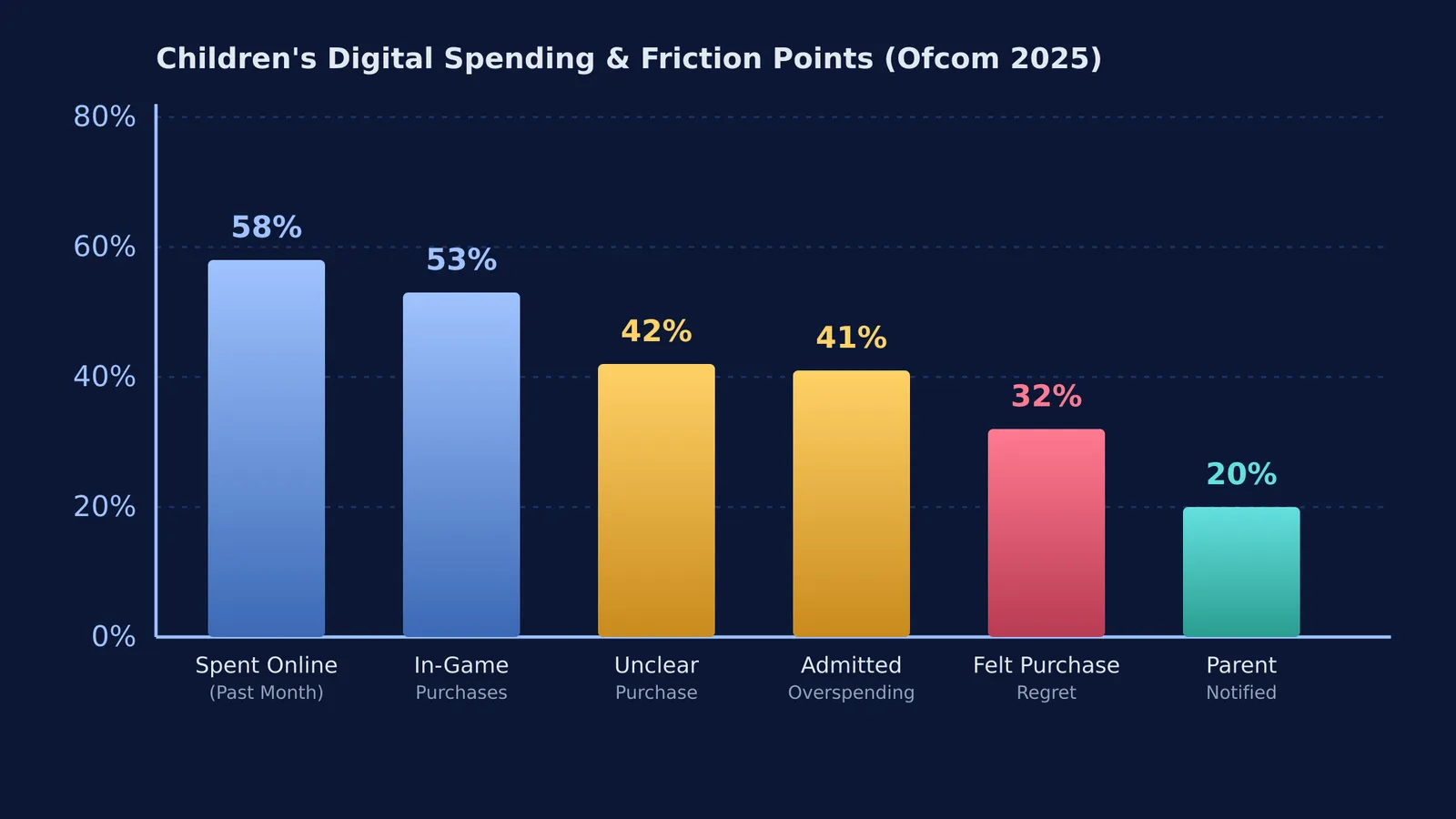
Rules work best when children understand the economic reality behind the screen. In a 2025 quantitative study of 2,205 children aged 8–17 by UK communications regulator Ofcom, 58% of children spent money online in the past month. Within games, 53% spent money, while 42% found it unclear what they were actually buying and 41% admitted to overspending. Crucially, 32% of young gamers regularly regretted their in-game purchases, yet only 20% of parents received notifications when an online purchase was attempted.
To bridge this gap, complete three steps together:
Translate the screen into physical trade-offs: Show what the checkout amount represents in everyday items, such as books, cinema tickets, or a week of lunches.
Inspect the digital receipt together: Open your banking app immediately after checkout so the child watches the balance decrease in real time.
Review past purchases monthly: Look back at previous in-app buys after thirty days. Recognizing that a digital costume lost its appeal after one weekend turns buyer's regret into lasting maturity.