On this page
A phone camera is a stopwatch and a ruler in one. Each frame is a snapshot at a known moment, so if you mark where a falling ball is in every frame, you get distance-time data good enough to measure g.
What do you need to analyse motion from a video?
A phone, a small heavy ball, a metre rule and a laptop. Tracker is a free video analysis and modelling tool built on the Open Source Physics Java framework and designed for physics education. In The Physics Teacher, Douglas Brown and Anne Cox described Tracker experiments including modelling air resistance on falling objects.
Slow motion helps, with one trap: the clip plays back slower than it was recorded. A Clayton State University guide to Tracker gives the example of a clip that plays at 60 frames per second but was captured at 960. You must type the capture rate into Tracker's Clip Settings, or every time in your data will be wrong.
How do you film a falling object so the scale is right?
Scale is where most home experiments go wrong. In tests at Dordt College by John Zwart, Kayt Frisch and Tim Martin, placing the reference metre stick nearer to or farther from the camera than the moving object, or filming at an angle, gave systematic errors as large as 40%. Their summary on the Vernier blog reports that on a wide-angle setting, an object 40 cm in front of the stick would appear 40% larger than its true size; on the normal and telephoto settings the effect fell to 10–15%. Their advice: stand farther back and use the telephoto (zoomed-in) setting.
Before you press record:
Tape the metre rule to the wall directly behind the ball's path.
Prop the phone on books, level, with the lens facing the wall square-on.
Step the phone back and zoom in so the drop fills most of the frame.
Light the scene well so the ball shows up crisply.
Drop, don't throw, and start marking once your hand is out of the shot.
How do you mark positions frame by frame?
In Tracker, set the true frame rate, drag a calibration stick along your metre rule and type its length. Put the origin at the ball's first marked position with the y-axis pointing down. Then step through the frames, clicking the centre of the ball each time, never its edge.
The time between frames is 1 divided by the frame rate. Slow motion gives more frames than you need, so mark every third or fourth frame and keep the step equal.
Worked example: how do you get g from the marks?
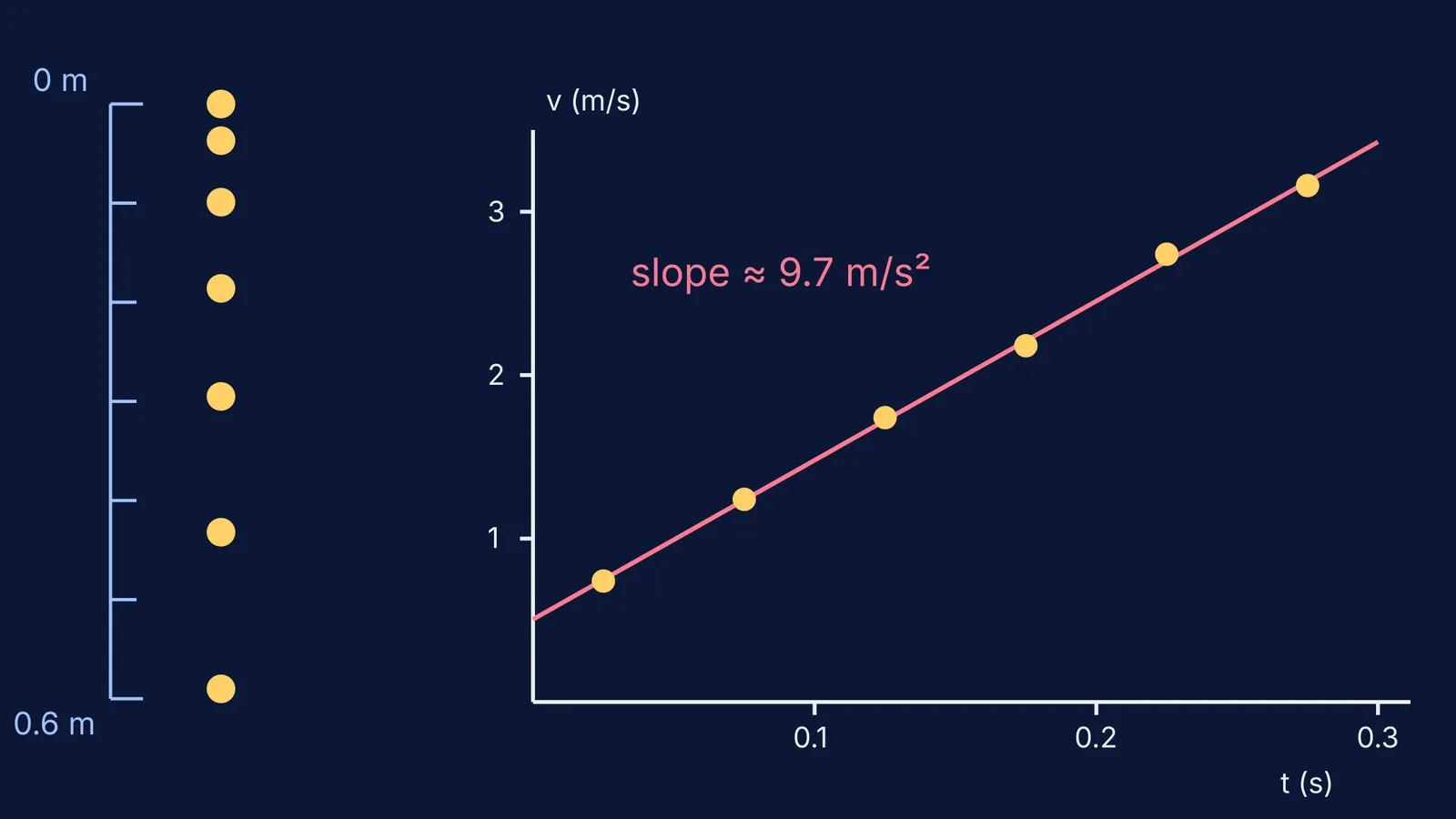
These are illustrative numbers of the kind a 60 fps clip gives when you mark every third frame, so the time step is T = 0.05 s. Positions below the first mark, in centimetres: 0, 3.7, 9.9, 18.6, 29.5, 43.2, 59.0.
Find the gaps: 3.7, 6.2, 8.7, 10.9, 13.7, 15.8 cm. Each is bigger than the last by roughly the same amount, the signature of constant acceleration behind Galileo's odd-number rule for free fall.
Divide each gap by 0.05 s to get average velocities: 0.74, 1.24, 1.74, 2.18, 2.74 and 3.16 m/s.
Plot each velocity at the middle of its interval: 0.025 s, 0.075 s and so on up to 0.275 s.
Draw the best-fit line. Its slope is the acceleration: about 9.7 m/s² by least squares.
Compare with the standard acceleration of gravity, 9.80665 m/s², listed by NIST. This result is about 0.7% low.
Why not use a single pair of gaps? Their differences jump around (here from 2.1 to 2.8 cm) because each click is good to only a millimetre or two. The line averages that scatter out. To show how far to trust the slope, add error bars as in our guide to finding the uncertainty in a gradient.
Does a higher frame rate give a better value of g?
Not always. In a 2026 arXiv preprint, Mauricio Echiburu Fuenzalida and Nicolás Fernández Astudillo analysed free-fall and pendulum videos in Tracker at 120, 60, 30 and 10 frames per second. For free fall, 120 fps gave less scatter, but the 10 and 30 fps estimates landed closer to the reference value; for the pendulum, frame rate made little difference. The study has not yet been peer reviewed. The lesson: more frames buy more points, not automatic accuracy. Scale and a square-on camera matter more.
What should you try next?
Predict before you film. Our slow-motion video experiments guide has four set-ups to guess first. The Fermi Simulation Lab has interactive simulations for ideas that are easier to see than to read, so you can test a guess about a velocity-time graph before you collect real data. Then film, mark, plot, and see how close you get to 9.8.