
On this page
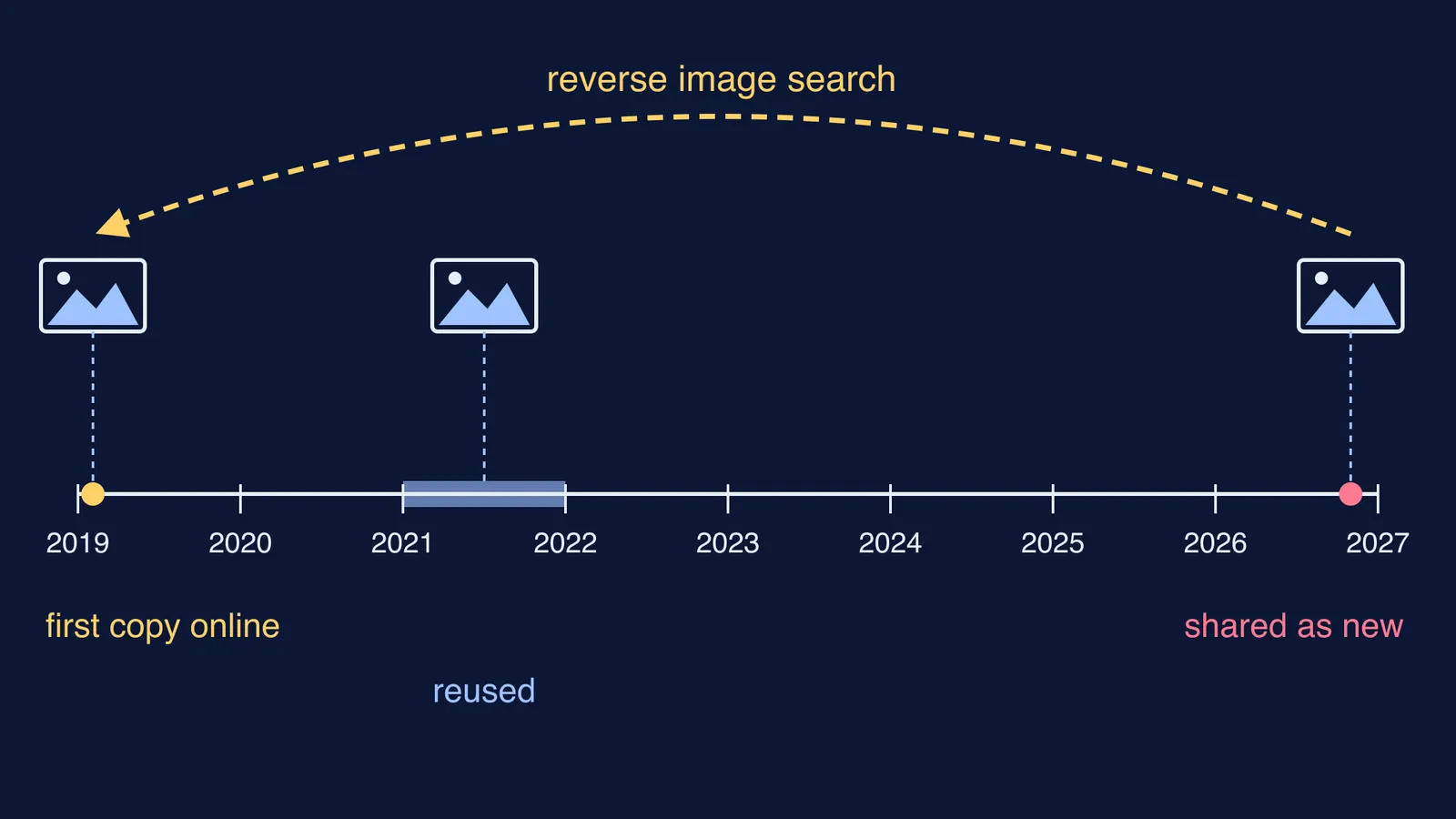
A photo is going round your family WhatsApp group with a confident caption. You can check where it came from in a few minutes, with free tools on your phone. The idea: a reverse image search finds other copies of the same picture online, and the oldest copy you can find tells you the latest date the photo could have been taken.
How do you reverse image search a photo on your phone?
On Android, open the Google app, tap Google Lens in the search bar, and upload the photo or a screenshot of it, as Google's Android instructions describe. In Chrome, touch and hold an image on a website and tap Search image with Google Lens. On an iPhone, the Google app works the same way, and in Chrome you touch and hold the image, as in Google's iPhone instructions.
If the photo arrived on WhatsApp, save it first and crop away added captions and stickers.
How do you do it on a laptop?
Go to google.com, click Search by image, and upload the file or drag it into the search box. In Chrome you can also right-click any image and choose Search with Google Lens, according to Google Search Help. For a second opinion, upload the same file to TinEye, a separate reverse image search engine with its own index.
How do you find the earliest date a photo appeared?
Two features do this job.
Google's About this image shows "when Google may have first seen a similar version of the image" and pages where it "may have been seen much earlier than other results", says Google Search Help. Open it from the info icon in the image viewer, then Learn more about an image. Google notes it is only available in some regions.
TinEye's Oldest sort shows "the earliest crawled images at the top", as TinEye's announcement of the feature explains. That date is when TinEye's crawler found the copy, not when the photo was taken.
Read these dates as a ceiling, not a birthday. The oldest copy a search engine knows about is not always the first one ever posted, so open the earliest link and read what it says.
Worked example: a 2019 crowd shared as a 2026 rally
On 3 November 2026, The Quint's fact-check team looked at a photo of a huge crowd shared on X as the INDIA bloc's rally at Delhi's Ramlila Maidan on 1 November 2026. Here is how their check maps onto the steps above.
Search the image. A reverse image search led to a People's Dispatch report dated 4 February 2019.
Read the earliest caption. That report described a Left Front rally at Kolkata's Brigade ground ahead of the 2019 general election.
Confirm with an independent copy. The same image on the stock photo site Alamy carried the date 3 February 2019 and a Kolkata location.
Look for earlier fact-checks. The Quint had already debunked the same photo in 2021, when it was shared as a crowd for the Prime Minister's address in Kolkata.
Check who posted it. The account that shared it had recently changed its username to impersonate another group.
So one 2019 photo got a new caption in 2021 and again in 2026. Crowd photos can travel this way: the picture stays, the caption changes.
How do you spot a photo that has been edited or made with AI?
If reverse search finds an older version, put the two side by side and look for what changed: a person added, a sign removed, a different sky. About this image can also show whether an image was "captured with a camera or generated with AI" when those details are available, according to Google Search Help. Missing details prove nothing either way, and Google notes that editing tools can change them. For the visual giveaways, use our checklist on how to tell if a photo or video is AI-generated, and our explainer on AI watermarks and content credentials.
A quick check before you forward
Save the image and crop out captions and stickers.
Search it with Google Lens, then with TinEye.
Find the oldest copy using About this image or TinEye's Oldest sort.
Compare the earliest caption, place and date with what the viral post claims.
Search the claim's key words with the words fact check.
If the photo is about the Government of India, send it to PIB Fact Check, which takes queries on WhatsApp at +91 8799711259.
The same habit works for fake exam notices and circulars.
If a viral photo comes with a science claim, such as a ring around the Sun, Fermi's Concept Library has a lesson for every concept in physics, chemistry, biology, mathematics and computing, so you can check whether the picture fits the science.