
On this page
You post a picture of your new study desk. If the file still carries its metadata, you may also have posted your home's coordinates. Here is how to check and strip it.
What is EXIF data in a photo?
EXIF stands for Exchangeable image file format, a standard for digital cameras worked on jointly by Japan's camera industry body CIPA and the electronics association JEITA; its current version, Exif 3.1, was published in January 2026 (CIPA standards list).
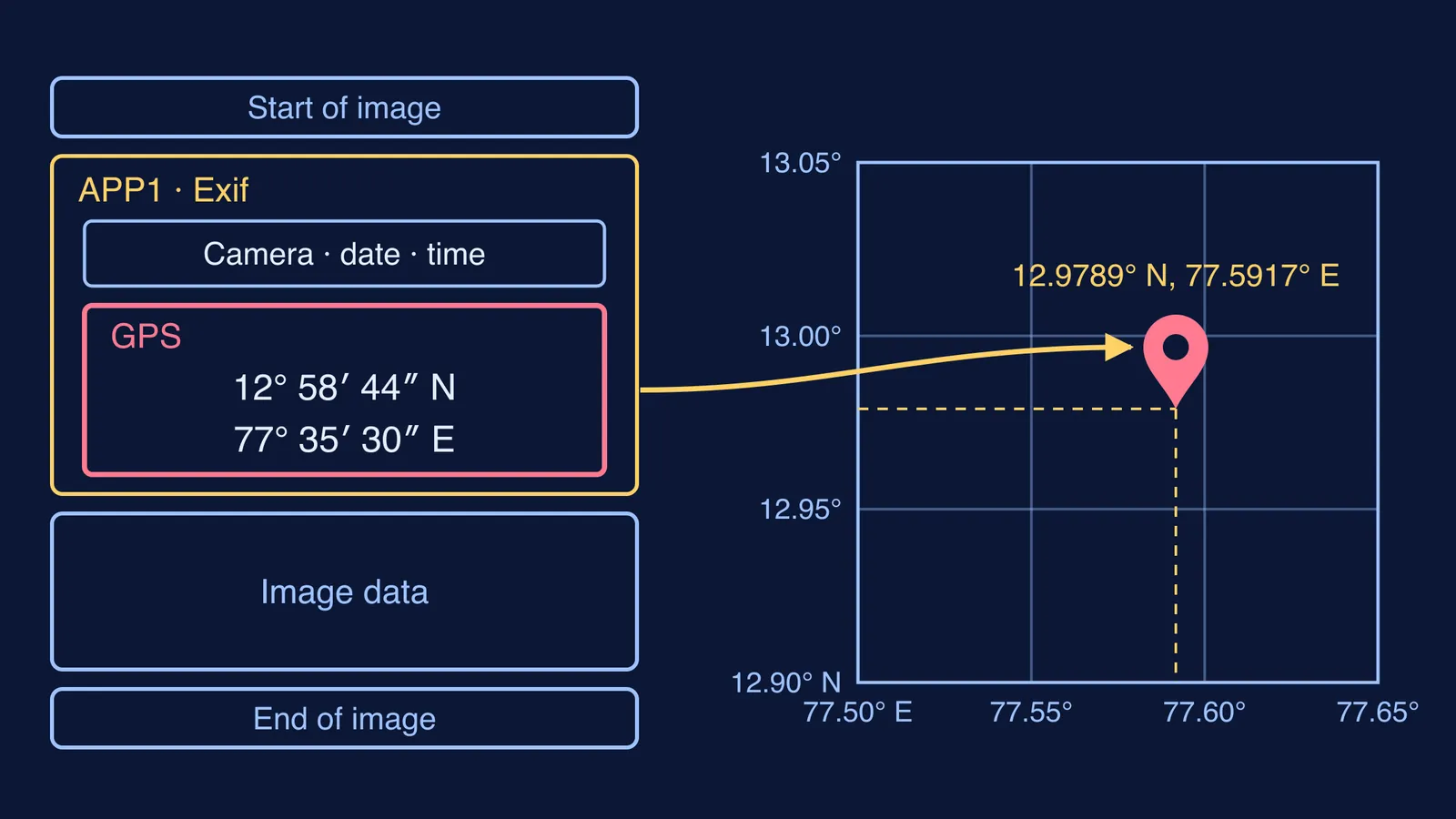
EXIF records the camera model, settings such as shutter speed, the date and time, and often the GPS position (Exif overview, Wikipedia). In a JPEG, this data sits in a segment called APP1 (same source). You never see it in the photo; anyone with the original file can read it.
Does a photo show where it was taken?
Often, yes. Apple's personal safety guide says that when Location Services is on for the Camera app, metadata gathered from GPS, Wi-Fi, mobile networks and Bluetooth is embedded in your photos and videos (Apple Support). Android cameras have the same kind of switch: Save location on Pixel and Motorola, Location tags on Samsung and Store location data on OnePlus (Google Photos Help).
The coordinates go into a GPS section of the EXIF data, with tags for latitude, longitude, altitude, a UTC time stamp and even the direction the camera was facing (ExifTool GPS tag reference).
This has happened. In December 2012, Vice posted a photo of the fugitive John McAfee whose leftover EXIF data let it be pinpointed to a location in Guatemala (The Next Web).
Worked example: turning EXIF numbers into a place
Latitude and longitude are each stored as three numbers (degrees, minutes and seconds) plus a letter for N/S or E/W (ExifTool GPS tag reference). Suppose a photo's details show:
GPSLatitude 12° 58′ 44″, GPSLatitudeRef N
GPSLongitude 77° 35′ 30″, GPSLongitudeRef E
Convert each to decimal degrees with degrees + minutes/60 + seconds/3600:
Latitude: 12 + 58/60 + 44/3600 = 12 + 0.9667 + 0.0122 = 12.9789° N
Longitude: 77 + 35/60 + 30/3600 = 77 + 0.5833 + 0.0083 = 77.5917° E
Type 12.9789, 77.5917 into a map app and you land in central Bengaluru, listed at exactly these coordinates (Bengaluru, Wikipedia). Each value is stored as a fraction, so a phone can record seconds with decimals and point to a spot far smaller than a city.
Our explainer on how GPS on a phone finds your location shows where the numbers come from. If converting minutes and seconds felt rusty, the Fermi Concept Library gives every concept in mathematics its own lesson and its place in the map.
How do you check a photo's location on iPhone or Android?
iPhone: open the photo in Photos, then swipe up or tap the Info button. The Map collection shows photos and videos with embedded GPS data (Apple Support).
Samsung Gallery: swipe up on the image to see where it was captured (Samsung Support).
Google Photos: Google says a location it only estimated is not shared, but a location your camera added shows when you share, and you cannot edit or remove it in Google Photos (Google Photos Help).
How do you remove location from a photo before posting?
On iPhone
In Photos, select the photos and tap Share.
Tap Options, turn off Location, then tap Done. "Location Not Included" appears above Options.
To strip it from the copy in your library, tap More, then Adjust Info, Adjust Location and No Location. To stop new photos being tagged, go to Settings > Privacy & Security > Location Services > Camera and choose Never (Apple Support).
On Android
Samsung (One UI 3.0 or later): in Gallery, select the photos, tap Share, tick Remove location data, then choose the app (Samsung Support).
Any brand, for future photos: open the Camera app's settings and turn off Save location, Location tags or Store location data, depending on your phone (Google Photos Help).
Some websites strip EXIF data on upload and others keep it (Exif overview, Wikipedia), so do not count on the app.
What should you check before you post a photo?
Location off: "Location Not Included" on iPhone, or Remove location data ticked on Samsung.
Background clear: no house number, school name, uniform logo, vehicle plate or street sign.
Timing: posting while you are still somewhere tells people where you are now. Post after you leave.
Whole files: cloud links and email attachments carry whatever metadata the file still has.
Parents, try a script instead of a lecture: "Show me where the location setting is. Let's switch it off together on one photo now."
Location is one of several small clues covered in our guide to what doxxing is and how small posts give you away. If someone has already used your location to follow or contact you, read what counts as cyberstalking in India and how to report it. Mumbai Police says citizens can register cyber-crime complaints on the 1930 helpline 24×7 (Mumbai Police).
Pick one photo on your phone now and check its location.