On this page
Group projects usually go wrong the same way: the night before submission, two people are still writing while the rest say they "didn't know what to do." A shared online document can prevent much of that if you set it up on day one with roles, deadlines and a record of who did what. Here is how, with a 14-day plan and a template.
Why do group projects go wrong?
Psychologists call this social loafing: "the tendency for individuals to expend less effort when working collectively than when working individually." A 1993 meta-analysis of 78 studies by Steven Karau and Kipling Williams found that social loafing is robust and holds across many tasks and kinds of people. The same review found that evaluation potential (whether your own contribution can be seen and judged) had an especially strong influence on it. So did how meaningful the task felt and what people expected of their teammates.
So make each person's work visible, give everyone a piece that matters, and make the plan clear enough that nobody has to guess.
How do you set up a shared document for a group project?
Use your school's editor; the names below are from Google Docs.
One person creates the document, gives it a clear name such as "Class 10B Science Project, Group 3, MASTER", and gives every member edit access.
Paste the template from the end of this post at the top.
Give every member their own heading, so nobody writes over anyone else.
Agree the checkpoint dates on a short call, and type them into the document before anyone hangs up.
Which roles should each person take?
Everyone writes one section. Each person also takes one job:
Coordinator: owns the plan and the checkpoint dates, and politely chases work that is missing.
Editor: at the end, joins the sections so they read in one voice, and checks spelling and headings.
Fact-checker: opens every source and checks every number and link.
Presenter or designer: builds the slides or poster from the final text.
With three people, merge editor and fact-checker.
How do you use comments and version history?
Use comments for tasks and keep the page for content. Highlight the sentence, add a comment and type @ followed by your teammate's email. Google's help page on comments explains that ticking "Assign to" turns the comment into an action item and emails that person. When the job is done, they click Resolve, and it can be reopened if it isn't really fixed.
Version history is both your safety net and your record. At each checkpoint, the coordinator names a version: "Notes done", "Full draft" or "Submitted". Google's version history guide shows how to name a version, see who updated the file and restore an earlier version if a section is deleted by accident. A single document can hold up to 40 named versions.
What does a 14-day group project plan look like?
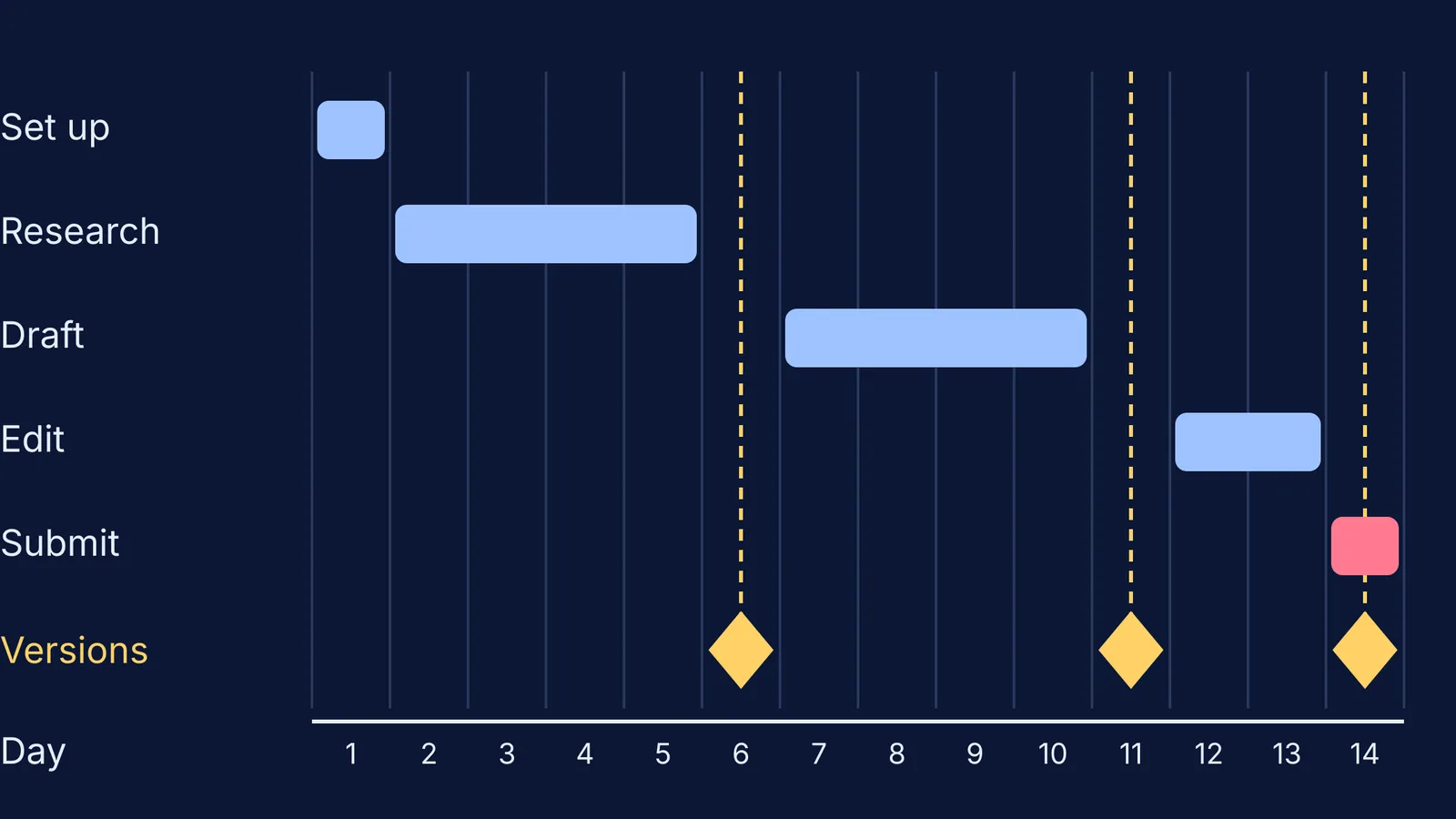
Here is a worked example for four students with two weeks:
Day 1: set up the document, roles and dates.
Days 2-5: everyone researches and writes notes under their own heading.
Day 6: checkpoint 1. The coordinator names the version "Notes done" and comments on any gaps.
Days 7-10: everyone drafts their own section and leaves at least two comments on one teammate's section.
Day 11: checkpoint 2. Name the version "Full draft" and make sure every open comment is assigned to someone.
Days 12-13: the editor joins the sections, the fact-checker checks the sources, and everyone resolves their own comments.
Day 14: everyone reads the whole document once. Name the version "Submitted", export it as a PDF and hand it in.
If a teammate misses checkpoint 1, raise it on day 6, not day 13. Our guide to what to say when group project teammates are not doing their work has scripts for that conversation. Parents who want to help without taking over can read how to help your child plan a school project timeline.
A template to paste at the top of your document
Project title and question:
Submission date and format:
Teacher's marking criteria (copy them in word for word):
Members and roles: name, role, section
Checkpoints: day 6 notes, day 11 full draft, day 14 submit
Rules: tasks go in assigned comments; nobody deletes someone else's text without leaving a comment; name a version at every checkpoint
Contribution log: date, name, what I did, where (section or comment)
Sources: section, link, checked by
Stuck on the science in your section? Fermi's AI tutor can work out what you already know and build a plan for the session. The Fermi Concept Library has a lesson for each concept in physics, chemistry, biology, mathematics and computing. Once you understand the idea, write your section in your own words.
Set up the document today, before anyone writes a word of the project itself.