
On this page
Your program either crashes with a wall of red text or, worse, quietly prints the wrong answer. Debugging is a routine you can learn. Work in this order: read the error, reproduce it, halve the problem, explain it to a rubber duck, and only then ask AI.
What should you do first when your code shows an error?
Read the error message slowly, from the bottom up. Python's official tutorial says that the last line of the error message indicates what happened, and the traceback above it shows where. The same page warns that the arrows under a syntax error mark where Python noticed the problem, not always where to fix it: in its example, a missing colon is flagged at the print() call just after it.
Take a short program that averages three test marks:
Line 1: marks = [78, 85, 92]
Line 2: total = 0
Line 3: for m in marks:
Line 4 (inside the loop): total = total + m
Line 5: average = total / len(mark)
Line 6: print(average)
Python stops with "NameError: name 'mark' is not defined" (newer versions also suggest marks) and points at line 5. The last line gives the type (an unknown name) and the detail ("mark"). The fix is one letter: the list is called marks.
Next, reproduce. Before changing anything, make the bug happen again with the same input, and write down what you expected and what you got. The Pragmatic Programmer's advice is to create a focussed test that reveals the bug before you try fixing it. If you cannot make a bug happen twice, you cannot tell whether your fix worked.
How do you find a bug when there is no error message?
Suppose a classmate's version runs but prints 30.666666666666668 instead of 85.0.
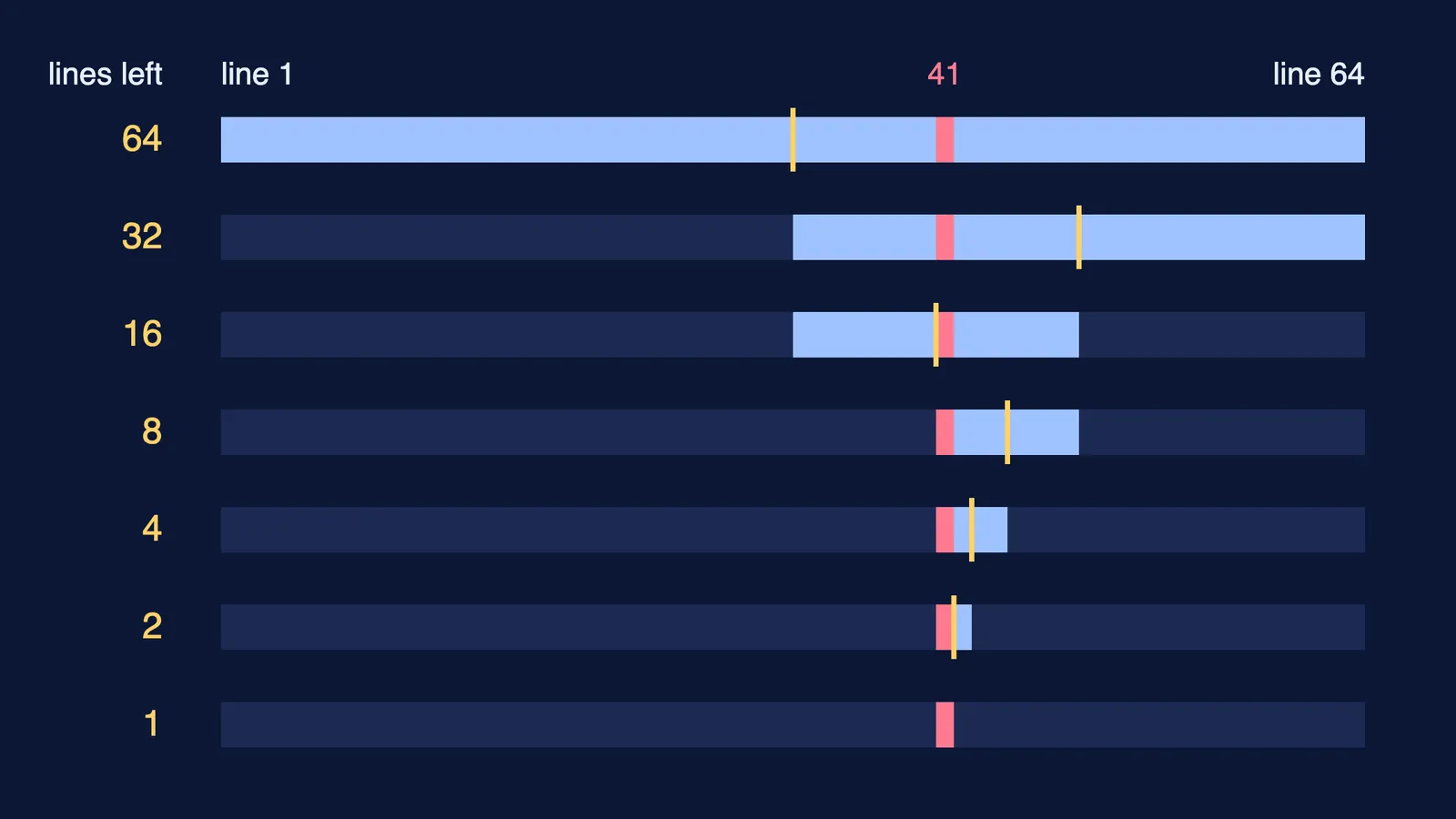
Halve the problem. Print the values halfway through the code. If they are right, the bug is in the second half; if wrong, the first. Then split that half again. Here, printing total just after the loop shows 92, not 255, so the bug is in the loop. Printing total inside the loop shows 78, then 85, then 92: it only ever holds the current mark, because line 4 says total = m instead of total = total + m.
This is a binary search. In 1982 Edward J. Gauss described the idea in Communications of the ACM as the "Wolf Fence" algorithm for debugging, a quickly converging way to catch run-time errors. Because each check halves what is left, 64 suspect lines need at most 6 checks: 64, 32, 16, 8, 4, 2, 1.
What is rubber duck debugging, and why does it work?
Rubber duck debugging means explaining your code, line by line, out loud to an object such as a toy duck. The method as usually described is to tell the duck what the code should do, then go line by line until you hear yourself describe a line that does not do what you said. For the loop above you would say "line 4 adds each mark to the total" and then see that it does not.
We found no controlled study of the duck itself, but research on self-explanation suggests why explaining can help. In a 1989 study in Cognitive Science, Michelene Chi and colleagues analysed students thinking aloud while they studied worked mechanics examples; the stronger students generated many self-explanations and monitored their own understanding accurately, while weaker students explained less and leaned on the examples. It studied physics students and did not test a method, but the duck prompts the same habit. The same idea sits behind the Feynman technique for learning a concept.
When should you ask AI for help with a bug?
Ask AI after the first four steps, not instead of them. By then you have the exact error, a way to reproduce it, the few lines where it lives and your own account of what they should do. That is a far better question than "my code doesn't work", and you keep the learning.
A script you can paste and adapt:
"Here is a six-line Python program. Please do not rewrite it."
"Expected output: 85.0. Actual output: 30.666666666666668."
"I have narrowed it to the loop on lines 3 and 4. I think line 4 adds each mark to the total."
"Give me a hint about which line is wrong and why, not the corrected code."
Asking for a hint about the first wrong line is the same move we suggest for maths and physics in why is my answer wrong? Ask AI for the first bad line. Then run the code again: AI can be wrong too, and only the output settles it.
Fermi's AI tutor teaches rather than answers: it notices where you are stuck and decides whether to explain, ask or show. If the bug is really a concept gap, such as what a loop variable holds, the Fermi Concept Library covers computing alongside physics, chemistry, biology and mathematics.
Learning C? The same routine applies: see how to learn C in first semester with small programs.