
On this page
Your laptop has a CPU, and it almost certainly has a GPU too, often built into the same chip.Both are chips that do arithmetic, but they are built for opposite kinds of work, and that difference explains why AI is trained on graphics chips.
What is the difference between a CPU and a GPU?
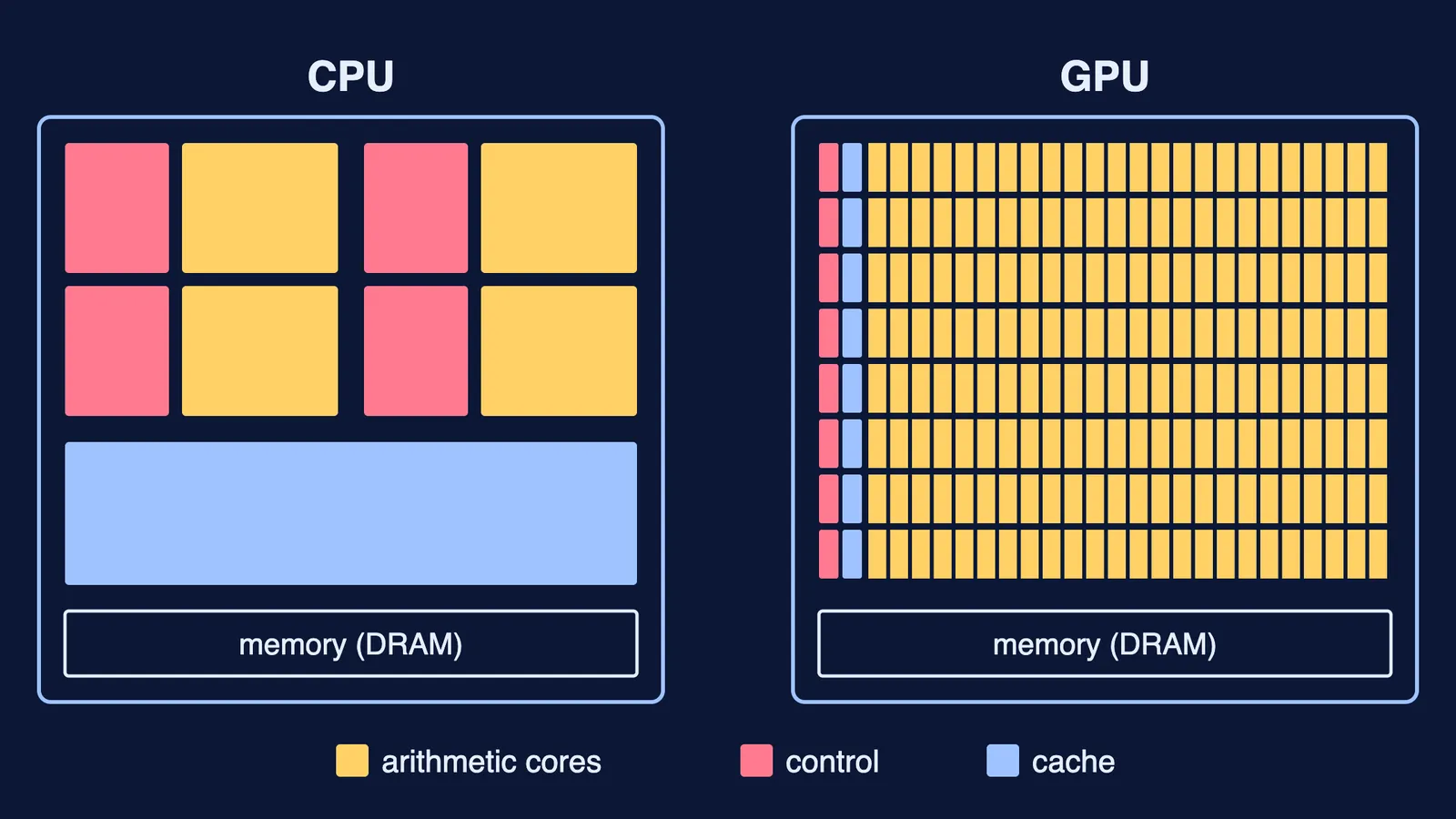
A CPU (central processing unit) is a few very fast workers; a GPU (graphics processing unit) is thousands of simpler workers moving together.
NVIDIA's CUDA Programming Guide says a CPU is designed to run one sequence of operations, called a thread, as fast as possible and can run a few tens of threads in parallel, while a GPU is designed to run thousands of threads in parallel.
The same guide says where the difference comes from: GPUs devote more of their transistors to data processing, while CPUs spend more on data caching and flow control. Cache keeps data close at hand. Flow control handles the "if this, then that" decisions. A GPU accepts a slower single thread in return for much more total work done.
GPUs began as chips for 3D graphics, the guide notes, running the same code in parallel for every part of a 3D scene or an image. It adds that this ability has been foundational to AI, from image classification to large language models.
Why do AI models train on GPUs?
A neural network is mostly layers of numbers called weights. Passing data through one layer means multiplying a list of inputs by a grid of weights: matrix multiplication. If the rules feel rusty, start with why AB is not equal to BA in matrices. To see what those layers do with a picture, read how computers recognise handwritten digits.
The key fact is simple: each output number of a matrix multiplication can be worked out on its own. Nothing waits for anything else, so the work splits cleanly across many GPU threads.
A well-known example is AlexNet, an image-recognition network described by Alex Krizhevsky, Ilya Sutskever and Geoffrey Hinton of the University of Toronto in a 2012 paper. It had 60 million parameters and learned from about 1.2 million training images. It took five to six days to train on two GTX 580 graphics cards with 3 GB of memory each. The authors wrote that the network's size was "limited mainly by the amount of memory available on current GPUs and by the amount of training time that we are willing to tolerate." In the 2012 ImageNet competition, a version of it won with a top-5 error of 15.3%, against 26.2% for the second-best entry.
A worked example: one small layer, counted by hand
Take a tiny layer with two inputs, 5 and 6, and two outputs. Its weights are the rows (1, 2) and (3, 4).
Output one: 1 × 5 + 2 × 6 = 17.
Output two: 3 × 5 + 4 × 6 = 39.
Neither line needs the other's answer. Give each to a different worker and both finish in the time of one.
Now scale up. A layer with 1,000 inputs and 1,000 outputs needs 1,000 × 1,000 = 1,000,000 multiplications for one example passing through it, and all 1,000 output sums are independent of each other. Training repeats this for every example, every layer, many times over. A CPU running a few tens of threads in parallel, as the CUDA guide describes, has to take that pile in small bites; a GPU can spread it across thousands.
Which jobs suit a CPU, and which suit a GPU?
Ask three questions about any task:
Can it be cut into many small pieces?
Can the pieces run without waiting for each other?
Is each piece the same simple arithmetic?
Three yeses point to a GPU. A no on the second question points to a CPU. That is why the CPU still runs your operating system, opens files and decides what happens when you click: jobs full of "if this, then that".
Try these yourself before reading the answers:
Brightening every pixel of a photo.
Listing the Fibonacci numbers in order, where each needs the two before it.
Adding up each classmate's marks across all their subjects.
Stepping a falling ball forward in time, where each position depends on the last one.
Answers: the first and third split cleanly into independent pieces, so they suit a GPU-style approach. The second and fourth are chains. Each step waits on the one before, so extra workers do not help.
If matrix multiplication itself is the shaky part, the Fermi Concept Library has a lesson for every concept in mathematics and computing, so you can fill that gap first. To build a model of your own, try this no-code image classifier project.
Want to work through the 2 × 2 example step by step? Fermi's AI tutor can write it out on a board with you and check your understanding as it goes.