
On this page
You set the rules at the start: use g = 9.8 m/s², give hints, not answers. Forty messages later the chatbot is using g = 10 and printing full solutions. It has not turned lazy. It has run into the limits of its context window, and once you know how that works, you can keep a long study chat on track.
What is a context window?
A context window is all the text a language model can refer to when it writes a reply, including the reply itself, as Anthropic's documentation on context windows defines it. The model reads text as small chunks called tokens, which is also why AI miscounts the letters in a word.
Everything counts towards that window: your earlier messages, the bot's earlier answers, any notes or PDFs you pasted, and the answer being written now. In a chat, each new message and reply is added on top of the last.
Chatting does not change the model itself, a difference we explain in fine-tuning versus prompting. Your rules exist only inside that window.
Why does AI forget earlier messages?
The window fills up. Once a conversation outgrows the window, something has to give: older messages are dropped or shortened, or you are asked to start again. One method, which Anthropic calls compaction, automatically summarises earlier parts of the conversation so the chat can continue. A summary keeps the gist, but it may not keep every rule and number you typed.
Long inputs blur. Even before the limit, Anthropic's documentation says that as token count grows, accuracy and recall degrade, which it calls context rot. A Chroma report on context rot tested 18 language models and found performance grows increasingly unreliable as input length grows.
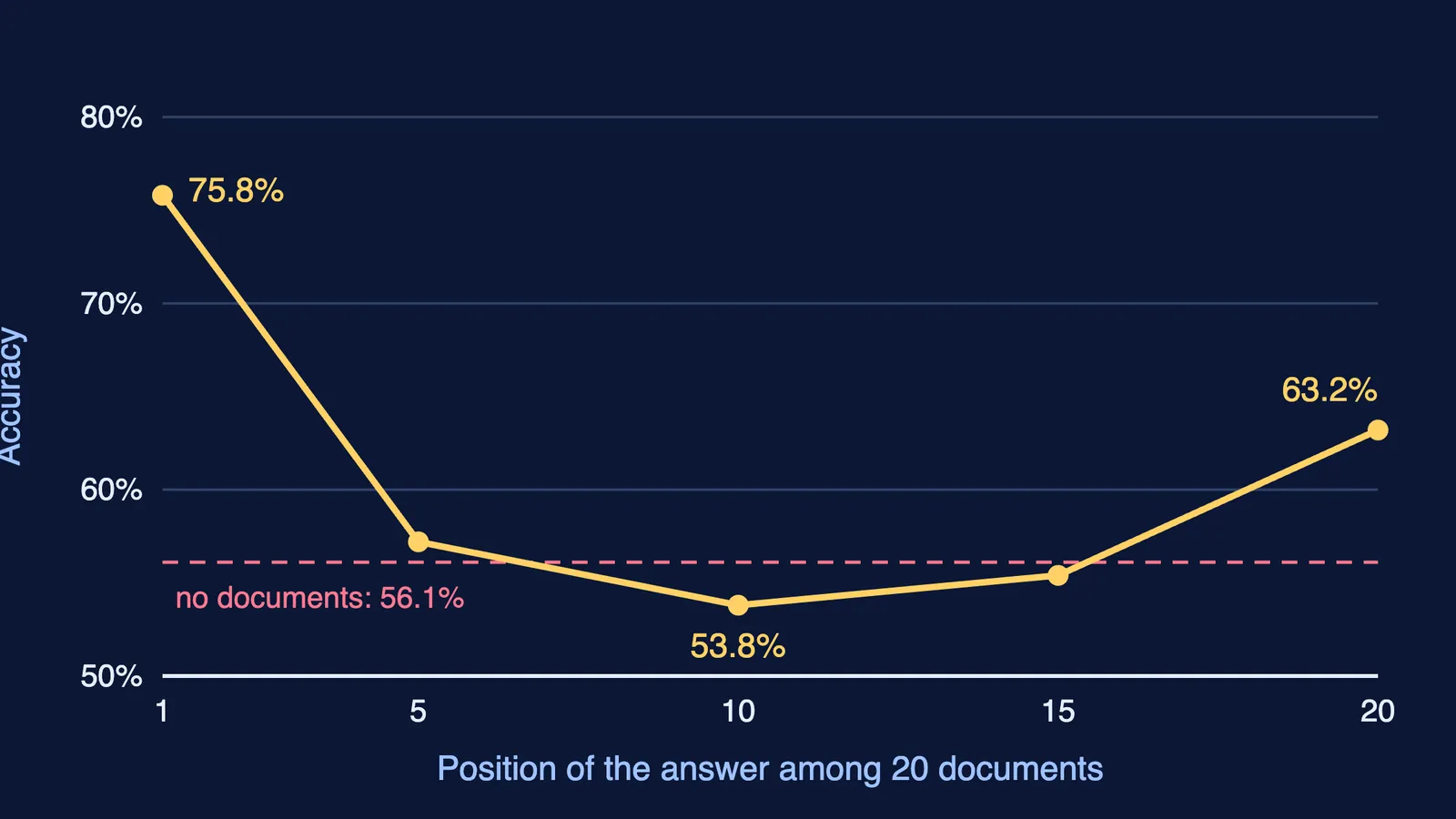
The middle gets lost. In Lost in the Middle, published in Transactions of the ACL in 2024, Nelson Liu and colleagues from Stanford, UC Berkeley and Samaya AI found that models often used information best at the beginning or end of a long input, and worst in the middle.
In that study, GPT-3.5-Turbo answered 75.8% of questions correctly when the useful document came first among 20, but only 53.8% when it came tenth (Liu et al., 2024). With no documents at all, the same model scored 56.1%, so with the answer buried in the middle it did worse than with no documents.
The study tested question answering over documents, not chats, but the lesson carries over. In a long study chat, the corrections and details you gave halfway through end up in a long middle stretch, and once older messages are summarised or dropped, even your opening rules may not survive word for word.
How do you keep a long study chat on track?
One chat per topic. Start a new chat for kinematics and another for rotational motion, instead of one chat for the whole week.
Put your question last. When you paste notes or a long problem, add your question after the material, not before it.
Restate the rules when you switch sub-topic. A two-line reminder (SI units, g = 9.8 m/s², hints first) puts the rules back at the end, one of the two places models read best.
Save standing rules as custom instructions. Many apps let you store them outside the chat; see our guide to custom instructions for a study chatbot.
Check any number that matters against your textbook or notes, especially late in a long chat.
Restart before the drift gets bad. Ask for a summary, then open a new chat with it.
What does a restart look like in practice?
Say you have spent an evening on projectile motion and the bot has started giving full answers. Ask for the restart summary, read it, and fix anything it got wrong, such as a rule it left out. Then paste it into a new chat. You keep the useful part of the session and drop the long middle that was confusing the model.
Parents can use the same test: if a long homework chat starts contradicting itself, the fix is usually a fresh chat with a short summary, not more messages.
If the bot keeps handing over final answers, the Fermi Problem Library has worked problems with a step-by-step solver that explains the reasoning rather than printing an answer. If you would rather not manage the session yourself, Fermi's AI tutor works out what you already know, builds a plan for the session and holds a line of reasoning across it, with your notes and progress kept in your library.
Next time a chat drifts, do not argue with it. Summarise, restart, and put your rules where the model reads them well: at the end.