
On this page
If a rectangle's length and breadth both go up by 10%, the tempting answer for the area is 20%. Using the standard definition of percentage change, the real answer is 21%. That extra 1% is a common trap in multiple-choice questions, and once you see where it comes from you will not fall into it again.
The key idea is that percentage change is always measured against the starting value. Wikipedia's article on relative change defines percentage change as (new value − old value) ÷ old value × 100%. Area is a product of two lengths, so the changes multiply instead of adding.
Why does 10% on each side give 21%, not 20%?
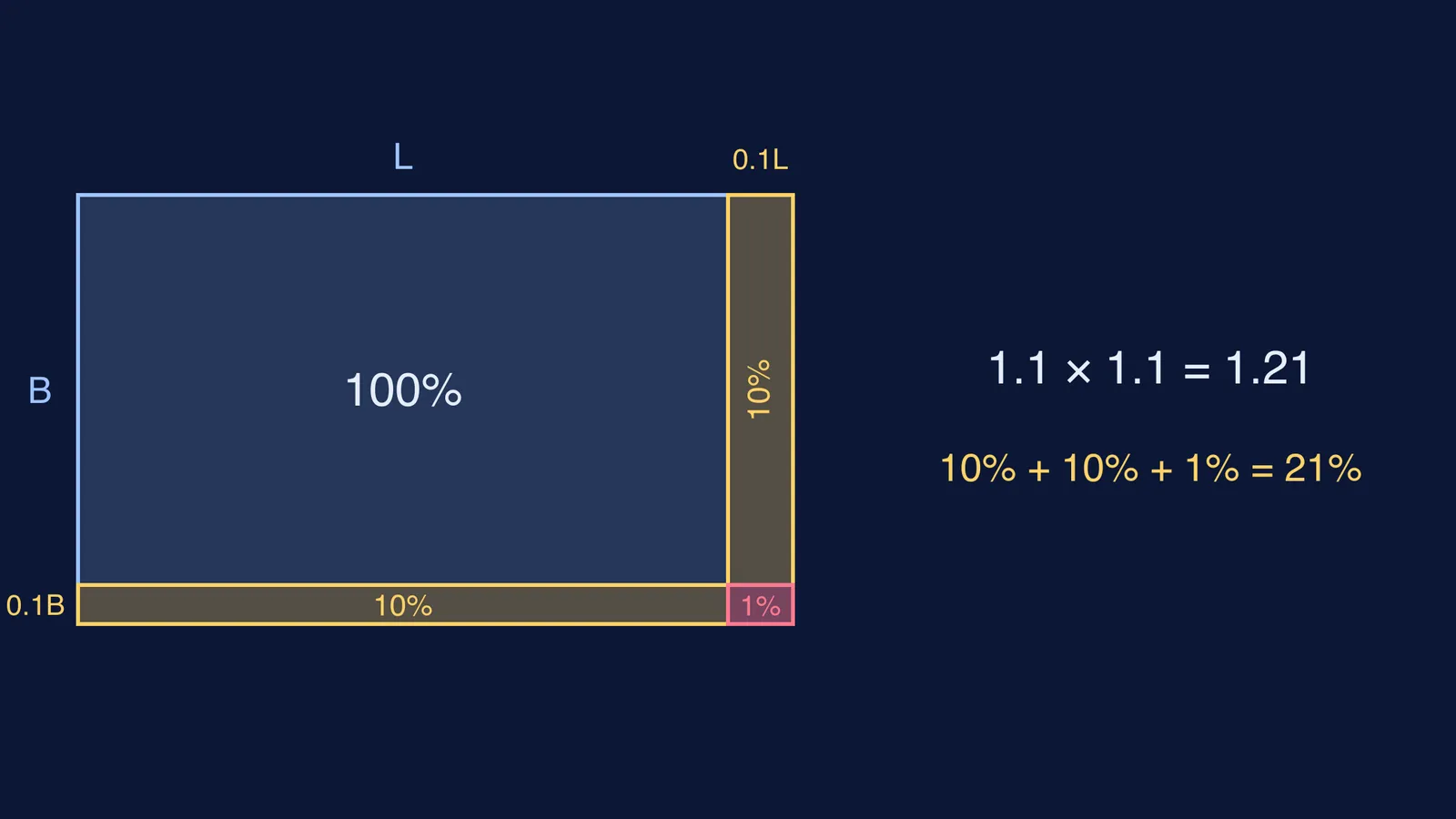
Using the definition of percentage change from the relative change article, take a rectangle with length L and breadth B, so its area is LB. Increase both by 10%:
New length = 1.1L
New breadth = 1.1B
New area = 1.1L × 1.1B = 1.21LB
The area is now 1.21 times the old area, which is a 21% increase.
The diagram above shows where that 21% sits. The old rectangle is 100%. Stretching the length adds a strip worth 10% of the old area; stretching the breadth adds another 10%. Where the two strips meet sits a small corner, 0.1L × 0.1B, which is 1% of the old area. Answering 20% means forgetting the corner.
What is the formula for percentage change in area?
If length changes by a% and breadth changes by b%, the area changes by (1 + a/100)(1 + b/100) − 1, written as a percentage. Expanding the brackets gives a shortcut you will often see in exam solutions: net change = a + b + ab/100 per cent. Use a minus sign for any decrease.
An exam-style question on Testbook asks for the area increase when each side of a rectangle grows by 20%, and works it out as 20 + 20 + (20 × 20)/100 = 44%. The same check with multipliers: 1.2 × 1.2 = 1.44.
How do you find the change when one side decreases?
The same method handles decreases, as long as the minus sign goes in. The relative change article notes that adding percentage changes is only an approximation, with a larger error for larger changes, which is why these cases surprise people.
Here are four worked examples using the factors method:
Length up 20%, breadth down 10%: 1.2 × 0.9 = 1.08, so the area rises by 8%. The shortcut agrees: 20 − 10 + (20 × −10)/100 = 8.
Length up 10%, breadth down 10%: 1.1 × 0.9 = 0.99, so the area falls by 1%. It does not stay the same.
Length up 25%, and you need the area unchanged: the breadth factor must be 1 ÷ 1.25 = 0.8, so the breadth must fall by 20%, not 25%.
Side of a square up 10%: both sides grow, so the area rises by 21%, exactly as in the rectangle case.
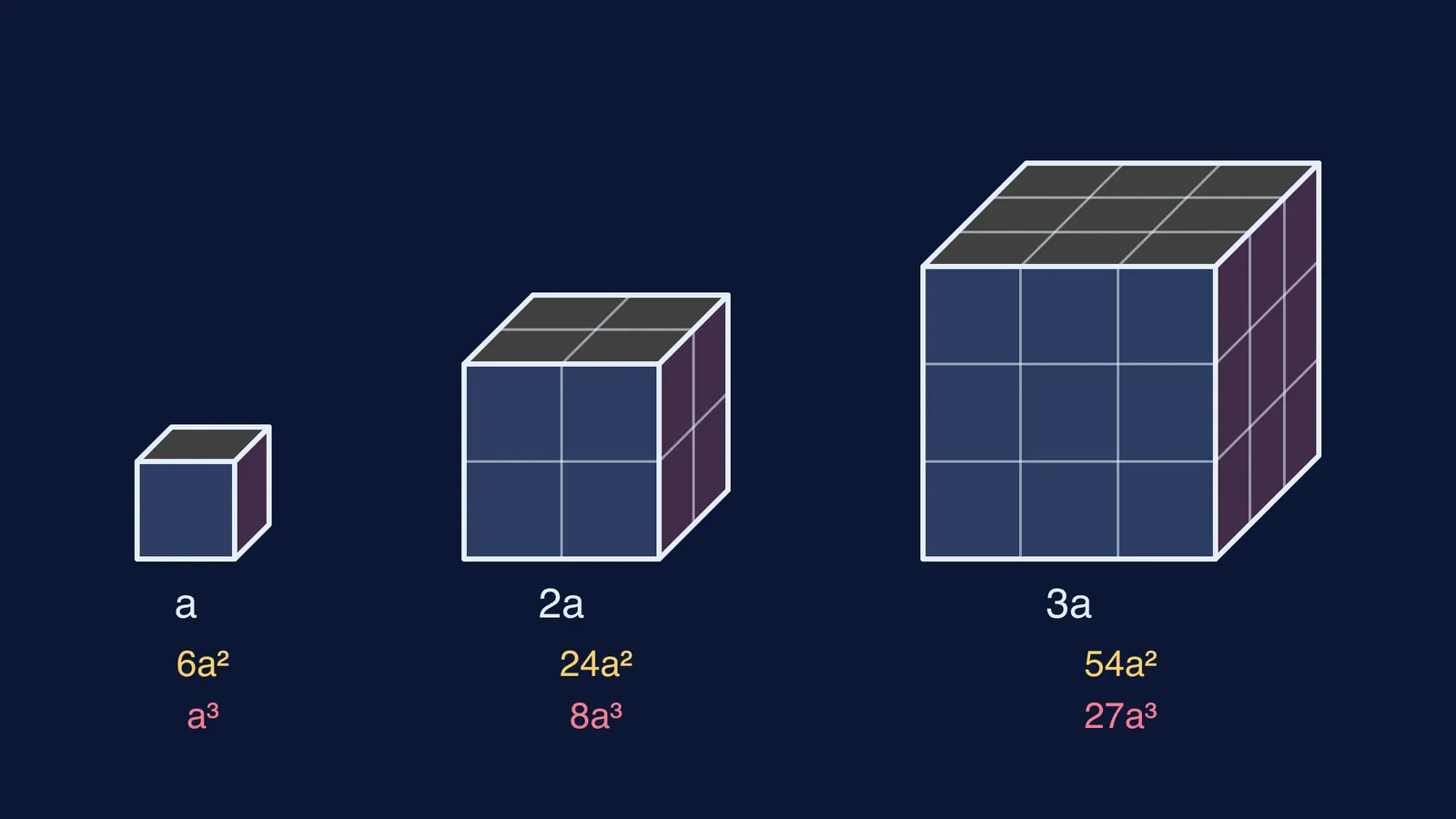
Example 3 is the same idea as the one in our post on why a percentage drop needs a bigger rise to recover. Example 4 connects to how scale factors change area and volume: a shape enlarged by a factor k has its area multiplied by k².
Where else does this pattern show up?
Because percentage change compares the new value with the old one (relative change), the multiply-the-factors rule works for any quantity that is a product. Volume of a box uses three factors, so 10% on every edge gives 1.1 × 1.1 × 1.1 = 1.331, a 33.1% rise. Revenue is price × quantity sold, so a 10% price rise with a 10% drop in sales leaves revenue down 1%. In physics, the same logic, for small changes, sits behind the rule that the percentage error in a squared quantity doubles.
A 30-second check before you mark the answer
Write each change as a factor: rise of a% is 1 + a/100, fall of a% is 1 − a/100.
Multiply the factors; do not add the percentages.
Subtract 1 and turn the result back into a percentage.
Sanity-check the sign: a rise and an equal fall always give a small net fall.
If an option says exactly a + b, be suspicious unless one change is zero.
If you keep reaching for a + b, try a few problems where you must explain every step, not just pick an option. The Fermi Problem Library has worked problems with a step-by-step solver that explains the reasoning rather than printing an answer, and the Fermi Concept Library has a lesson for each idea in mathematics if percentages themselves feel shaky.
Next time you see "length and breadth both increase", draw the rectangle and look for the corner.