
On this page
Every time you save a picture as a .jpg, rules written in the early 1990s decide which details you will never see again. The rules are in the JPEG standard, ITU-T Recommendation T.81. Here is what happens, a worked example with real numbers from that standard, and a checklist for keeping pictures sharp.
How does JPEG compression work?
The standard's lossy mode is built on the discrete cosine transform (DCT) and runs in four steps (T.81, sections 4.2 and 4.3):
Cut into blocks. Each colour component is split into 8 by 8 blocks of pixels, 64 numbers per block.
Describe each block as waves. The forward DCT turns the 64 pixel values into 64 DCT coefficients: one DC coefficient for the block's overall brightness and 63 AC coefficients for patterns that vary across it.
Round. Each coefficient is divided by its own value from a 64-entry quantisation table and rounded to a whole number.
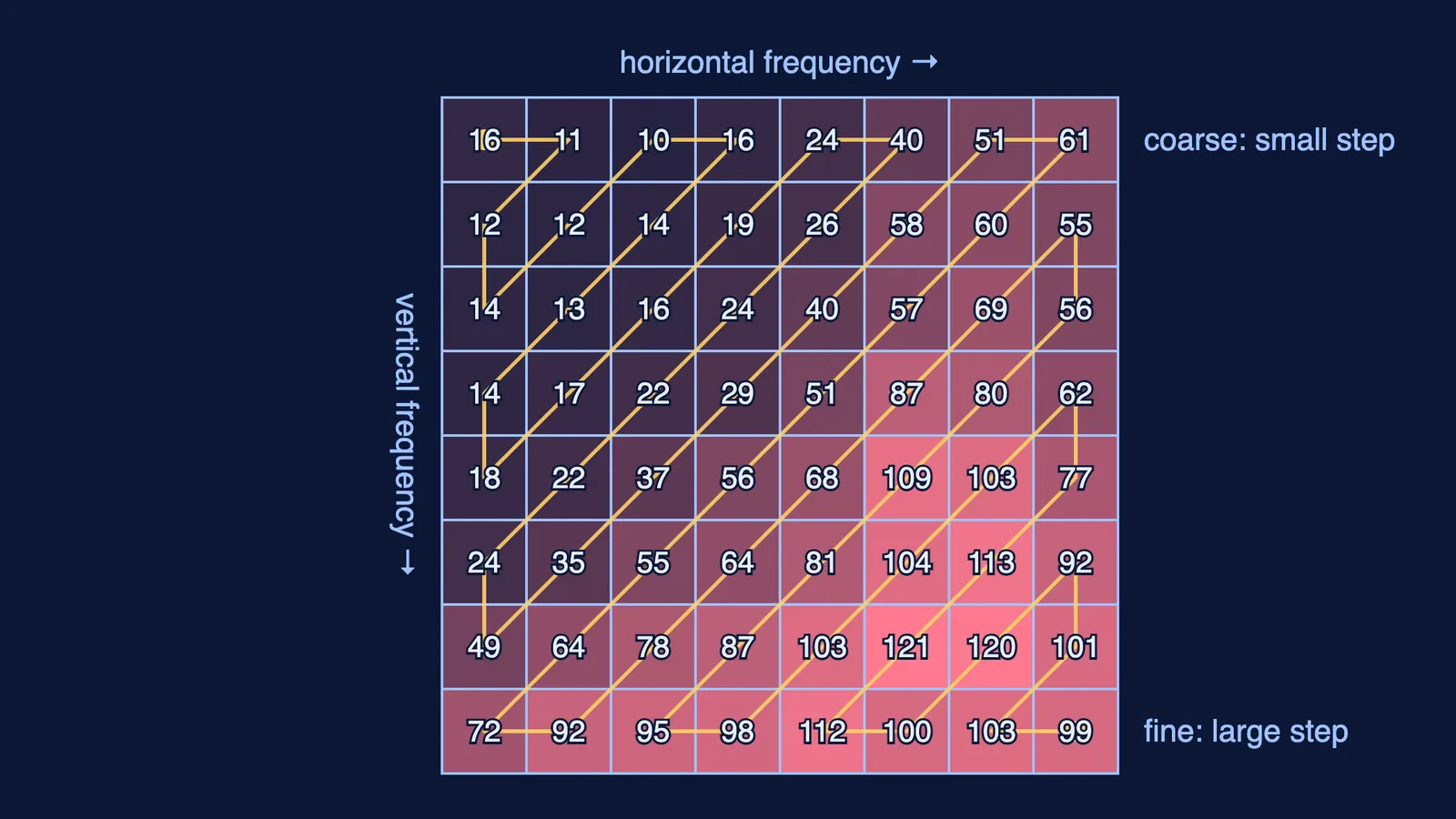
Pack. The rounded numbers are read in a zig-zag order and compressed further with Huffman or arithmetic coding.
Step 2 on its own loses nothing. Any 8 by 8 block can be built by adding 64 fixed cosine patterns, from a flat square to a fine chequerboard, each scaled by its coefficient. Our post on how adding sine waves makes a square wave shows the same idea in one dimension. The transform was published by N. Ahmed, T. Natarajan and K. R. Rao in IEEE Transactions on Computers in 1974.
Where does JPEG throw away detail?
Mostly in step 3. The example luminance table in Annex K of T.81 uses a step of 16 for the flat brightness pattern and steps of up to 121 for fine patterns. The standard says these values are “based on psychovisual thresholding” and “derived empirically”: they were set from how much error viewers could see.
A worked example, with two coefficients from one block and steps from that table:
A coarse pattern. Coefficient 37, step 16. 37 ÷ 16 = 2.31, which rounds to 2. The decoder multiplies back: 2 × 16 = 32. The error is 5.
A fine pattern. Coefficient 40, step 112 (bottom row of the table). 40 ÷ 112 = 0.36, which rounds to 0. That texture is gone, and no software can bring it back, because the file no longer holds it.
When many fine-pattern coefficients round to zero, the zig-zag order lines them up in long runs that step 4 stores cheaply.
In many apps, the quality slider changes these steps. In the open-source libjpeg-turbo library, quality runs from 0 to 100 and works by scaling the quantisation tables, with 75 as the default (libjpeg-turbo usage notes). The standard adds that if its example steps are halved, the result is “usually nearly indistinguishable from the source image”.
Why does saving a JPEG again make it blocky?
Opening a JPEG decodes it back to pixels. Saving runs all four steps again, rounding included. The libjpeg-turbo notes say their jpegtran tool avoids this by rearranging the stored DCT coefficients without decoding, so there is “no image degradation at all, which would not be true” if you decompressed and recompressed (libjpeg-turbo usage notes).
Continue the worked example. The coarse coefficient is now 32.
Same settings again: 32 ÷ 16 = 2 exactly, back to 32. In this ideal case it survives, though real pixels still pick up small roundoff errors.
A lower quality that makes the step 24: 32 ÷ 24 = 1.33, which rounds to 1, giving 24. The error against the original 37 has grown from 5 to 13.
A photo of class notes that is forwarded, screenshotted and forwarded again may meet different steps each time, so each pass rounds already-rounded values a new way. Cropping makes it worse: trim 3 pixels from the left and the new 8 by 8 grid no longer lines up with the old one, so old block edges sit inside new blocks and get rounded again as if they were real detail.
How do you stop images going blocky?
A checklist for sharing notes, diagrams and project photos:
Keep the original file and make every edit from it, not from the last exported JPEG.
Save as JPEG once, at the end; the libjpeg-turbo usage notes suggest a quality between 50 and 95 for photographs.
Use PNG for screenshots, diagrams and anything with text. The W3C PNG specification defines it as a lossless format, using the kind of dictionary compression explained in our post on how ZIP, GIF and PNG shrink files.
Rotate and crop JPEGs with a lossless tool such as jpegtran when you only need to turn or trim them.
MP3 makes the same trade with sound: see how MP3 compression decides what your ears never miss.
If waves and frequencies are hard to picture from formulas, the Fermi Simulation Lab has interactive simulations for ideas that are easier to see than to read.
Next time a photo looks like a mosaic, you will know where the squares came from: rounding, one 8 by 8 block at a time.