
On this page
Turn off the lights and open a pure black image on your phone. On some phones the screen disappears into the dark; on others a faint grey glow remains. The difference comes down to one question: does each pixel make its own light, or block light from behind?
Why can OLED screens show pure black?
OLED stands for organic light-emitting diode. A 2018 review of display technology in Light: Science and Applications describes OLEDs as emissive, with a "true black state" among their main advantages.
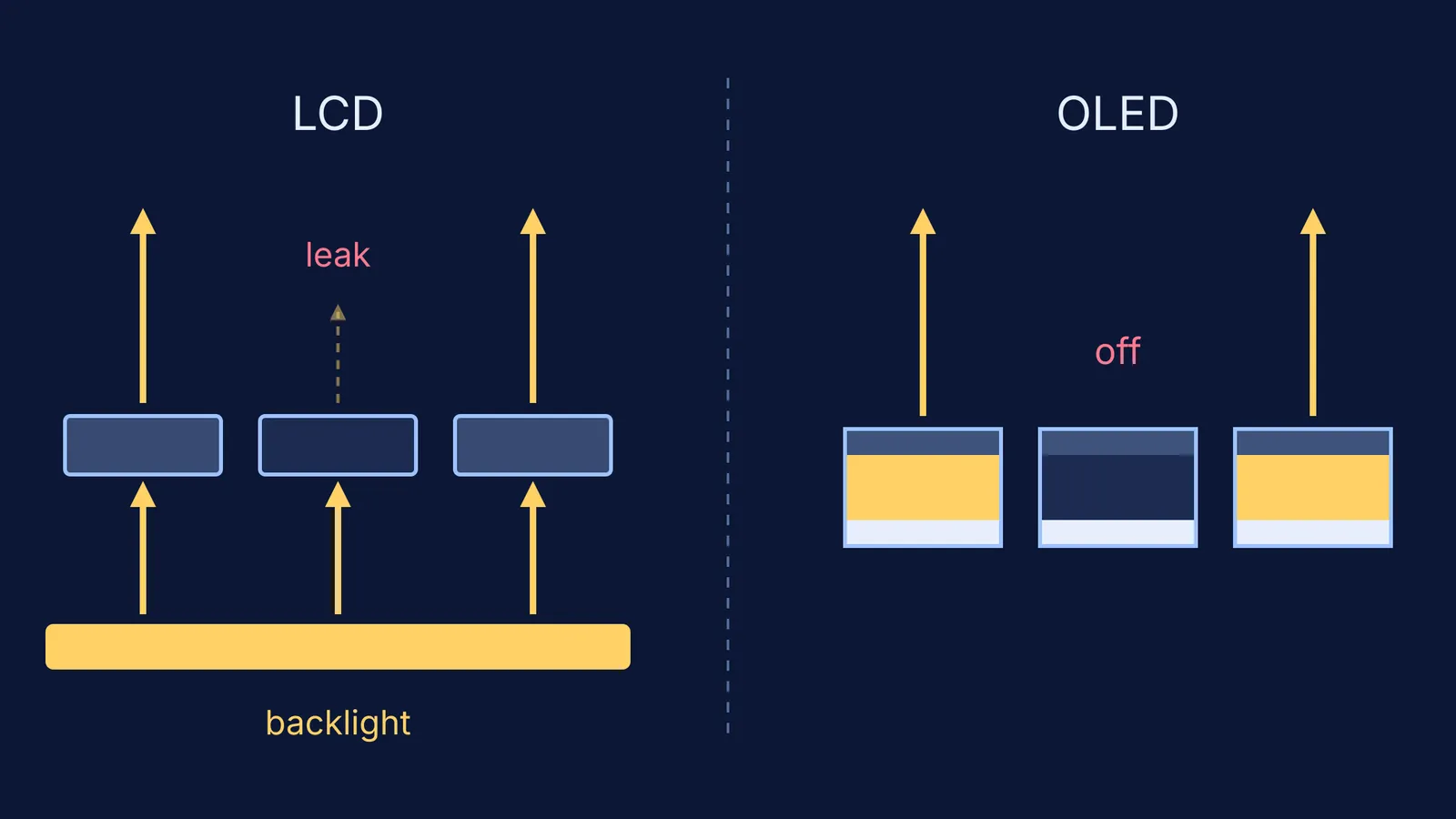
Emissive means each pixel is its own tiny lamp. For white it glows; for black it switches off. An off pixel sends out no light of its own, so black on an OLED is not "very dark grey". It is the absence of light.
The same review says the contrast ratio of an OLED, the brightness of white divided by the brightness of black, could in theory approach infinity, but only in a dark room (Chen and colleagues, 2018).
How does an OLED pixel make its own light?
The US Department of Energy defines an OLED as a solid-state device with "a thin, carbon-based semiconductor layer that emits light when electricity is applied by adjacent electrodes" (DOE, OLED basics). The same page notes that at least one electrode must be transparent so the light can get out, and that the colour depends on the emissive material.
Electrons enter from one electrode and holes from the other. They meet in the light-emitting layer and recombine, and the energy they give up leaves as light (Chen and colleagues, 2018). The same review puts the whole multilayer stack, not counting the glass or plastic it sits on, at less than 1 micrometre thick.
"Organic" means the semiconductor is built from carbon-based molecules. A landmark came in 1987, when C. W. Tang and S. A. VanSlyke at Eastman Kodak reported a two-layer organic thin-film device that gave more than 1000 candela per square metre while running below 10 volts (Applied Physics Letters, 1987).
If you want the inorganic version first, read our explainer on how an LED turns current into light, then see why an LED's colour depends on its band gap.
Why does an LCD's black look grey in a dark room?
An LCD (liquid crystal display) makes no light of its own. A backlight shines through a liquid crystal layer sandwiched between two crossed polarisers, and the liquid crystal sets how much light passes (Chen and colleagues, 2018). For black, the shutter closes, but a little light still leaks through. The review lists typical contrast ratios of about 1000:1 for twisted nematic (TN) panels and more than 5000:1 for film-compensated MVA panels. Polarisers are the same idea that makes polarised sunglasses cut glare.
LCDs are not simply worse. The same review finds LCDs lead in lifetime, cost and peak brightness, and fall behind OLEDs in black state, flexibility and response time.
Does true black still matter in a bright room?
Less than you might think. The review stresses that infinite contrast "is true only under dark ambient conditions", because the screen also reflects room light (Chen and colleagues, 2018).
Here is a worked example. Contrast ratio is white brightness divided by black brightness. The round numbers below are made up for practice, in candela per square metre (cd/m², also called nits):
Dark room. White is 500 on both screens. The LCD's black leaks 0.1, so its contrast is 500 / 0.1 = 5000:1. The OLED's black is 0, so its contrast has no upper limit.
Lit room. Now the glass reflects room light, adding 5 to every pixel. OLED: 505 / 5 = 101:1. LCD: 505 / 5.1, about 99:1.
Lesson: once room light bounces off the glass, that reflection, not the pixel, decides how black "black" looks.
The review ran a similar calculation for two TVs, with the LCD twice as bright as the OLED (1200 versus 600 nits). The OLED won in dim light, but at about 60 lux, which the authors call typical of a family living room, the brighter LCD drew level and then pulled ahead. The paper also notes that OLEDs are more efficient than LCDs at showing dark images, because black pixels use little power. So dark mode can save more battery on an OLED phone.
Try it: a three-minute dark-room test
Switch off the lights and let your eyes adjust for a minute.
Open a fully black image at full brightness.
Look for a grey glow. A glow points to a backlight (LCD); nothing visible points to OLED.
Show a small white shape on black. On an OLED the black stays black up to its edge; on an LCD it keeps a faint grey.
Explain what you saw using three words: emissive, backlight, contrast ratio.
Electrons and holes meeting in a layer thinner than a micrometre are hard to picture. The Fermi Simulation Lab has interactive simulations for ideas that are easier to see than to read, and the Fermi Concept Library gives each physics and chemistry concept its own lesson.